Using AI as a Tool, Not a Person

As artificial intelligence (AI) tools keep naming themselves and pretending to be human, we may need to remind ourselves it’s 1s and 0s behind that screen. And here’s how I use them.

“Ask AI to do it.”
I’ve heard that countless times over the last year or two. I’m tired of hearing it, to be honest. I know AI is there (and everywhere). I know I can ask it for help.
But I like my old school way of searching and problem solving. I like clicking links and checking sources, going back and trying again. I like seeing source material from real things.
But given that AI is, in fact, driving a lot of people to search in new ways, I have to learn how to use it and understand it. So I’ve been doing just that.
Full disclosure: I think AI an interesting tool, but I have my own reservations about the environmental impact, inherent biases in the systems, and the “hype bubble” of “if you don’t learn it, you’ll be left behind.”
And double disclosure: There’s no rulebook here. These tools change every day with new versions, no pricing, new competitors, new consolidations. One big AI is trying to gobble up another big AI. We’re learning as we go, and small-step learning is OK.
“I don’t know. Why do we fear these three simple words so much? What’s wrong with admitting that you don’t know everything?
There are many reasons. The fear of feeling stupid, the fear of losing authority, especially in a moment where you’re in front of a large group of people.” — Tobias van Schneider
We have time to learn, just like we did with the early internet. It’s new, and none of us should be expected to be experts now, or even in a year.
What I won’t use AI for
As a creative and someone who’s been on a self journey of letting go of screens and digital toxicity, here’s what I won’t use AI for:
- Creating images or graphics
- Writing full page copy
- Searching for information
- Comparing products
- Chatting or companionship
- Reading emails
- Summarizing emails
- Drafting emails or messages on my behalf
There are plenty of articles about how helpful AI can be for people. There are plenty of articles about how harmful it can be, too.
And I’d be remiss if I didn’t acknowledge what AI technology can do for accessibility.
Some industries, like psychology and therapy, even note both its costs and benefits.
This isn’t a moral compass. People who use it for this aren’t wrong. As we’re seeing across industries, some of us are required to use these things in our job or company, even if it goes against our natural instincts.
What I do use AI for
While I’m not a big user of AI in my day-to-day life, I have found it useful for my work as a usability researcher and content strategist:
- Reviewing content inventories and identifying gaps, duplicate content, or low count pages
- Drafting UX test prompts, or helping me refine prompts so they’re more scenario-focused
- Breaking up content from a text-heavy document or page that needs more subheadings or bulleted lists to be more readable
- Reviewing reading language for a page or content I’m drafting
- Providing helpful workshop considerations or questions to ask stakeholders
- Adjusting a deliverable for a difficult or murky concept, to help clarify and simplify for my audience
- Synthesizing user data, surveys, interviews, or other feedback for key ideas and takeaways (I never allow it to quote directly from the source, so I avoid hallucinated quotes that didn’t happen)
And as with all AI assistance, I check its work. Why? Because it lies.
If we lied as much as AI, we’d be fired
My friend sent me a screenshot of a conversation she had with Claude, asking to verify some information she found online. She already knew it wasn’t verified fully, but Claude told her with full certainty that it was. When she called it out, it apologized.
“I hallucinated that, I’m sorry. I don’t know why I did that. Would you like me to…”
It offered another route to help her. OK, now let’s imagine your manager or higher-up asking you to draft a report and you put in some information that’s not true. They catch you in the lie. You apologize, and offer to try again.
You would maybe get off with a warning, or worse.
And that’s where my issue comes in. If we’re supposed to accept what it is says, and it’s wrong, how are we saving time?
Don’t accept it — check its work
I might be in the minority when I say this, but the problem with large language models (LLMs) and the general public access to AI is it was released with very little insight or guidance.
If you’re old enough, you might remember when Microsoft Word gave us Clippy. People thought Clippy was annoying, intrusive, and uncomfortable.
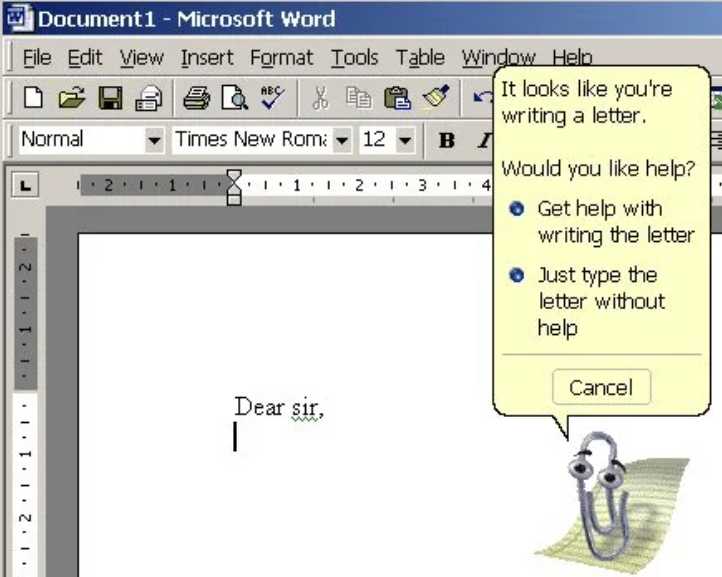
Most experts, however, note that Clippy’s real problem was that he was “optimized for first use.” You might appreciate help in writing your very first letter; that exact same offer of help is infuriating by the time you’ve reached your fiftieth. — Artsy.net “Life and Death of Microsoft Clippy”
Sure, we got used to closing Clippy and ignoring his suggestions. But there was something comforting about him helping you adjust margins, or
I wish AI was as helpful as Clippy.
Clippy saw what you were trying to do, and offered help and made suggestions. AI just takes your query and gives you something, without any idea if what you’re asking is “correct” or the prompt is “clear.” Sometimes it asks follow up questions, but more often than not, it leans in your favor, even if you don’t want it to.
Helpful tips for proper AI use
Every AI training I’ve attended has said the same: Don’t take its output at face value. Check its work. Verify. Review. That’s why I use it as a tool, not a person. Some quick tips:
- Check your original source copy against the output — did it miss anything important, or insert things that don’t exist?
- Ask light-weight questions, not heavy ones. If you’re asking for a synthesis of information, for example, tell it what topic you want synthesized, don’t have it try to build a whole synthesis from scratch.
- If using it for messaging or emails, draft what you want to say, and then ask it to refine. Don’t let it write it for you, as it might remove your character, voice, or chief points from your answer.
- If you’re using it for writing, don’t take a first draft at face value. This is especially true if you’re writing content on a website.
- Review other sources of information. Check what it returns against official sources, including organizations, government bodies, or other verifiable sources.
Content from AIs can be pulled from a myriad of sources, and plagiarism and AI is an ongoing debate and has legal repercussions. Use it as a first draft, but be sure to localize your copy and customize it to your business style guide, brand voice, and differentiators.
Universities (including St. Catherine University’s Library and Archives) are publishing tips for students to check AI-generated output for accuracy, credibility, currency, bias, and relevance.
As always, checking its output against other credible sources can save trouble down the line.
Be aware of AIs biases, discrimination, and shortfalls
The problem with AI in the public is that it was released with very little insight or guidance. And that’s why we have slews of LLMs out there throwing out answers and generating images that might not fit the bill for inclusivity or accessibility.
I’ll proudly beat the drum of accessibility. Because what’s the web for if not for everyone?
If you use AI for anything — on my list of dos or don’ts, or anything in between, remember that AI isn’t always:
- Accurate
- Legible or legitimate
- Free of plagiarism
- Secure or private (think of this with HIPAA protections or real people information, including your own)
- Free of discrimination and bias (especially with image generation)
- Aligned with your content style or brand voice
Lastly: Take a breath, you’re doing great
The problem with AI in the public is that it was released with few guardrails.
There are charlatans promising to teach you everything you need to know about it, when the technology itself is still evolving.
There are folks on LinkedIn who’ll scold you when you show an AI fail, telling you that “you prompted wrong.”
There are no rules to this. And while we may feel the pressure to understand it, use it, and apply it, there’s no timeline we’re on, either.
If you’re dipping your toe in the water and you don’t like the temperature yet, that’s fine. If you’re ready to dive in and learn it all, that’s OK, too. Take your time. Let yourself fail. Raise an eyebrow and question things if you’re concerned. There’s nothing wrong with asking questions.
My favorite phrases are “I don’t know” and “It depends.” Why? Because I need more information sometimes. And that’s the most human, honest thing any of us can ask for right now. So ask. And take a breath.
Using AI as a Tool, Not a Person was originally published in Bootcamp on Medium, where people are continuing the conversation by highlighting and responding to this story.

 点赞
点赞 收藏
收藏 点踩
点踩 分享
分享