The Curious Case of the Helix Editor & Why It’s My Go-To

About fifteen years ago I started using the Vim editor. I was an apprentice software developer on a small team who were all using MacVim with the Janus configuration. People who take the time to learn and use Vim typically do so intentionally, as it requires more effort to learn than your average text editor. Inevitably I started using Vim with their guidance, while also dabbling a bit with TextMate and Sublime Text. But Vim stuck, and I used it almost exclusively for fourteen years.
I used Janus for a while, but it did a whole lot I didn’t need, so I ditched it for a minimal config. Then I worked at a job where nearly every developer shared the same dotfiles and Vim config, as it made it easier to collaborate over SSH and Tmux. Those shared dotfiles were what I used for about seven years, and it was a lot of fun to collectively contribute toward improving them. Neovim rose to popularity during that time, and in particular, the coc.nvim was released, a plugin that had pretty robust integration with Language Server Protocols for various languages. So the team and I switched to Neovim.
This setup was comfortable. Occasionally in large projects performance would drop, but it was workable. And even while it was simple, it required a fair amount of tinkering that I was becoming less and less interested in. There was a general feeling in the air of trying to make Vim (and Neovim) more and more like a fully featured IDE. I’d dabbled with Atom and Visual Studio Code over the years, but they always felt a bit sluggish and I missed my terminal-first workflow. In mid-2025 I tried out the Zed editor, an open-source Rust-powered editor focused on performance. With the Vim keybindings enabled, I dove in and used it for the better part of six months. I liked Zed and how little I had to configure or change things. It felt refreshing compared to managing my Vim configuration. Installing plugins was simple enough, and I only needed to do so for the key languages I used.
During the Zed era, I was struggling with depression (a newborn and a toddler plus an existential crisis), and I thought, You know what, maybe Emacs will fix all my problems? So I did what any depressed developer would do, I bought an outdated used copy of the Emacs manual and tried using it for a month. I got comfortable enough with it but it never really connected with me. I loved org mode though and having a scratch buffer, so I’ve taken some of that with me to future editors. I tried Doom Emacs too but it was too much of a whole thing, like Janus used to be for Vim. I was updating plugins and learning all of those and it was just too much. So I fled back to the simplicity of Zed.
But then two major issues arose with Zed. When I recorded my screen using OBS on the KDE Plasma desktop on Linux, it would flicker and flash. I tried all sorts of things but had no luck getting it to work. Since I make coding videos, this was a problem. Secondly, Zed, the company and the editor, began leaning heavily into developing AI features and various telemetry features. This is when I was beginning to question the use of AI in my life (and eventually excising entirely), and this focus was unappealing to me. I was also missing my home-base of Tmux in the terminal. (Shout-out to Gram, though! It’s an AI-free, telemetry-free fork of Zed that I use whenever I want a GUI editor.)
Going back to Vim would have been a fine choice. But configuring LSPs and various plugins was not what I wanted to focus on. I didn’t want a heavyweight config and plugin list either. So I looked around to see what the other options were and Helix came up as a terminal-based editor that people really like.
I gave Helix a spin, and it felt great to use right from the get-go. The keybindings are similar to Vim but different in some key ways. I used the built-in tutorial (hx --tutor) to practice using it. After a couple of weeks, I was comfortable and at a level of speed similar to when I used Vim. I’ve been using Helix for five months now and quite like it. It’s not perfect (no editor is), but it meets my needs. Helix is fast and requires minimal configuration.
Helix just works with the key languages I program in: Lua, Rust, TypeScript, HTML, CSS, and Ruby. All I have to do is install the language server on my machine if the language distribution itself doesn’t include it. Sometimes, like when I use the Deno runtime for my TypeScript, I have to set up a project-specific config. But I just copy that from project to project and it’s no big deal. To me, this is my favorite part of Helix: minimal tinkering to get modern LSPs working.
This is the only config I have in my .config/helix/config.toml:
theme = "darcula-solid"

[editor.soft-wrap]
enable = true
I don't like the way the default Helix theme looks, so I use the included darcula-solid. And I want soft-wrap for long lines, which is ideal when writing with Helix.
I interact with Helix in two primary ways: : for commands like :write to save the current buffer. Helix provides helpful suggestions for the available commands and shows documentation about what the highlighted command does. Many of these are similar to Vim. And then Space opens up a command palette for all kinds of actions: y yanks the selection to clipboard, e opens a file explorer showing everything in the project whereas E opens the file explorer in the current file’s directory. / opens up a fast search interface across the project. I love that all of these features are included and work well. Navigating through a large project is fast and comfortable.
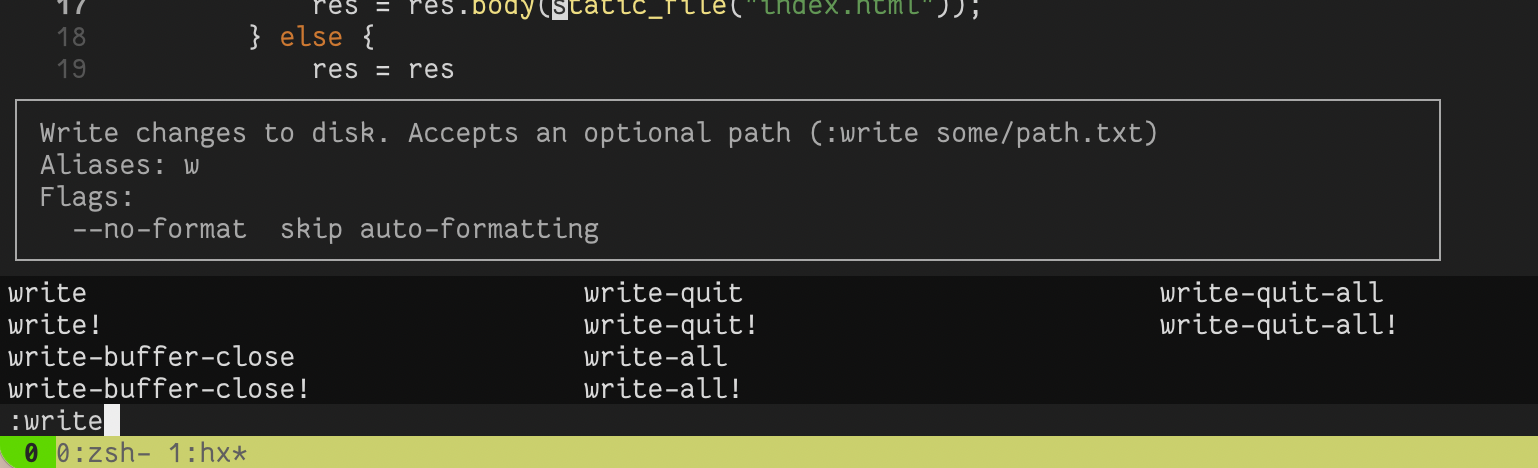
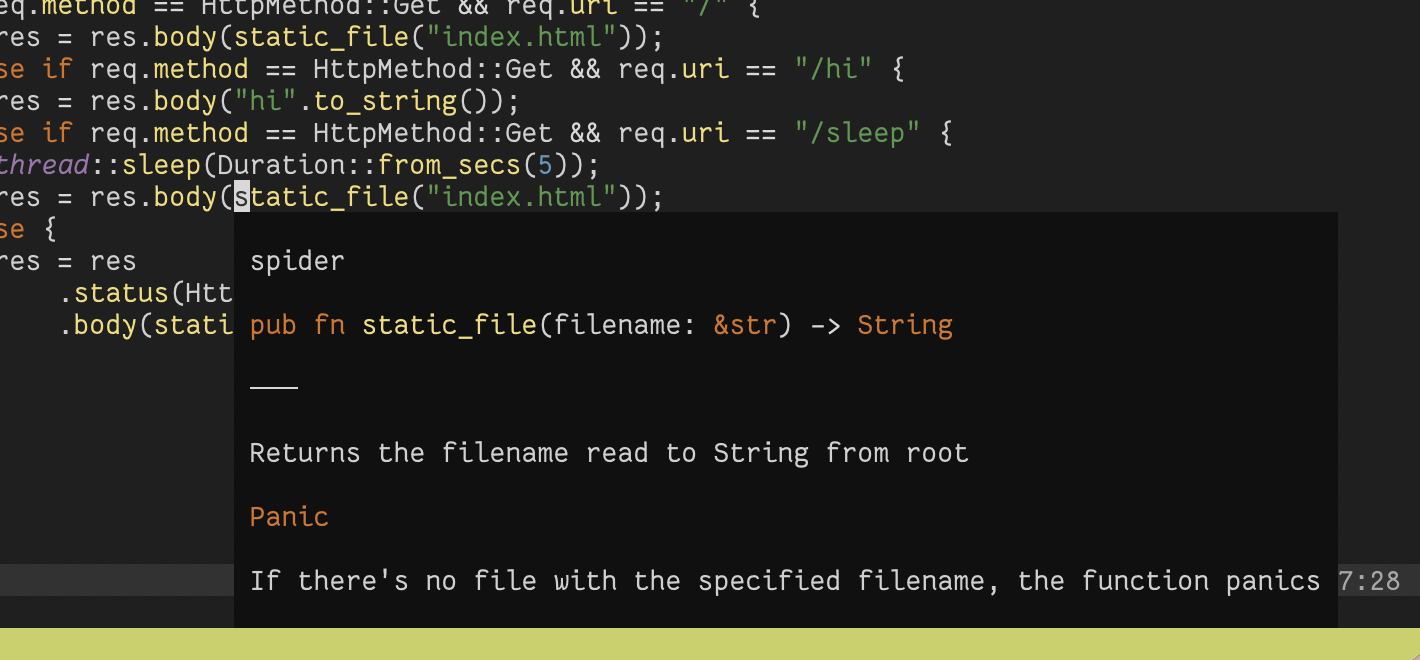
I really appreciate how Helix doesn’t show any pop-ups while editing text unless I specifically want to see them (or if there's an error from the LSP). When I press Space k, the docs for the item under my cursor show, often powered by the LSP. I like how this looks and works.
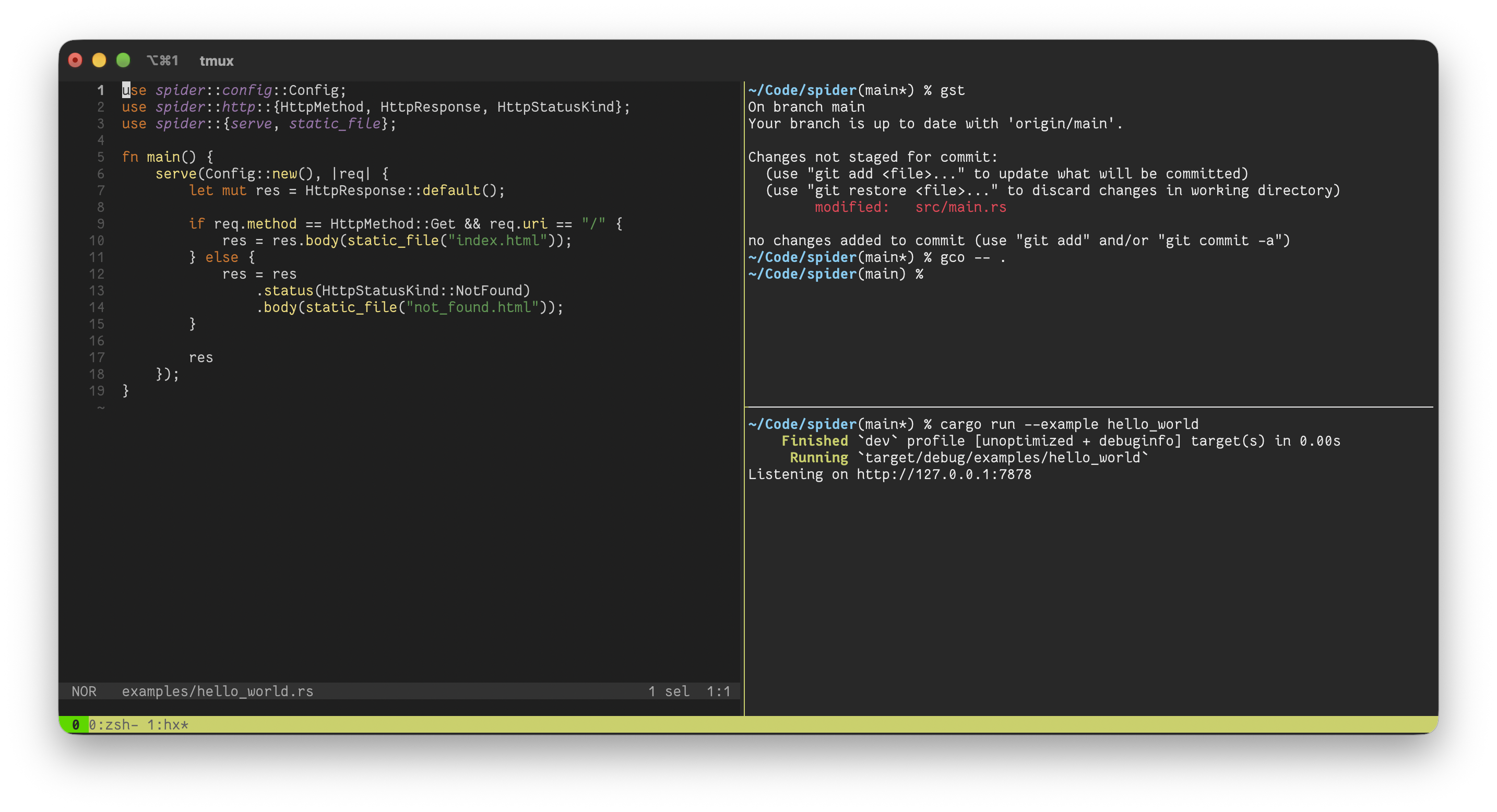
Helix works really well in my Tmux workflow, where I usually have my editor on the left and then one or two terminals to the right. I use the shells to run commands relating to my project and can watch the logs or run tests by switching between the Tmux panes.
The Helix docs and community resources are robust. I’ve been able to find helpful info about anything I’m looking for or stuck on.
The jump from Vim to Helix wasn’t too big of a change. Aside from rebuilding muscle memory with keybindings and commands, the biggest mental shift for me was abandoning tabs. I was a heavy user of tabs in Vim, using them in a way similar to modern GUI text editors. I’d gt and gT back and forth through my tabs where I’d have different splits. At first I missed the tabs, but once I let them go and just leaned into buffers and splitting quickly, it hasn’t been a problem. In Helix, Space b opens the buffer explorer, making it easy to jump to a previously opened buffer. And you can :bn and :bp to jump between the next and previous buffers as well.
As of writing this, Helix does not support scriptable plugins. It’s an oft-discussed and wished for feature. For me, I don’t mind not having plugins. It’s refreshing to not think about it or tinker. But I can totally understand if certain behavior or missing functionality is a deal-breaker for people.
I’ve had the editor crash twice on me, which I can’t say I’ve had other editors do. Maybe I’ve been lucky or something. But two crashes in five months isn’t terrible but it’s not ideal at all. I habitually save my buffers, so I didn’t lose anything. But just beware: crashes in Helix can happen. What’s more concerning to me though is that the latest release of Helix, as of writing this, is from July 2025. There have been 989 commits to the master branch since this release. Why hasn’t a new release been made in over a year? I genuinely don’t understand, especially since the project is active. It’s a bit odd. I don’t really want to compile it and run off of master, as I don’t know how stable that branch is. I can’t help but wonder what’s going on with the development and if everything is okay.
The only other issue I’ve had is that the diagnostic window overlaps with the source code and cursor, making it impossible to see where my editor is and what’s under the diagnostic window:
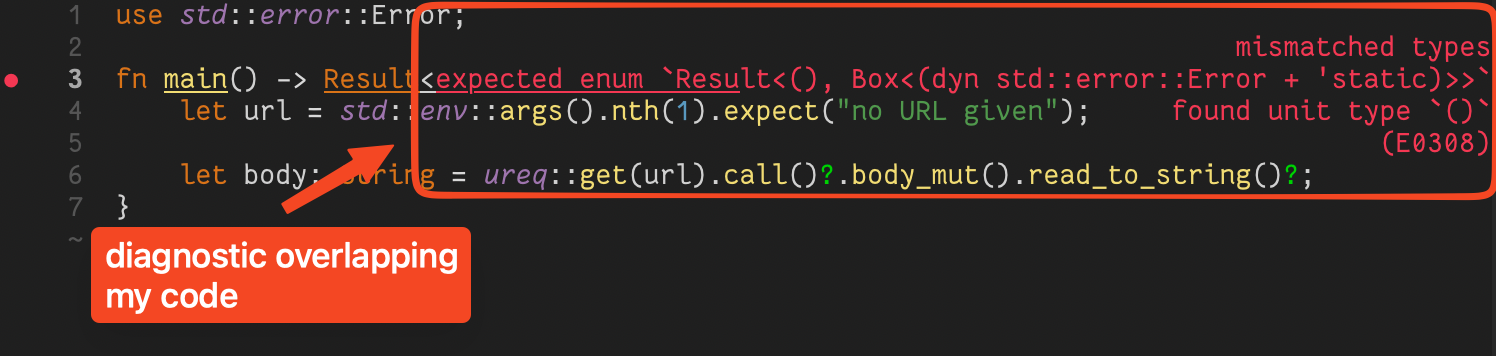
I end up resizing my window or making my text really small so I can edit the text until the error pop-up goes away. Ideally if the cursor is under the diagnostic window, that little pop-up would move or hide.
These problems aren’t enough for me stop using Helix. They’re not big deals. And the simplicity is absolutely worth it. Helix’s speed and robustness are much appreciated, and it’s incredible that the project exists and works as well as it does. It also seems to have a healthy amount of contributors, which makes me hopeful it’ll continue to get better and better over the months and years to come. Thank you to all the contributors who have made such a great editor. All they need to do is remember to create releases! (I’m half-kidding, maybe there’s a good reason for the lack of releases lately?)

 点赞
点赞 收藏
收藏 点踩
点踩 分享
分享