Callout improvements in Marked, Share, and Apex


Callouts (as popularized by Obsidian and GitHub) are one of those features that seem simple until someone really puts them to work. One user did exactly that. He sent me a document with callouts nested inside callouts, with tables and task lists tucked inside those, and asked why it didn’t render the way he expected.
It was a truly edge case. It was also a great stress test, and fixing it turned up improvements across four of my Markdown projects: Marked, Marked QL, , and Apex.
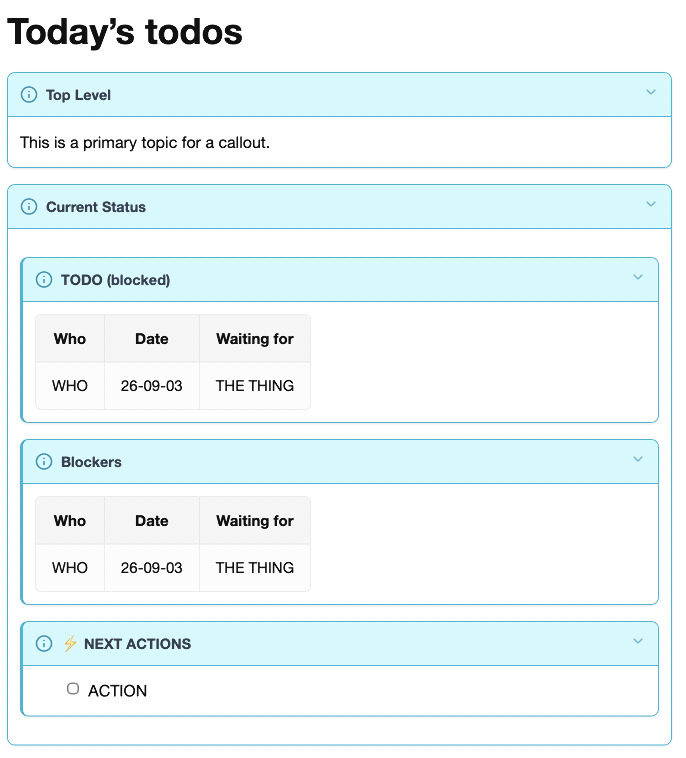
What was the problem?
Here’s the gist of the kind of thing that used to fall apart:
> [!info]+ **Project** status
> Here's where things stand this week.
>
> | Task  | Owner | Due    |
> |-------|-------|--------|
> | Draft | Me    | Friday |
> | Edit  | Sam   | Monday |
>
> > [!warning] Blockers
> > - [ ] Waiting on legal review
> > - [x] Assets delivered
>
> > [!tip]- Notes for next week
> > Keep the `status` doc updated.
That’s a collapsible callout with a bold title, a table, and two more callouts nested inside, one with a task list and one collapsed by default. Depending on the processor, you’d get raw [!warning] text, tables that never became tables, checkboxes that stayed as [ ], or callouts that swallowed the one after them.
Marked
Marked now handles all of that, whichever processor you’re using:
- Nested callouts render as callouts all the way down, not literal
[!TYPE]markers. - Tables and task lists work inside callouts, including nested ones.
- Callout titles render inline formatting, so
**bold**,*italic*, and`code`show up styled instead of as literal asterisks and backticks. - Back-to-back callouts separated by a blank line stay separate instead of merging into the one above.
- Apex users get properly styled, collapsible callouts instead of plain details blocks.
Collapsible callouts (+ for open, - for closed) still toggle with a click, and they keep their colors in print and PDF.
Apex
Apex got the same treatment on its own. The latest release converts > > [!TYPE] callouts nested inside other callouts, renders inline markup in callout titles (emoji, bold, code, links, emphasis), and cleans up the stray line breaks and empty paragraphs that sometimes showed up at the top of a callout body.
A few related fixes came along for the ride:
- Task lists render inside blockquotes.
- Relaxed tables no longer break tables that live inside blockquotes.
- Pipes inside code spans in table cells (
`a|b`) stay in the code span instead of splitting the cell.
If you use Apex from the command line, Homebrew, or any of the bindings, update to get all of it. The Rubygems, Swift, and NPM libraries are also updated for callout improvements, along with a slew of other recent Apex changes.
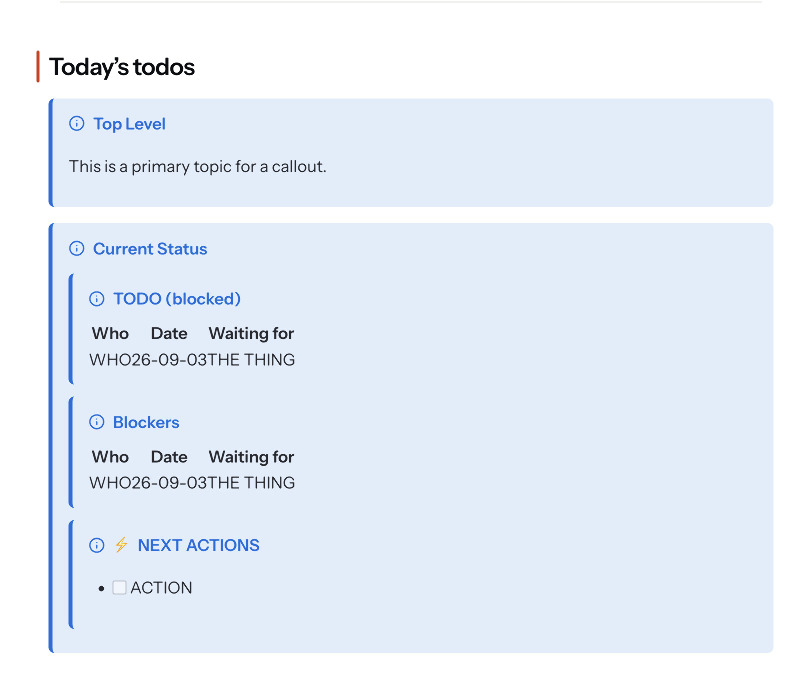
Marked Share
renders documents with Apex, so it picks up all of the above. Publish a document full of nested callouts from Marked and it’ll look the same on the web as it does in your preview, tables and checkboxes included.
I also added some additional callout styling to Marked Share to make them look more like you’d expect.
Bonus: Bear wiki links
One more thing that landed alongside this. If you use Marked’s Streaming Preview with Bear, wiki links in your notes now link back into Bear:
See [[Project Notes]] for background.
Jump straight to [[Project Notes/Timeline]].
Or give it a label: [[Project Notes|the project doc]].
Clicking one of those in the preview opens the linked note in Bear, and if you included a header after the slash, Bear jumps right to that section. If the note doesn’t exist yet, Bear offers to create it. This only kicks in for Bear notes, so wiki links in your regular documents keep working the way they always have.
User feedback
Edge cases like this are how software gets better. Most people will never nest a task list inside a callout inside a callout, but making that work cleaned up a lot of smaller problems that everyone runs into eventually. If you’ve got a document that makes Marked, Share, or Apex do something weird, send it my way.
Apex is an open source tool I’ve been working on for the last year or so, combining all the best features of all the most popular Markdown processors. You can find the source on GitHub.
Check out the latest version of Marked on the Mac App Store, direct from the website, or on Setapp. I recently added Apex to it, and Apex also powers the Marked Quick Look tool.
is a free service for editing and sharing Markdown documents, tightly integrated with Marked but fully functional without it. It’s powered by Apex as welll. You should check it out!
Like or share this post .
BrettTerpstra.com is supported by readers like you. Click here if you'd like to help out.
Find Brett on Mastodon, Bluesky, GitHub, and everywhere else.

 点赞
点赞 收藏
收藏 点踩
点踩 分享
分享