
Fix Class Imbalance in Defect Detection
'%20fill-opacity='.8'%20d='M3.256%203.913a3.083%203.083%200%200%200-.003%204.397L8%2012.998l4.743-4.684a3.085%203.085%200%200%200%20.001-4.4c-.6-.593-1.4-.914-2.233-.914a3.17%203.17%200%200%200-1.91.635L8%204.087l-.601-.452A3.17%203.17%200%200%200%205.489%203c-.834%200-1.634.321-2.233.913m10.19%205.111-4.748%204.69a.996.996%200%200%201-1.397%200L2.549%209.02a4.083%204.083%200%200%201%20.004-5.82A4.17%204.17%200%200%201%205.488%202c.907%200%201.787.29%202.512.835A4.17%204.17%200%200%201%2010.51%202c1.093%200%202.146.422%202.936%201.202a4.085%204.085%200%200%201%200%205.822'%20/%3e%3c/svg%3e)
'%20stroke-opacity='.75'%20stroke-width='1.5'%20stroke-linejoin='round'/%3e%3c/svg%3e)

SUMMARY
Class imbalance in defect detection means the rare defect gets so little influence during training that overall mAP looks fine while the model misses the defects that matter most, so track per-class AP for the rare class instead.
Class imbalance in defect detection happens when one defect class appears far more often than another in the manufacturing training data, so the object detection model learns the common class well and misses the rare one.
A recent study found that defects make up only 0.58% of more than 1.18 million records in the Bosch Production Line dataset. That is fewer than 6 defect examples for every 1,000 records. At that frequency, the rare class may not include enough variety in how the defect looks, making it harder for the detector to recognize it consistently.
The problem is worse for detection than for classification. A classifier predicts one label per image, but a detector has to learn from every background region in every training image, which dilutes the rare class even further. If the common classes perform well, overall mAP can look acceptable while the rare defect is barely detected.
To measure which fixes actually help, we will train RF-DETR on a fabric defect dataset with a 50:1 imbalance (Stitch as the common class, Hole as the rare class), then retrain after three data-level interventions: oversampling, targeted augmentation, and synthetic data.
The sections below walk through each method, when to use it, and the numbers.
Roboflow has already covered unbalanced classes and rare defects; this post is about what those methods do to rare-class performance in object detection specifically.
Collect More Rare-Defect Examples with Active Learning
The first thing to try is to add more real examples of your rare defect. That gives the model a better chance to see how the defect changes across fabric textures, lighting, camera angles, positions, and defect sizes. Repeating the same images only increases how often those existing examples are seen during training, so the model is still learning from the same limited conditions.
In Roboflow, use Active Learning to collect new examples of the rare Hole class:
- Deploy the project’s Base Workflow to Roboflow Cloud. This Workflow runs the RF-DETR model.
- Open Active Learning, enable it for the project, then add a collection condition for the rare Hole class or uncertain predictions.
- Run new production images through the deployed Base Workflow.
- Review the images collected in the Active Learning tab and correct the predicted bounding boxes where needed.
- Add the approved examples to the dataset for the next version.
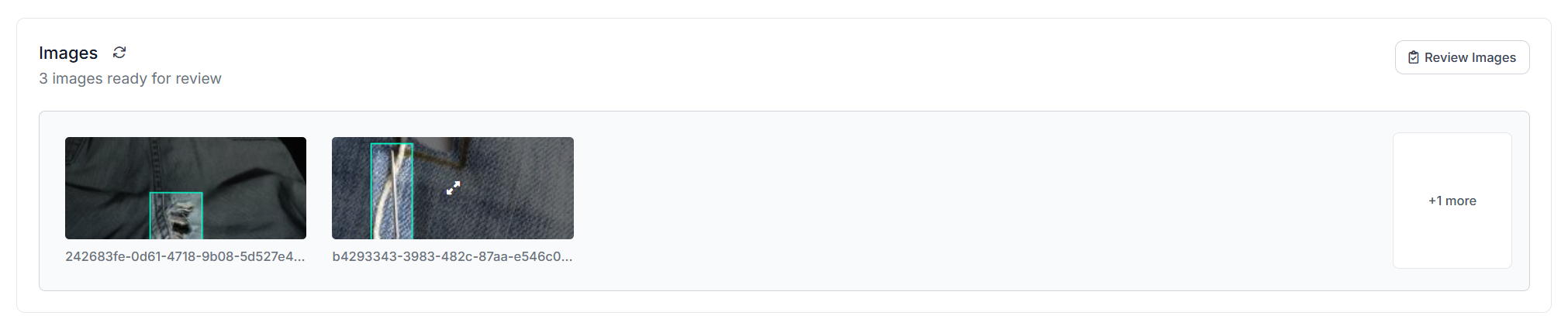
This approach is most useful when the rare class does not cover enough real-world variation. A small set of Hole examples may leave important cases missing from the dataset. New production images can fill those gaps with examples the model has not seen before.
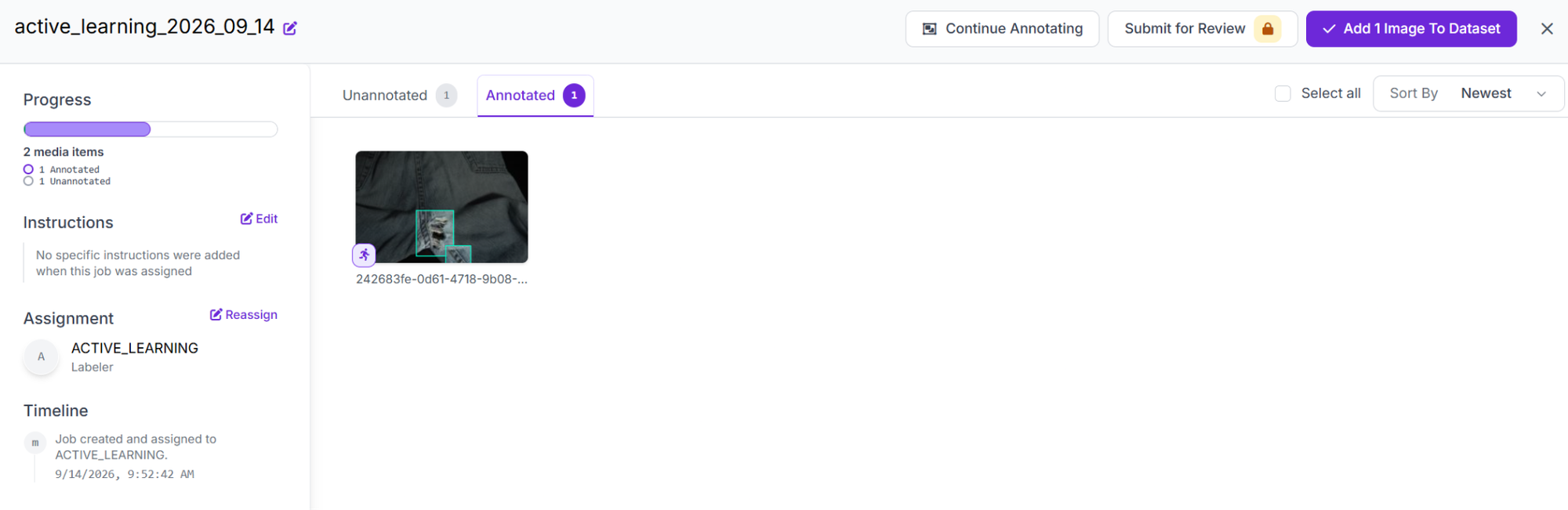
If the Hole class already covers enough variation and the main problem is how rarely those images are used during training, oversampling is the next option to test.
Oversample Images Containing the Rare Class
If collecting more production images is not practical yet, oversampling is the next step. For this dataset, I duplicated the training images containing Hole defects so the model sees them more often, applying a 1-pixel crop to each copy before re-uploading so Roboflow wouldn't automatically delete them as duplicates.
I kept the validation and test sets unchanged. Oversampling makes the most sense when the existing Hole images already cover enough variation in size, position, texture, and lighting, and the main issue is simply that there are too few of them.
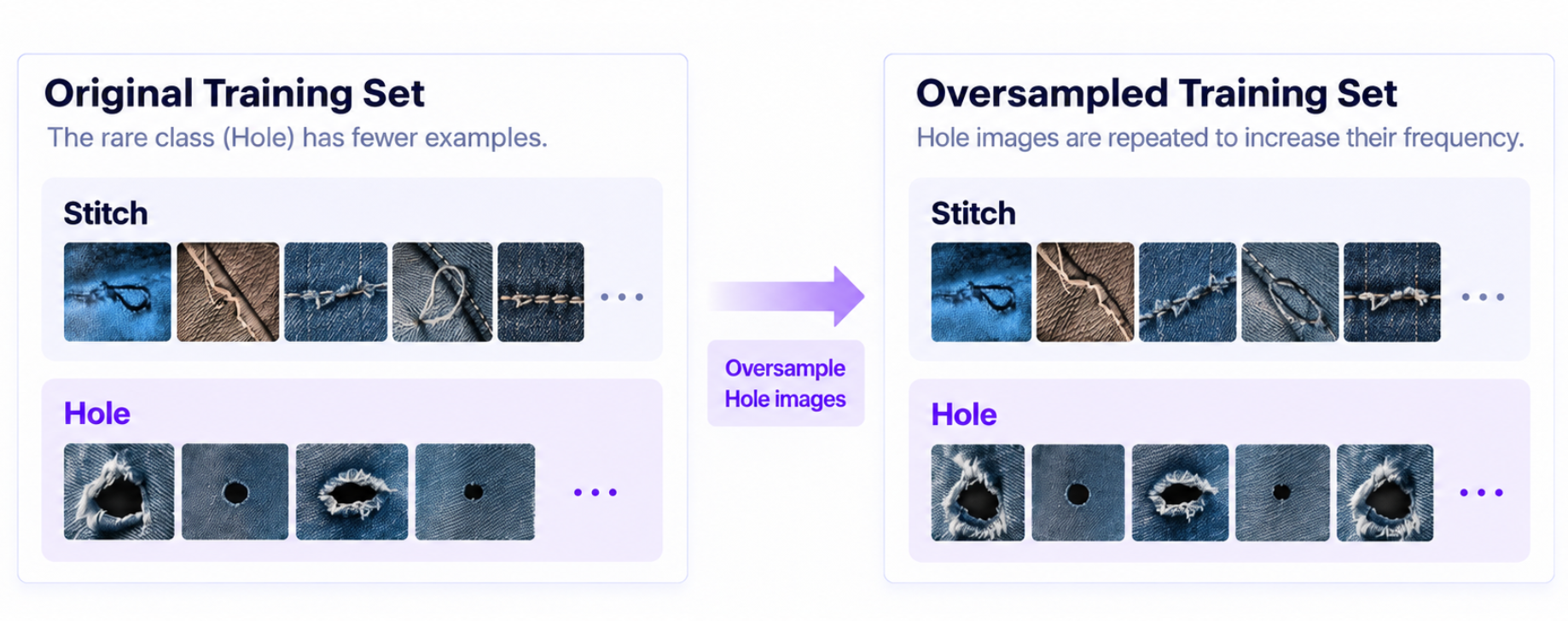
The limitation is that it doesn't add new defect patterns. If the current Hole images are too similar, targeted augmentation is a better next step because it introduces more variation from the examples you already have.
Use Dataset Tags for Targeted Augmentation
Targeted augmentation should focus on the conditions where the model is already missing defects. Review the baseline predictions and note where misses happen, such as darker fabric, slight blur, different camera angles, or smaller defects. Those patterns tell you which augmentations are worth adding.
In Roboflow, select the training images that contain Hole defects and add a rare-defect tag to them. This makes it easier to filter those images using the filter by tag feature in the preprocessing step when creating the augmentation dataset version.
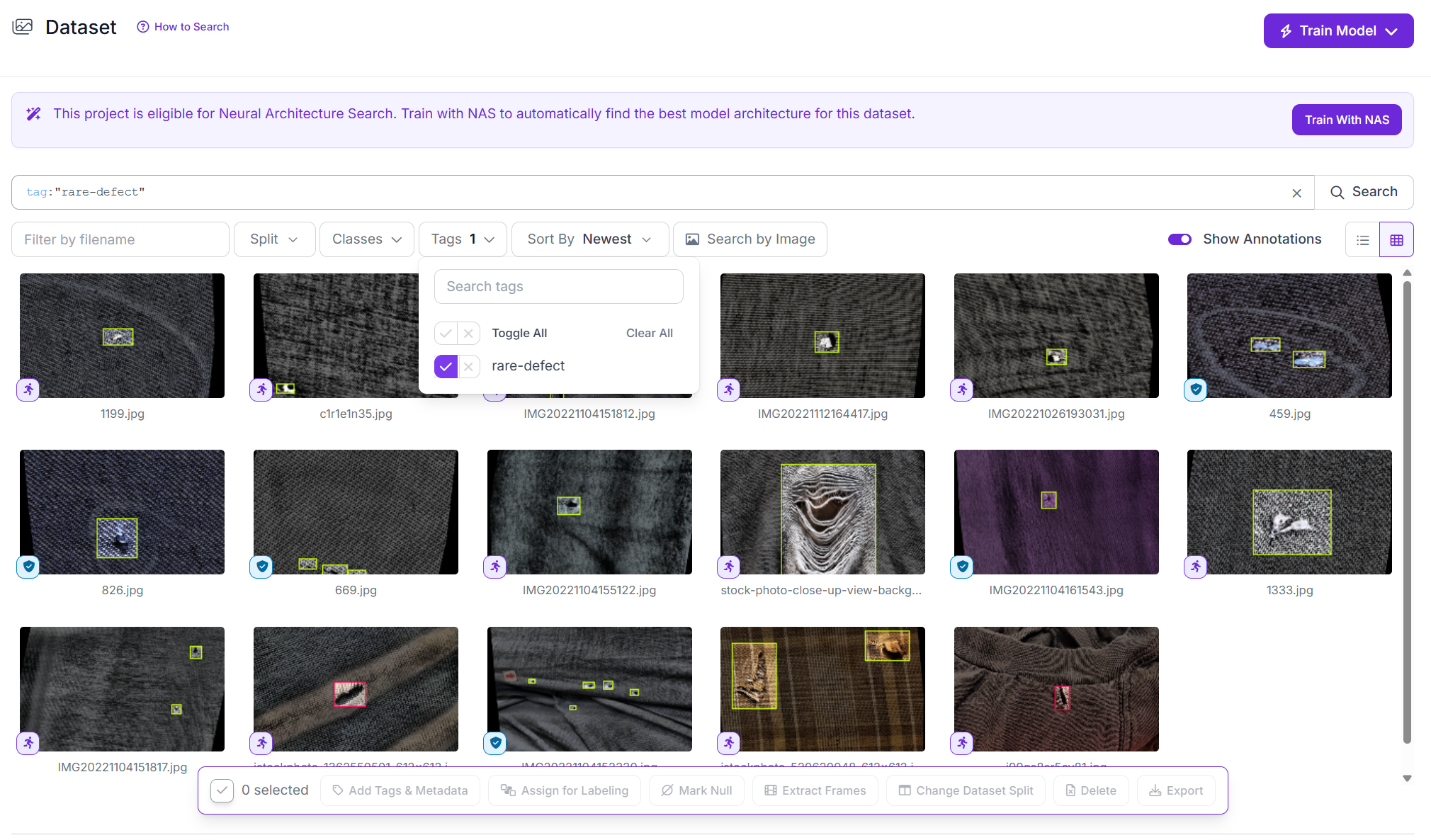
Choose from augmentation options based on conditions the production camera can realistically face. Brightness or exposure changes can cover lighting differences, blur can represent focus changes, and limited rotation can simulate camera angle. Review the generated images before using them for training.
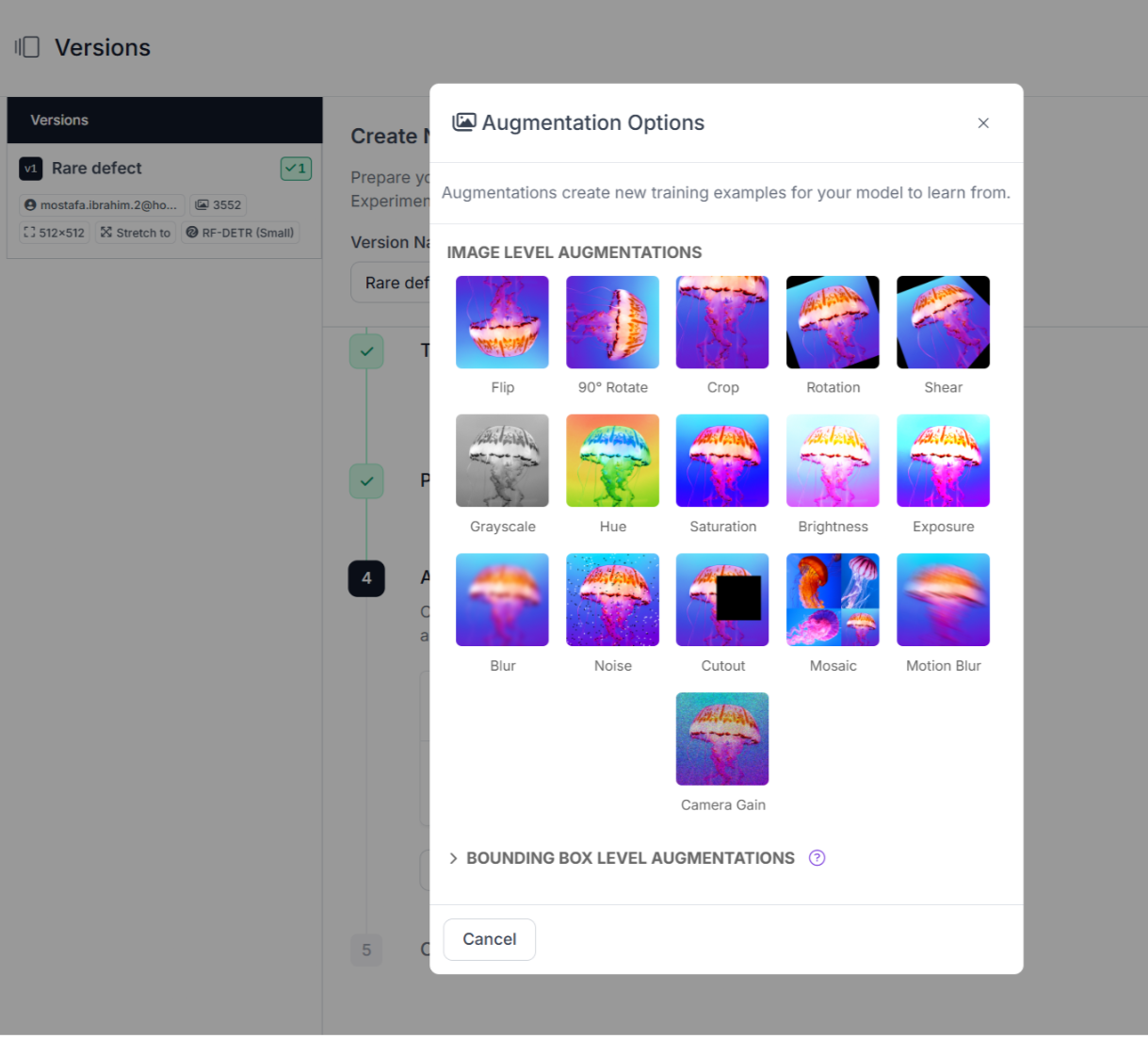
Keep the Stitch images unchanged for this experiment and focus the augmentation on the tagged rare-defect subset. If both classes receive the same amount of augmentation, the imbalance stays the same.
Add Synthetic Rare-Defect Examples to the Dataset
Some defect scenarios may be missing after augmentation, especially if they are difficult to capture on a production line or were never present in the original dataset. Synthetic data can help fill those gaps by adding new examples. Oversampling repeats existing images, augmentation modifies them, and synthetic data introduces defect scenes that were not captured in the original dataset.
To add synthetic examples to the dataset:
- Generate synthetic images for the missing defect scenarios.
- Import the images into the project.
- Review the annotations and correct any bounding boxes that are wrong.
- Tag the approved images as synthetic so they can be identified later.
Create a separate dataset version that includes the synthetic training images. Keep the validation and test sets unchanged and based on real production images so the comparison stays fair.
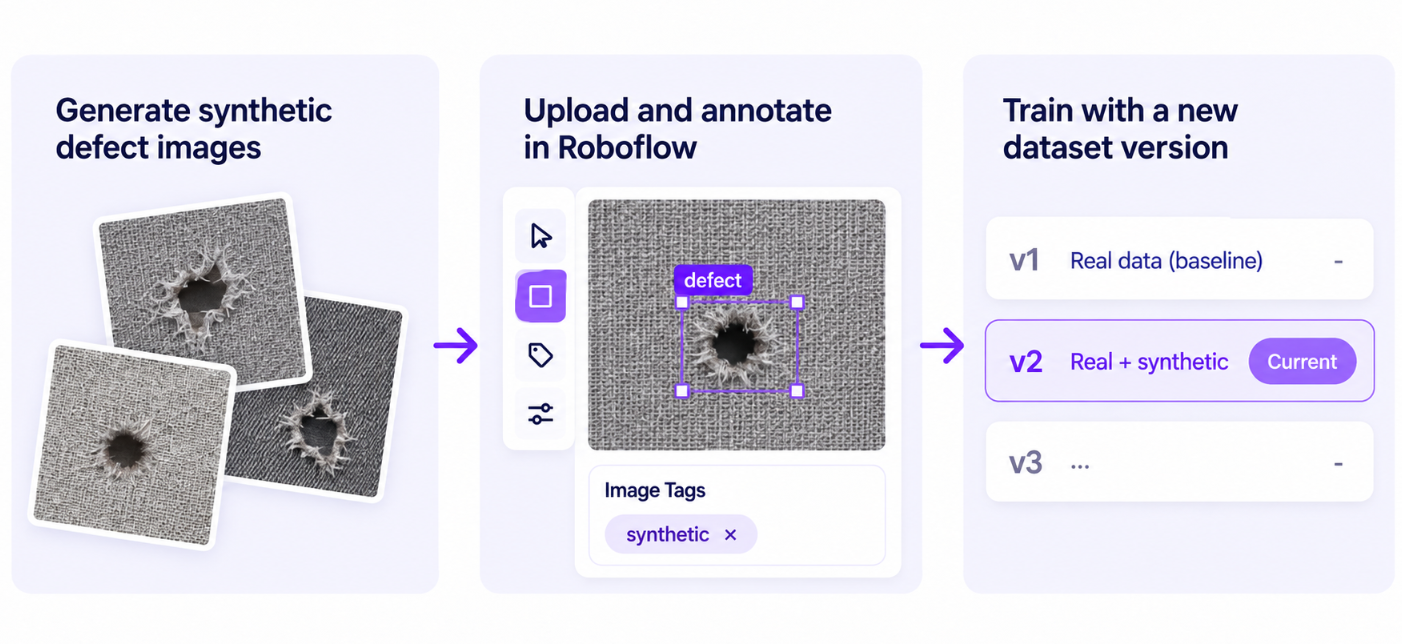
Check the generated images before training. If the fabric texture, lighting, camera view, or defect shape looks too different from the real dataset, the synthetic examples may not improve rare-class AP.
When Per-Class Weighting and Focal Loss Help
Per-class loss weighting gives specified classes more influence during training. A customer asked for this specifically as a way to handle class imbalance. Assigning a larger weight to the rare class means errors on that class have a bigger effect during training.
Focal loss works differently. It reduces the weight of easy predictions so harder examples have more influence during training. RF-DETR already uses focal loss for classification. Roboflow Train does not currently expose a per-class loss-weight setting for RF-DETR, so the experiment here uses data-level changes instead.
Neither approach adds new visual cases to the dataset, so missing defect shapes, fabric textures, lighting conditions, or camera angles still need to be addressed through the training data.
For this experiment, we tested three data-level changes: oversampling, targeted augmentation, and synthetic data. We retrained the model after each change and compared the rare-class AP against the baseline.
Retrain RF-DETR and Compare the Three Interventions
I used the same 50:1 dataset to train RF-DETR Small on the baseline, oversampled, targeted-augmentation, and synthetic-data versions. To keep the comparison consistent, each intervention added the same quantity of around 200 new images to the baseline dataset. Across all runs, the RF-DETR configuration stayed the same, and evaluation used the same validation and test splits.
Because overall mAP can hide poor performance on a rare class, I used Hole mAP@50 as the main metric.
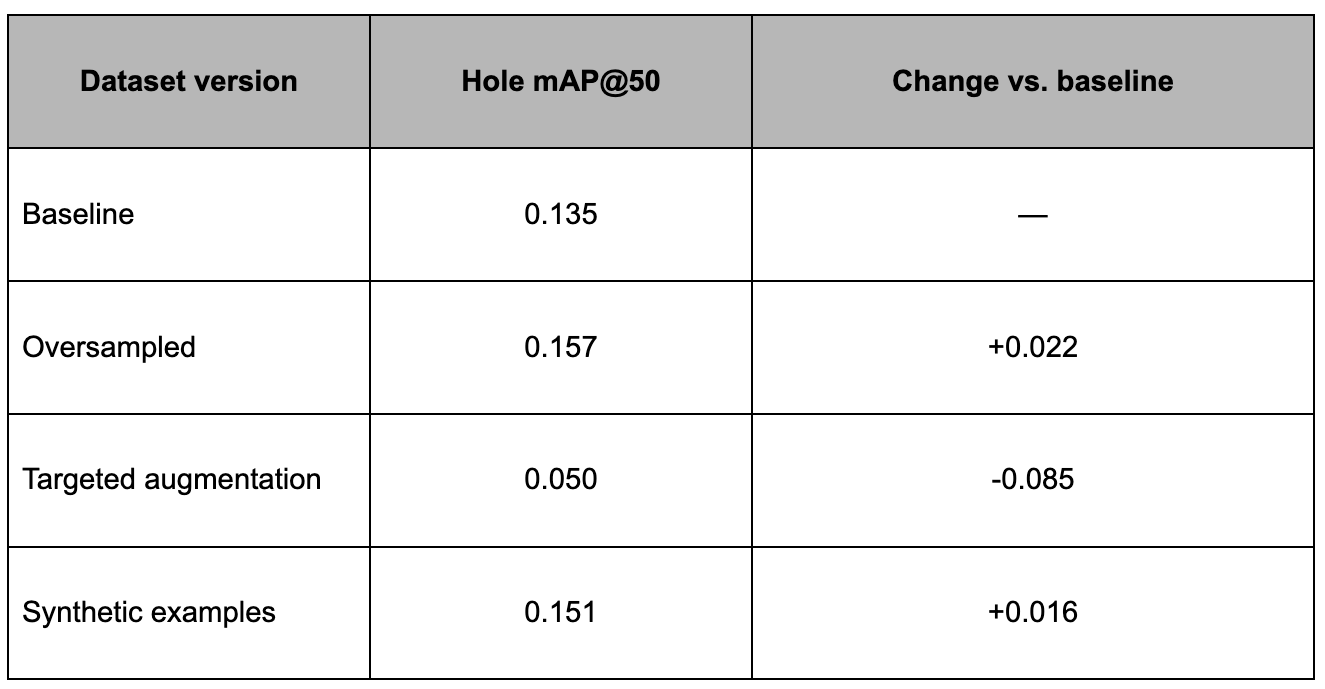
Oversampling gave the strongest result, increasing Hole mAP@50 from 0.135 to 0.157. Synthetic images also improved the rare class, reaching 0.151. Targeted augmentation performed worse than the baseline, with Hole mAP@50 falling to 0.050.
The oversampling result suggests that the existing Hole images already contained useful defect examples. Showing those images more often during training was enough to produce a small gain. Synthetic data helped too, although the improvement was smaller.
Augmentation was the only intervention that made the result worse. After adding brightness, blur, and rotation, Hole mAP@50 fell to 0.050. In this run, those changes did not match the variation the model needed to handle. Augmentation can still help when the transformations match real production conditions.
The improvements from oversampling and synthetic data are small, which is expected with a rare class that has relatively few evaluation examples. A larger set of Hole images would show more clearly how much each method improves detection. In production, even small gains in rare-class mAP can matter when the model processes many images.
Conclusion
Class imbalance in object detection is easiest to spot at the class level. Overall mAP may look acceptable while a rare defect is being missed, so per-class AP should be part of the evaluation from the start.
The best next step depends on what the rare class is missing. Use Active Learning when you need more real examples. Try oversampling when the existing examples are useful but appear too rarely. Use tagged augmentation when you can point to a specific type of variation the model struggles with. Synthetic data is another option when important defect cases are difficult to collect directly.
After each change, create a new dataset version, retrain RF-DETR with the same setup, and compare the same rare-class metric against the baseline. That makes it easier to see whether the change actually helped.
Further reading: