
Friday Facts #446 - An ARM and a Frame
'%20fill-opacity='.8'%20d='M3.256%203.913a3.083%203.083%200%200%200-.003%204.397L8%2012.998l4.743-4.684a3.085%203.085%200%200%200%20.001-4.4c-.6-.593-1.4-.914-2.233-.914a3.17%203.17%200%200%200-1.91.635L8%204.087l-.601-.452A3.17%203.17%200%200%200%205.489%203c-.834%200-1.634.321-2.233.913m10.19%205.111-4.748%204.69a.996.996%200%200%201-1.397%200L2.549%209.02a4.083%204.083%200%200%201%20.004-5.82A4.17%204.17%200%200%201%205.488%202c.907%200%201.787.29%202.512.835A4.17%204.17%200%200%201%2010.51%202c1.093%200%202.146.422%202.936%201.202a4.085%204.085%200%200%201%200%205.822'%20/%3e%3c/svg%3e) 7
7'%20stroke-opacity='.75'%20stroke-width='1.5'%20stroke-linejoin='round'/%3e%3c/svg%3e)

Hello,
Join the huddle, while I regale you with more tales of the Penguin...
Factorio on the Steam Frame raiguard
When Valve originally announced their next-gen hardware, I was very excited for the Steam Controller and marginally excited for the Steam Machine, but I wasn't very excited about the Steam Frame. I have had the opportunity to play VR on my friend's HTC Vive; and on the occasions where I visit the Wube office in Prague, I have played on the company's Valve Index that we keep upstairs. These experiences were very neat, but the amount of setup involved in clearing a playspace, connecting the headset to a PC, and setting up lighthouses for spatial tracking elevated the activation energy of enjoying a VR game beyond what I was willing to deal with. I had relegated VR to a gimmick that simply wasn't for me.
VR engineers and developers knew about the activation energy problem, so in recent years, headsets have been evolving to support "inside-out" tracking. Instead of setting up dedicated stationary sensors (lighthouses) to track where you are in the VR space, inside-out headsets use on-board cameras to track where you are in the room, and use that to translate your real-world location into a VR space. This eliminates the required lighthouse setup, and if you then shove all of the compute and a battery into the headset, you can achieve an untethered, console-like VR experience, free of wires and hassle. Simply put on the headset and play.
Standalone VR is a large improvement on activation energy, but I have not been interested until now because the best options were tied to companies whose ultimate motivations and privacy standards are not acceptable to me. But the Steam Frame changes things - in addition to Valve being more privacy-friendly, it's a Linux PC in disguise. If you want to install your own software on the headset, or entirely replace the operating system, that is up to you! All of these things were very appealing to me, and I quickly began to make plans to purchase one.
The Steam Frame represents an opportunity for ARM64 Linux computing to become more mainstream. Until now, the best options for ARM64 Linux have been limited to the Raspberry Pi (a relatively weak single-board computer), Ampere servers (which are inaccessible for the average person), and Asahi Linux on Apple Silicon MacBooks (which is still in a very early alpha stage). The Steam Frame joins a very small list of viable ARM64 Linux use-cases, and with Valve's emphasis on traditional 2D gaming on the Frame alongside VR titles, I finally had the excuse I needed to port Factorio to ARM64 Linux.
Porting to ARM64
The most involved part of the porting process didn't actually involve the Frame at all: setting up x86 -> ARM64 cross compilation. Because I had no idea what I was doing, the first several hours were spent researching the process. Fortunately, our Linux compiler of choice (Clang) has pretty good cross-compilation support, and at the end of the day you only need three things:
- Pass the correct "target triple" to the compiler and linker.
- Pass the path to a sysroot of the target architecture.
- Use a linker which natively supports cross-compilation. We already use the Mold linker, which supports cross compilation, so no special effort was required to make it work.
The most helpful resource by far was this blog post by mcillioni, which succinctly described the requirements and the process. Thank you!
My initial solution for obtaining the sysroot was to modify mcillioni's script to extract the system files from my Raspberry Pi. This worked for a short while, but was not a sustainable solution. Sanqui then pointed me to a wonderful tool called deboostrap, which can be used to install ARM64 Debian system files in a directory of your choice. This turned out to be a very good solution, both for ease of local development and for our build servers.
We prefer to statically link our dependencies, and we use a rather niche build system called FASTBuild, so sometimes building dependencies for a new platform can be challenging. Almost everything worked without much trouble, but there is one dependency which we use on Linux which is not used anywhere else: OpenSSL.
OpenSSL is a very configurable library, and has a pretty complicated build system. Rather than translating it to FASTBuild directly, we build OpenSSL by using FASTBuild to call its metabuild system (a Perl script) and then execute the generated Makefile. Building OpenSSL for ARM64 was a bit of a challenge due to OpenSSL's somewhat arcane documentation and my being unfamiliar with Perl, but I eventually figured out the correct combination of flags and arguments to pass, and got all of the game's static dependencies built!
I managed to get Factorio Linux cross-compilation down to just two steps: run just create-sysroot arm64 to generate the sysroot with debootstrap, then run just arch=arm64 build to compile!
The development kit
Valve graciously sent us not just one, but two development kits - one to the office in Prague, and another directly to my house in the USA! My immediate impressions of the hardware were very positive - it is extraordinarily lightweight (2/3rds the weight of the Steam Deck!) and is very comfortable to wear for long periods of time, particularly with the top strap attached. It is the most comfortable VR headset I have ever worn.
Getting Factorio to run on the Frame was relatively straightforward, but there were a few hoops to jump through. Valve supplies a tool called the "Steam Linux Runtime" (steamrt), which provides a stable base of dynamic libraries for native Linux game to target, bypassing many of the issues involved with dynamic dependency hell. Because we statically link our dependencies, we don't require steamrt in order for the game to run, but Steam does not allow games to opt out, so we have been targeting steamrt 1.0.
However, steamrt 1.0 does not have an ARM64 version - in fact, only steamrt 4.0 received an update to support ARM64 - so it was time to upgrade. The steamrt version is a global switch which affects all players, so when we were ready to begin distributing the ARM64 build through Steam, we had to bite the bullet and change Factorio's steamrt version to 4.0 for everyone. Fortunately, we did not notice any issues as a result of this.
I also had to update our version of the Steamworks SDK so I could link against the ARM64 Steamworks shared library. This update went live in 2.1.15, and there was one major bug which necessitated a hotfix. Fortunately, that was the worst of it, with only one other issue being reported.
The Steam Frame uses the same SteamOS Devkit Client software that is used on the Steam Deck and Steam Machine, so it was just a matter of enabling developer mode on the Frame, connecting it to the devkit client on my laptop, and uploading the build there. After a few failed attempts having to do with incompatible glibc versions (which is a dynamic dependency that we, unfortunately, cannot avoid), I successfully booted Factorio on the Steam Frame for the first time in February 2026!
This image was captured on an early development build of SteamOS, and does not represent the final experience.
There were a few issues which I worked with Valve to resolve, but overall it ran very smoothly! During the May 2026 Wube LAN party prior to the 2.1 release, I connected the office devkit to the game for the majority of the time, and largely thanks to prior efforts on the Nintendo Switch and Apple Silicon ports, we never experienced an ARM64 vs. x86 related desync. The Frame was able to keep up with the game without trouble, and I was playing on the Frame when we finished the playthrough.
Am I playing Factorio? You never know...
Performance
When running on the Frame, Factorio uses graphics settings identical to the Steam Deck and runs at 720p. The game easily maintains 60 FPS in the majority of cases, but will dip slightly in busy scenes. Lowering graphics settings did not help the performance, which suggests a more fundamental limitation in how Factorio's OpenGL renderer is interacting with the Frame's software stack.
On the CPU side, performance of the native ARM64 build is about 11% faster than the x86 build running via FEX:
Map: Klonan | 4k trains Megagrid | 10k SPM | Base game + Elevated rails
The performance of the FEX translation layer is very impressive!
Experience
2D games running on the Frame do not have access to VR features, so Factorio largely plays the same as it does on the Steam Deck or Nintendo Switch. However, even when in gamepad mode, Factorio will still respond to mouse movements and clicks, which happens to synergize well with the Frame's laser mouse. I have found it very convenient to toggle the laser mouse when using selection tools or clicking rapidly through GUI elements. And, of course, you can connect your Steam Controller to get a very Steam Deck-esque trackpad experience, or even connect a mouse and keyboard to play traditionally!
Release
Valve has (correctly) prioritized support for Windows games running via Proton+FEX and Android games running via Lepton, so the infrastructure for native ARM64 Linux games isn't as well-defined. We had to work with Valve to implement a workaround which involves shipping both binaries to all players and using a shell script to launch the correct binary based on the host architecture. As some community members have already noticed, the ARM64 Linux Steam build has already been distributed to all Linux Steam experimental players! Getting this working involved some trial-and-error in production, which resulted in humorous misunderstandings and issues launching the game.
Factorio is officially Steam Frame Certified! This certification is a guarantee from Valve and Wube that the game works great on the Frame. We were delighted to spot brief Factorio cameos on the "Great on Frame" page in Steam Frame reviews by Gamers Nexus and Dave2D.
I would like to thank Valve for sending us development kits and promptly responding to our emails when we had trouble. I would also like to thank my Wube pals Sanqui and Klonan, who worked with me for many hours, often long into the night due to time zone differences, to get everything ready in time for the Steam Frame's launch. As Klonan so eloquently put it, "We all shared this moment together, on that rainy night at the end of summer."
But the Steam Frame is not the only new device which can run Factorio...
Factorio on the Raspberry Pi
Of course we are going to support the Raspberry Pi, especially considering that I used mine to obtain the initial sysroots used in development! Unfortunately, the Pi's OpenGL support is rather limited, so while you can easily host servers from a Pi, you cannot play the game with graphics.
I secretly hosted a server from my pi a few weeks ago and joined from my Steam Frame, asking my friend _CodeGreen and my brother Doomquill to help me test for desyncs. A few random players also joined, and we did not encounter any desyncs or other issues. Thank you to darklich14 and Erielhonan for being unaware test subjects!
CPU performance on native ARM64 is about 28% faster than x86 running via box64:
Map: Klonan | 4k trains Megagrid | 10k SPM | Base game + Elevated rails
Hardware: Raspberry Pi 5 8GB
But wait, there's more!
Factorio on Asahi Linux
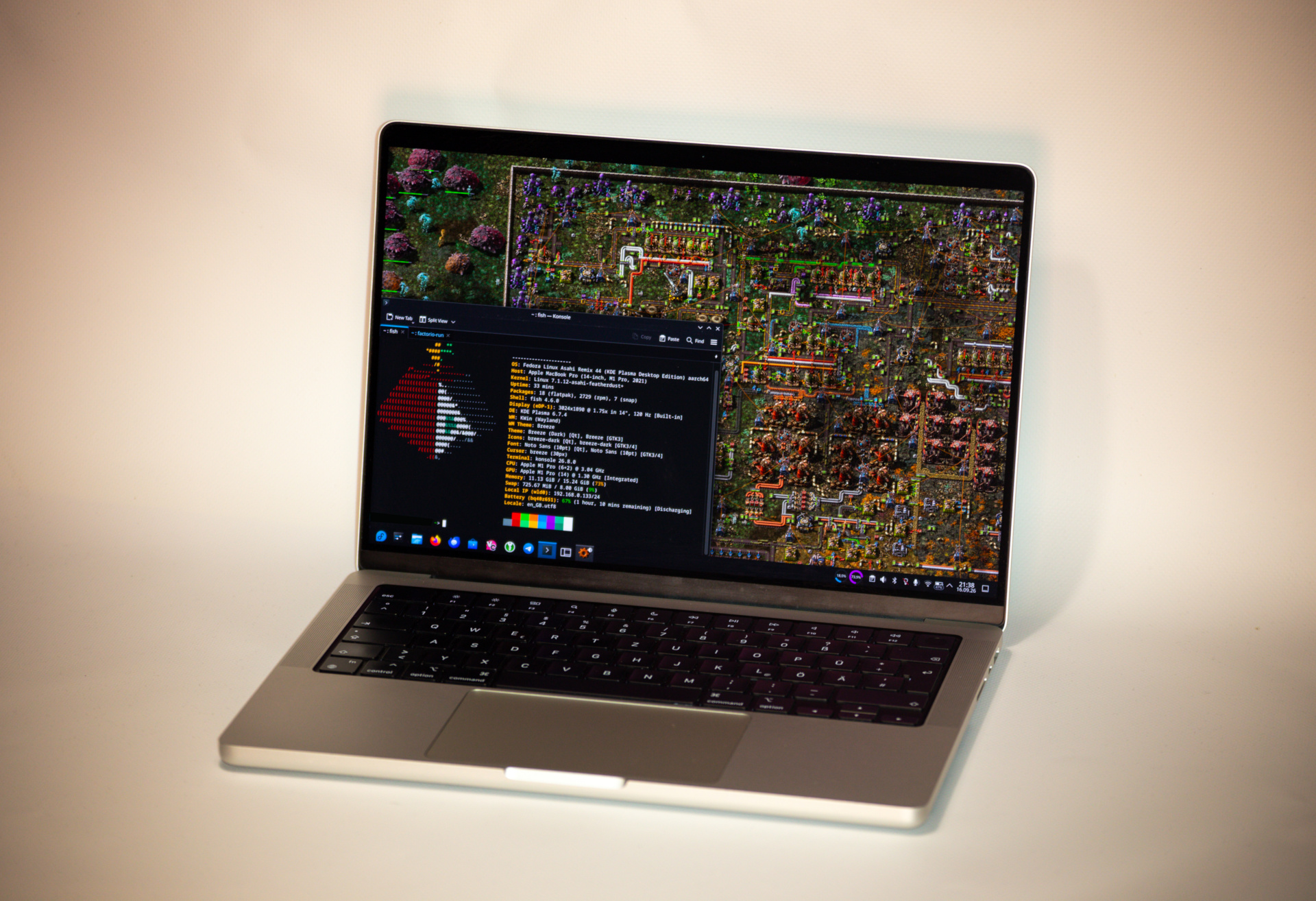
That's right, Factorio also works on Asahi Linux, the Linux distribution for MacBooks featuring ARM processors! Sanqui's friend graciously tested a few builds for us and everything appears to work great. This is a happy accident more than anything else, as we didn't put any special effort into making it work. Unfortunately, nobody at Wube has a MacBook with Asahi Linux installed, so there will almost undoubtedly be issues which we are unaware of. Play at your own risk!
Benchmark results were the most dramatic of the lot: the native ARM64 version is a whopping 35% faster than the x86 version running through FEX:
Map: Klonan | 4k trains Megagrid | 10k SPM | Base game + Elevated rails
Hardware: Macbook Pro M1 Pro (Model A2442, 8-Core, 16GB, 512GB)
Porting Factorio to ARM64 Linux was a very fun and educational process, and I am very grateful that I was able to work on this. I hope you will enjoy playing Factorio in VR and on your other ARM64 Linux machines!
Finally, the ARM64 Linux port Sanqui
Our playerbase has been asking for a Linux ARM port of Factorio for at least eleven years. We listen and we also get excited about new hardware avenues, but supporting each new platform doesn't come for free in terms of development time, testing, and long term support. Over the years, we regularly re-evaluated the viability of this port, but most recently we've been hitting a wall in terms of hardware. It seems like ARM servers are simply unobtanium: our hardware provider failed to source us an Ampere Altra server, and the German VPS provider Hetzner has ARM64 virtual servers constantly out of stock. In the end we settled for cross-compilation from x86-64 and now have a Raspberry Pi 5 as the dedicated test runner.
The Steam Frame running native ARM64 Linux proved to be a catalyst that pushed these efforts over the edge and we are pleased to make this port available to all ARM64 Linux users today!
- Standalone Factorio for ARM64 Linux is available on our website, including the headless version.
- For Steam users, Factorio for ARM64 Linux is available on the experimental branch (version 2.1), so please opt into experimental if you are playing Factorio on the Steam Frame or other ARM64 Linux devices.
As always, submit a patch signed with your GPG key containing a diff of your thoughts to the usual places. See you next week!