ConardLi/garden-skills

ConardLi's open-source Skills collection, featuring web design, knowledge retrieval, image generation, and more.
Garden Skills
A curated collection of production-ready Agent Skills for Claude Code, Cursor, Codex, and other AI coding agents.
| web-video-presentation Web video / presentation | web-design-engineer Design / frontend |
| gpt-image-2 Image generation / prompting | beautiful-article Any source → beautiful article |
Table of contents
| Install | Use | Contribute |
|---|---|---|
Installskills CLI (npx)Claude Code plugin marketplace Pinned .zip from ReleasesManual copy Git submodule | Compatibility What is a Skill? | Contributing Acknowledgments License |
web-video-presentation
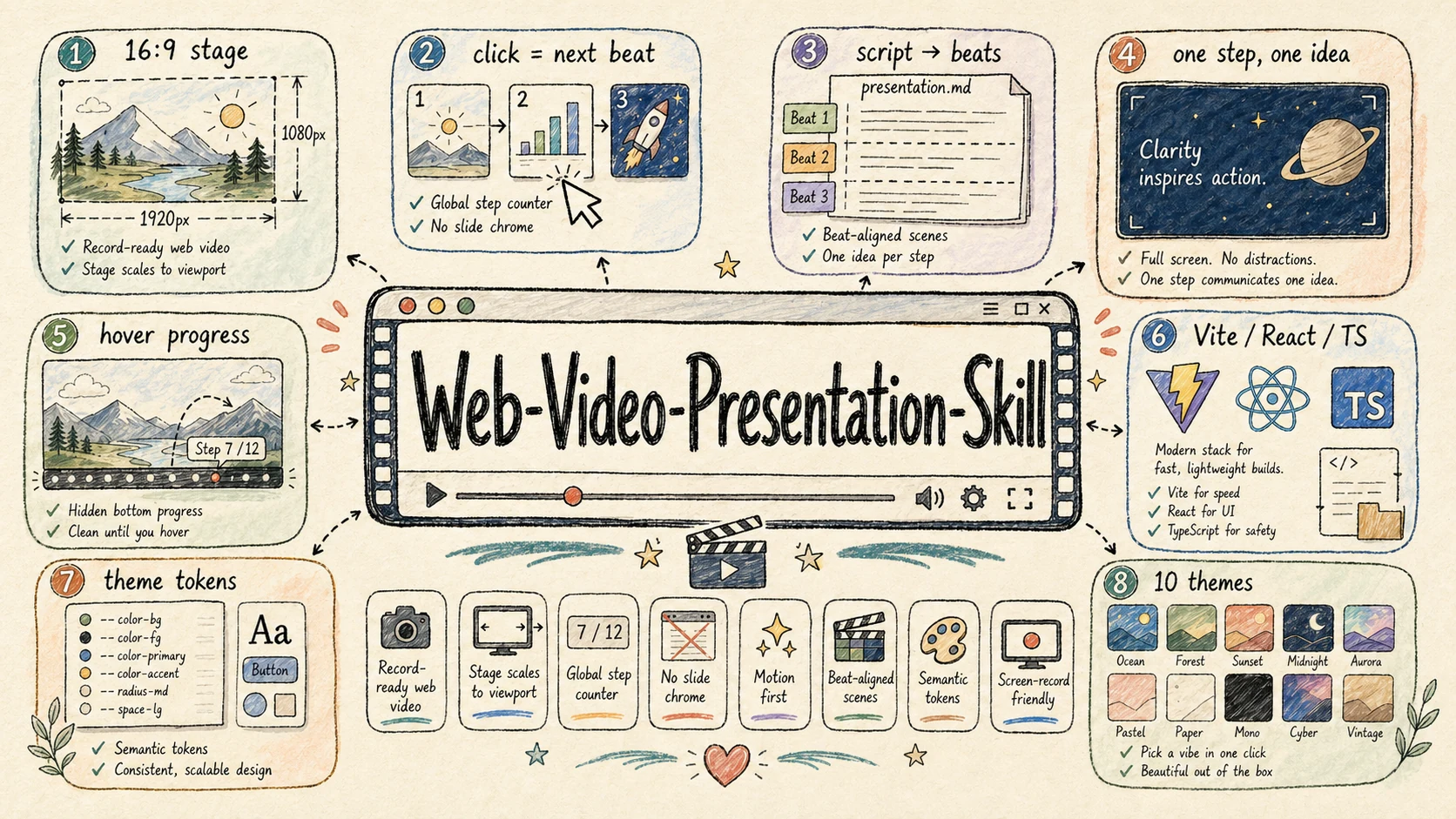
Category: Web Video / Presentation Engineering
Best for: turning scripts, articles, lessons, product demos, and talks into click-driven 16:9 web presentations that can be screen-recorded as cinematic videos.
web-video-presentation builds record-ready Vite + React + TypeScript presentations that behave like video production surfaces. The workflow turns raw articles into narration scripts, maps script beats to full-screen scenes, pauses at required checkpoints, and can optionally synthesize narration audio after the visual outline is approved.
Highlights:
- Fixed 1920×1080 stage that scales to the viewport for stable screen recording
- Click / keyboard driven
(chapter, step)cursor, with one narration beat per visual step - Hard collaboration checkpoints for script, theme, outline, implementation mode, and optional audio
- Hidden hover-only progress controls so the stage stays clean while recording
- Theme-token architecture with 23 built-in themes, each with its own design signature — editorial, terminal, engineering, Swiss International, and more
- Pluggable TTS — provider-agnostic audio runner; ships two built-in providers (MiniMax
mmx-cli+ OpenAI TTS via curl) plus a contract + ready-to-paste snippets for ElevenLabs / edge-tts / Azure / Google Cloud / macOSsay - Scaffolded Vite + React + TypeScript project with reusable stage primitives and recording guidance
creative-voltage
creative talks blueprint
tech architecture swiss-ikb
data reports chalk-garden
popular science
↑ All 23 themes at a glance — open the full gallery for live 16:9 previews, design signatures, and best-for tags.
Links: README · SKILL.md · Download v1.2.2 .zip
web-design-engineer
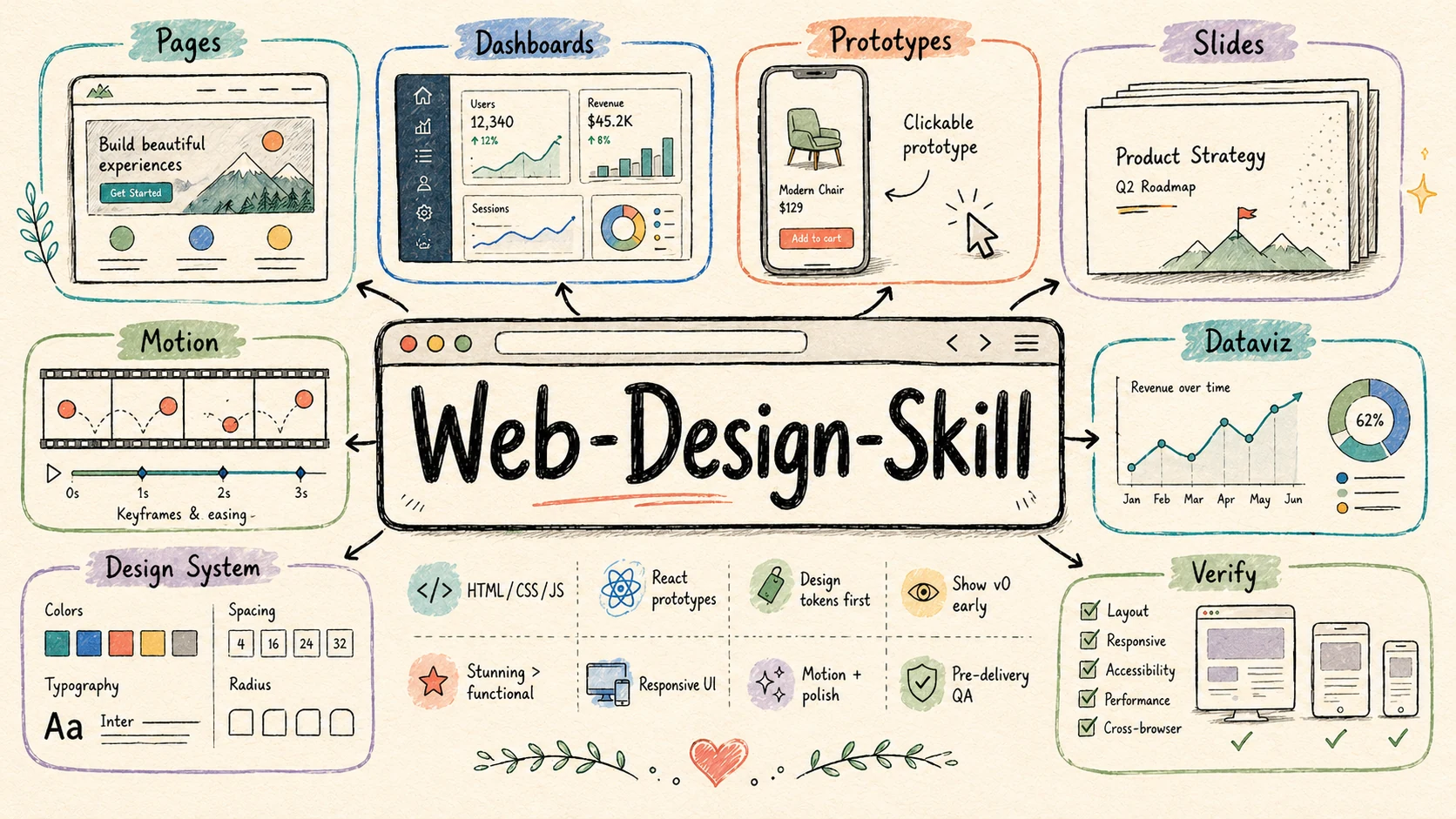
Category: Design / Frontend
Best for: web pages, landing pages, dashboards, interactive prototypes, HTML slide decks, animations, UI mockups, data visualizations, and design-system explorations.
web-design-engineer turns AI-generated web artifacts from merely functional into polished, deliberate, and visually memorable front-end work. It treats the agent as a design engineer: first understanding product context, then declaring a design system, showing an early v0, building the full experience, and verifying the result.
Highlights:
- Converts the brief into a five-dial Design Read covering variance, motion, density, asset dependence, and brand fidelity
- Distinguishes extension, preserve, and overhaul redesign modes before changing an existing product
- Runs executable browser acceptance only when the user explicitly requests acceptance, QA, or browser testing
- Pushes beyond generic AI UI patterns with an anti-cliché blocklist and stronger visual judgment
- Ships a Design Direction Advisor (six differentiated schools) + 25 anchored style recipes (Linear / Aesop / Pentagram / Bloomberg / Stripe Press / Mid-Century, etc.) — each recipe carries concrete palette, typography, signature moves, and anti-patterns ready to paste into the design-system declaration
- Covers HTML / CSS / JavaScript / React prototypes, with guidance for responsive layout, motion, and interaction polish
- Includes practical implementation rules for inline React + Babel, CSS tokens,
oklch()color work, container queries, and reduced-motion handling - Ships an advanced patterns reference for device frames, slide engines, animation timelines, dashboards, and other reusable web artifacts
aesopapothecary pages | muji-kenya-haraobject catalogues | monocle-magazinemagazine contents | stripe-pressbook detail |
bloomberg-terminaltrading dashboards | lineardev tool landing | vercel-meshdeploy hero | tufte-datainkdata narratives |
mid-century-modernposter homage | y2k-retrofuturismY2K portal | businessweek-turleyeditorial covers | active-theorycinematic launch |
↑ 12 of 25 anchored recipes — open the full gallery for all 25 working artefacts (apothecary pages, trading workstations, magazine covers, Y2K portals, mid-century posters …) with signature moves and best-for tags.
Links: README · SKILL.md · Website · Demo · Download v1.3.0 .zip
gpt-image-2
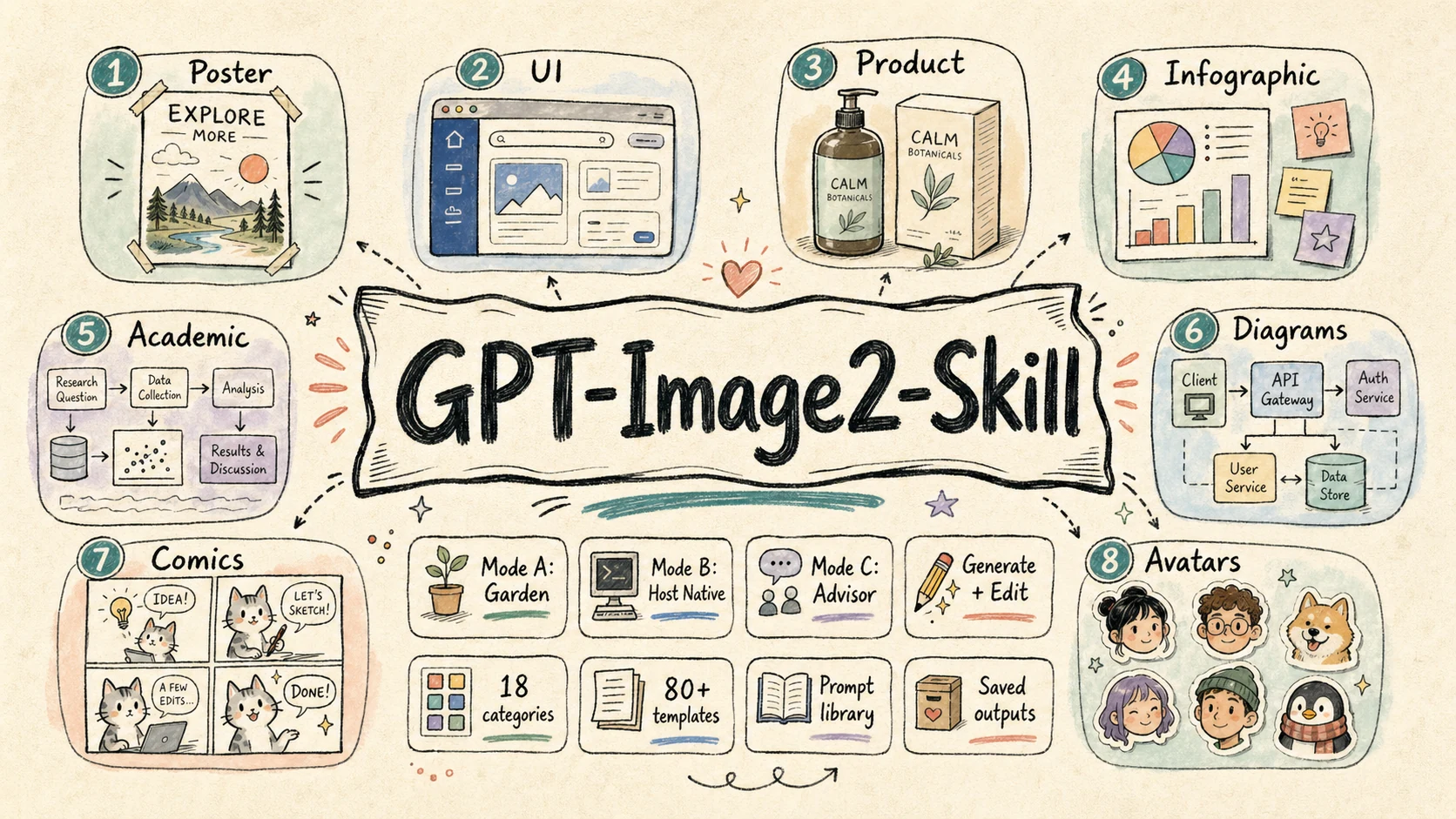
Category: Image Generation / Prompt Engineering
Best for: posters, UI mockups, product visuals, infographics, academic figures, technical diagrams, comics, avatars, storyboards, branding boards, and image-editing workflows.
gpt-image-2 is a focused image-generation skill for GPT Image 2 and OpenAI-compatible image APIs. It is designed to work across different agent environments: fully local Garden generation, host-native image-tool delegation, or prompt-only advisor mode when no image tool is available.
Highlights:
- Supports three runtime modes: Mode A Garden local, Mode B host-native delegation, and Mode C advisor-only prompt writing
- Starts every task with mode detection so the skill does not silently choose the wrong execution path
- Provides 18 visual categories and 79 structured prompt templates under
references/ - Covers both image generation and image editing through dedicated workflows and scripts
- Saves prompts and generated images under
garden-gpt-image-2/in Garden mode for reuse, review, and versioning
Selected live cases
background-replacementPortrait edit with Times Square relighting. | chat-interface-sceneClaude-style assistant product screenshot. | live-commerce-uiCelebrity livestream commerce interface. | product-card-overlaySkincare landing-page hero. |
bento-grid-infographicHigh-density iPhone 16 Pro explainer. | system-architectureMulti-tenant AI SaaS production diagram. | dense-explainer-slidesAI Agent mechanism in one page. | food-mapCity-walk editorial food guide. |
exploded-view-posterVision Pro 2 optical and compute teardown. | neural-network-architectureViT-B/16 model figure for papers. | cosmetic-packagingPremium skincare gift-box composition. | anime-key-visualGame-launch key art with crop-safe layout. |
↑ 12 selected cases from the 160+ public case library — open the skill gallery for more templates, or browse the live website.
Links: README · SKILL.md · Website · Download v1.0.4 .zip
kb-retriever
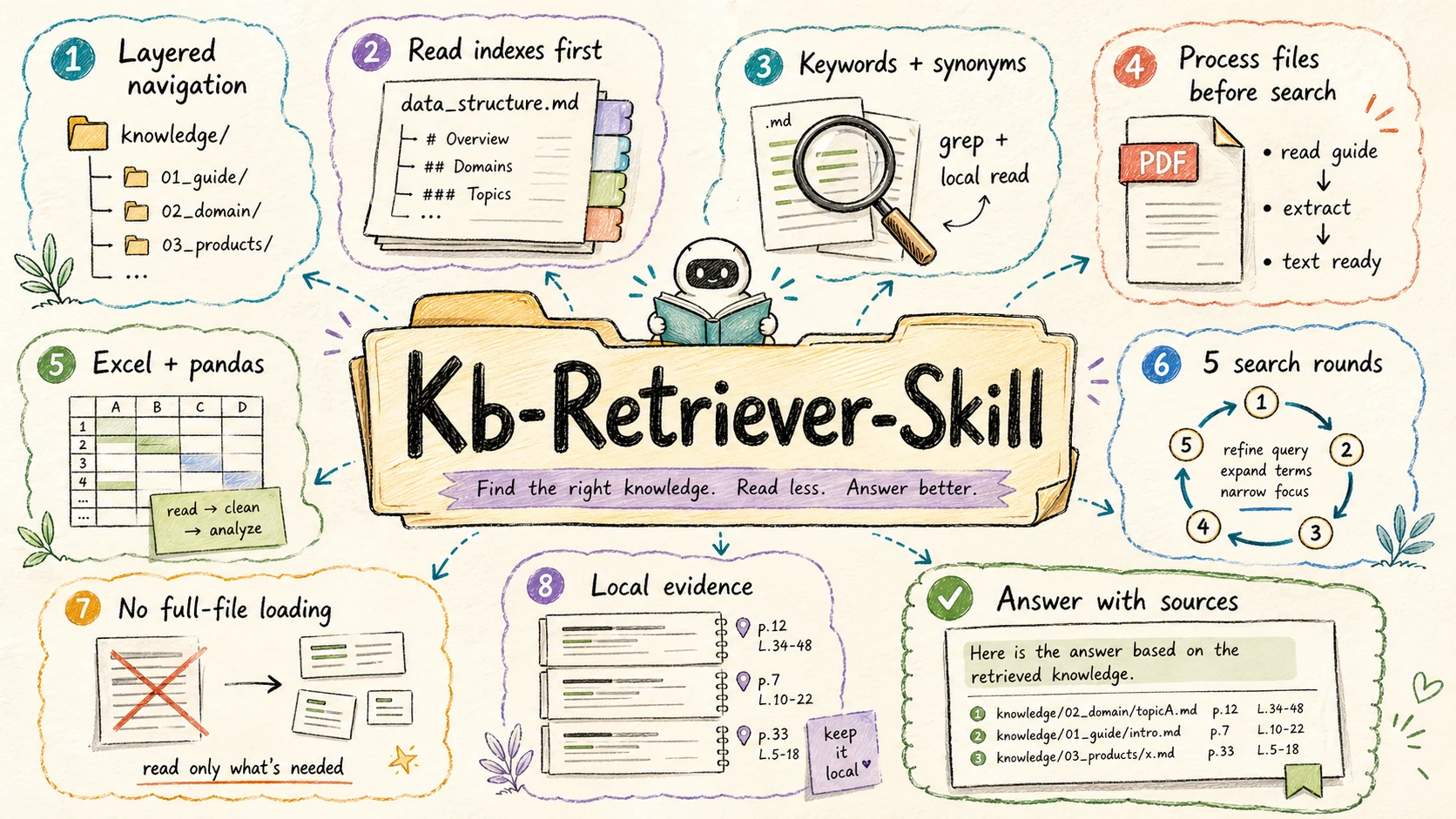
Category: Retrieval / Local Knowledge Base
Best for: answering questions from a local knowledge/ directory, searching structured documentation, and extracting evidence from Markdown, text, PDF, and Excel files without flooding the agent context.
kb-retriever is a local knowledge-base retriever built around careful, progressive search. Instead of loading whole files, it navigates hierarchical index files, narrows the candidate set, processes complex file types correctly, and answers with sources.
Highlights:
- Uses layered
data_structure.mdfiles to navigate the knowledge base before searching content - Enforces a learn-before-process rule for PDF and Excel files, using the included reference docs before extraction or analysis
- Combines precise keyword search, local windowed reads, synonyms, and iterative refinement
- Bounds retrieval to at most 5 search rounds so exploration stays controlled
- Includes workflows for
grep,pdftotext,pdfplumber, andpandas, with source-aware answer formatting
Links: README · SKILL.md · Download v1.0.1 .zip
beautiful-article
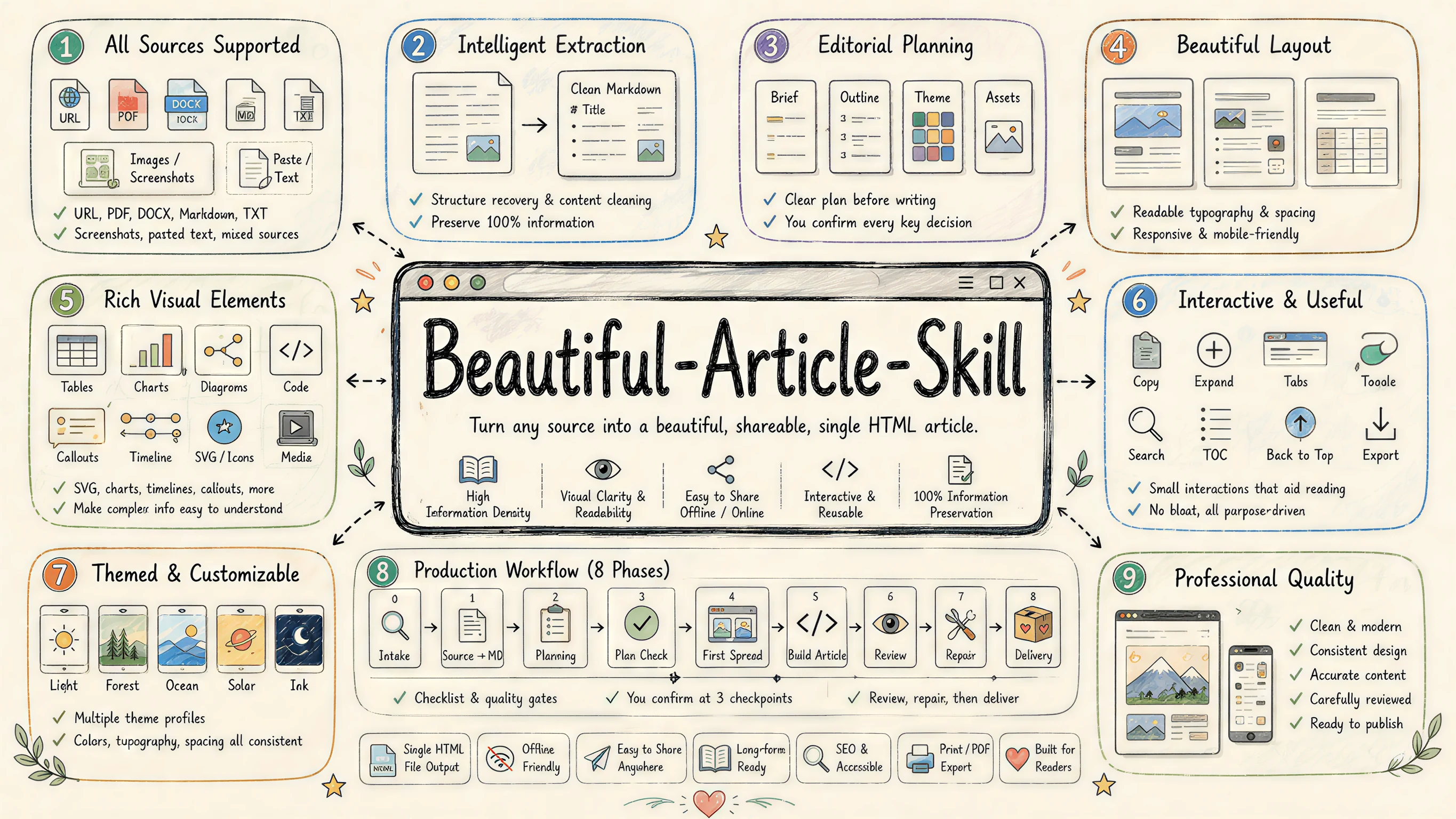
Category: Editorial · Any source → beautiful article
Best for: turning URLs, PDFs, DOCX, Markdown, plain text, screenshots, and pasted notes into a polished, share-ready article — long-form, briefings, explainers, tutorials, post-mortems, visual essays, dialogue transcripts.
beautiful-article is an editorial harness skill: it does not just "make a webpage", it edits and designs the source material into a polished article that is easier to read, share, and archive than the original. The skill flows through a small source → plan → double-confirmation → build → final review → repair loop and pauses at three hard checkpoints so the user keeps editorial control over article type, theme, layout, image strategy, cover, and delivery format.
Highlights:
- Article first — the focus is the article: better reading, better pacing, better aesthetics. Delivery is a self-contained file (HTML, optional PDF), but that's a delivery detail, not the goal
- Reacticle component protocol — prose-first semantic components (Hero / Lead / Section / Quote / Callout / Image / Formula / CodeBlock / Table…) plus a theme-token-only
Rawfree layer; the underlying React library lives atConardLi/reacticle - 10 article types with bundled retention ratios —
longform · ~100%/tutorial · ~90%/full-report · ~80%/explainer · ~80%/dialogue · ~80%/review · ~70%/essay · ~70%/briefing · ~50%/visual-essay · ~40%/interactive-explainer · ~25% excerpt + 75% AI-rebuild - 11 authoring theme profiles (
tufte,press,bayer,bodoni,vignelli,sottsass,freddie,andy,fuller,knuth,shannon) — each is a Markdown contract for the agent rather than a CSS file - Hard collaboration checkpoints with item-by-item decision capture (no silent defaults), plus a 3:4 book-style cover, default-on TOC, and language-aware translation step
- Per-node quality protocol — main-agent inline checks for plan, sub-agent reviewers for first spread / sections / final review, repair as minimal slices
Theme gallery
tufte | press | bayer | bodoni |
vignelli | sottsass | freddie | andy |
Links: README · SKILL.md · Download v0.1.0 .zip
Install
There are five supported install paths. Pick the one that fits your stack:
| # | Method | Best for | Pinned version? |
|---|---|---|---|
| A | skills CLI (npx skills add) | Any agent, one-line install, pick & choose skills | ✅ via tag URL |
| B | Claude Code plugin marketplace | Claude Code users who want to subscribe to plugin packs | ✅ via marketplace version |
| C | Pinned .zip from GitHub Releases | CI / air-gapped envs / reproducible installs | ✅ ✅ (immutable) |
| D | Manual copy after git clone | Local hacking on the skill itself | ❌ (tracks main) |
| E | Git submodule | Vendored into a larger project, want upstream updates | ✅ via submodule SHA |
Each skill section above also has aDownload v .ziplink in its "Links:" row that points at the current pinned release artifact. Those URLs are auto-rewritten byscripts/release/update-readme.mjson every release, so they always advertise the latest immutable version.
Option A · skills CLI (npx)
The fastest agent-agnostic path. Uses the standard npx skills CLI, which auto-detects your agent (Claude Code, Cursor, Codex, etc.) and drops the skill into the right directory.
# Install all four skills (latest)
npx skills add ConardLi/garden-skills

# Install just one skill (latest)
npx skills add ConardLi/garden-skills -s web-design-engineer

# Install globally (~/.skills) instead of per-project (./.skills)
npx skills add ConardLi/garden-skills -s gpt-image-2 --global

# Target a specific agent
npx skills add ConardLi/garden-skills -s kb-retriever -a claude-code
Defaults to the latest commit onmain. That's what you want 95% of the time — the CLI tracks each skill's most recent publishedSKILL.mdstraight from the source tree.
Want a pinned version? (CI / production) Use a tag-scoped tree/ URL — this points at the exact commit a release was cut from:
# Pin one skill to a specific release
npx skills add ConardLi/garden-skills/tree/web-design-engineer-v1.0.0/skills/web-design-engineer
For each skill, the current pinned .zip URL is also shown inline in its "Links:" row above (the Download v .zip link).
Useful sub-commands:
npx skills list                 # what's installed
npx skills find web-design      # search registries
npx skills update               # bump everything
npx skills remove kb-retriever  # uninstall
Option B · Claude Code plugin marketplace
If you use Claude Code, you can subscribe to the marketplace and install plugin packs that bundle one or more skills together:
/plugin marketplace add ConardLi/garden-skills
/plugin install presentation-skills@garden-skills
/plugin install web-design-skills@garden-skills
/plugin install knowledge-base-skills@garden-skills
/plugin install image-generation-skills@garden-skills
Plugin packs are declared in .claude-plugin/marketplace.json:
| Plugin pack | Skills included |
|---|---|
presentation-skills | web-video-presentation |
web-design-skills | web-design-engineer |
knowledge-base-skills | kb-retriever |
image-generation-skills | gpt-image-2 |
Option C · Pinned .zip from Releases
Every formal release publishes an immutable .zip (with a SHA-256 checksum) to GitHub Releases. Pin to this from CI, Dockerfiles, or air-gapped installers when you need the exact bytes to never move under you.
# Replace  and  with the version you want.
SKILL=web-design-engineer
VERSION=1.0.0

curl -fsSL -o "${SKILL}.zip" \
  "https://github.com/ConardLi/garden-skills/releases/download/${SKILL}-v${VERSION}/${SKILL}-${VERSION}.zip"

# Verify the checksum (highly recommended for unattended installs)
curl -fsSL -o "${SKILL}.zip.sha256" \
  "https://github.com/ConardLi/garden-skills/releases/download/${SKILL}-v${VERSION}/${SKILL}-${VERSION}.zip.sha256"
shasum -a 256 -c "${SKILL}.zip.sha256"

# Drop the folder into the agent's skills directory
unzip -q "${SKILL}.zip" -d .claude/skills/   # or .agents/skills/, .codex/skills/, ...
A floating "always-latest" URL is also available — useful for one-off installs:
https://github.com/ConardLi/garden-skills/releases/latest/download/-.zip
Pinned URLs for every skill are listed inline in this README — see the "Download" line under each skill's "Links" entry above. They are kept in sync automatically by the release pipeline.
Option D · Manual copy into your project
Clone the repo and copy the skill folder you want — handy if you want to fork or hack on the skill itself.
git clone https://github.com/ConardLi/garden-skills.git
cp -r garden-skills/skills/web-design-engineer  your-project/.claude/skills/
# Cursor / generic agent:
cp -r garden-skills/skills/web-design-engineer  your-project/.agents/skills/
The agent discovers the skill the next time it scans the workspace.
Option E · Git submodule
For vendoring into a larger project where you want to track upstream updates:
git submodule add https://github.com/ConardLi/garden-skills.git vendor/garden-skills
ln -s ../../vendor/garden-skills/skills/web-design-engineer .claude/skills/web-design-engineer
Pin to a release tag for reproducibility:
cd vendor/garden-skills
git checkout web-design-engineer-v1.0.0
Compatibility
| Agent / Runtime | Skill location | Status |
|---|---|---|
| Claude Code | .claude/skills// or via plugin marketplace | ✅ Tested |
| Claude.ai (web) | Settings → Capabilities → Skills | ✅ Tested |
| Cursor | .agents/skills// | ✅ Tested |
| Codex CLI | .codex/skills// | ✅ Tested |
| Gemini CLI | extension manifest | ✅ Tested |
| OpenCode | .opencode/skills// | ✅ Tested |
The SKILL.md format is portable by design — if your agent supports skills, copy the folder into the directory it scans, and it should work. PRs welcome to extend this matrix. What is a Skill?
A Skill is a self-contained folder the agent can load on-demand. It's just a SKILL.md (YAML frontmatter + instructions), optionally accompanied by reference docs, scripts, and assets:
/
├── SKILL.md      ← required: when to use it + how to do it
├── README.md     ← human-facing docs
├── references/   ← optional: extended docs the agent loads on demand
├── scripts/      ← optional: deterministic executable helpers
└── assets/       ← optional: templates, fonts, icons
The agent decides whether to activate the skill from the description line in the frontmatter — so the description is the contract between you and the agent. For the full spec, see agentskills.io and Anthropic's reference repository.
Contributing
Bug reports, new skills, and tooling improvements are all welcome.
The maintainer-facing docs — repository layout, release process, version rules, CI workflow, troubleshooting — live in CONTRIBUTING.md (中文). Read that first if you want to add a skill or cut a release.
Quick orientation:
git clone https://github.com/ConardLi/garden-skills.git
cd garden-skills
npm run list      # show all skills + manifest status
npm run validate  # the same check CI runs on every PR
Acknowledgments
This collection stands on the shoulders of:
- Anthropic for the Agent Skills spec and the
anthropics/skillsreference repository. - Claude Design — the system prompt that inspired
web-design-engineer. The original is preserved indist/prompt/claude-design-system-prompt.mdfor reference. - The broader OSS skill community — see
travisvn/awesome-claude-skillsandobra/superpowersfor further discovery.
Connect
| 平台 | 账号名称 | 链接 |
|---|---|---|
| X/Twitter | code秘密花园 | https://x.com/GardenConardLi |
| B 站 | code秘密花园 | https://space.bilibili.com/474921808 |
| 抖音 | code秘密花园 | https://v.douyin.com/i5b33Xfv/ |
| YouTube | code秘密花园 | https://www.youtube.com/@garden-conard |
| 小红书 | code秘密花园 | https://www.xiaohongshu.com/user/profile/5af45e78f7e8b903d6e04618 |
| 公众号 | code秘密花园 | https://cdn.jsdelivr.net/gh/ConardLi/easy-dataset@main/public/imgs/weichat.jpg |
| GitHub | ConardLi | https://github.com/ConardLi |
| 个人网站 | Easy AI | https://mmh1.top |

 点赞
点赞 收藏
收藏 点踩
点踩 分享
分享