Coding With Llama-cpp

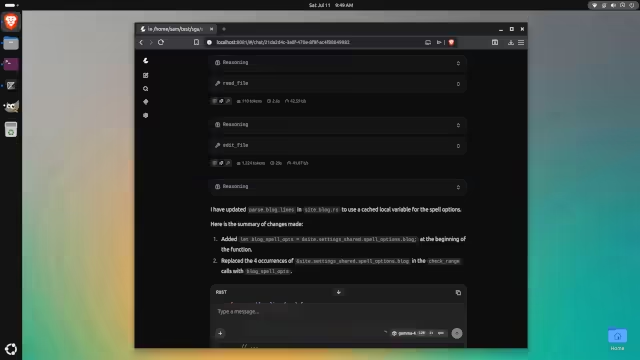
Unfortunately using programs like OpenCode with local LLMs and a mid-range Nvidia GPU can be rather slow. Over the past few days I have been experimenting with llama-cpp and its built-in tools (like edit file, read file).
llama-cpp Coding
It seems possible to replace a harness like OpenCode with llama-cpp and its built-in tools. This would reduce the large prompts used. Info about the project can be placed either directly in the prompt, or in a separate Markdown file that is referenced. Instructions for the current task are placed directly in the prompt.
In my experiments:
• I found that using llama-cpp alone is much faster due to reduced prompt sizes.
• If one avoids separate harness programs like OpenCode, system RAM usage is reduced, as OpenCode loads an entire JavaScript runtime.
• It can be somewhat less reliable, as the agent has to guess your intentions more often.
It is necessary to enable tools with the "tools all" argument in llama-cpp. Using separate files (like Markdown files) can be useful to avoid repeating information about your project in each prompt. This coding approach may be more viable for users with lower-powered systems (which is common).

 点赞
点赞 收藏
收藏 点踩
点踩 分享
分享