
Rhythm Stage Setup v5


I recently finished the largest set of changes I've made to my rhythm stage setup in 4.5y. The basic interface is similar, but I have a lot more flexibility, more control, more options, and it's easier to travel with. My favorite part is the speech recognition for calling chords.
I started off playing mandolin and piano, and then over the years added progressively more expressive footdrums. I added a breath controller. I built out a complex but expressive system where these different interfaces could interact to let me produce a coherent rhythm section. After a frustrating experience moving from one Mac to another and wanting to simplify, I moved from the Mac to a Raspberry Pi, set it all up as a pedalboard, and then again as a lighter pedalboard.
During the last year and a bit, however, I haven't been tinkering. It did what I wanted, in a reliable and portable fashion. And it was hard to modify: the pedalboard was static, and the Raspberry Pi code wasn't easy to get at either. Which was fine, and probably good for me! I just played a lot of gigs (23 Kingfisher, 3 Free Raisins, 3 Dandelion) and got better at it.
But then it started breaking. My whistle synth box didn't always come up, the drums sometimes needed an external DI, and a USB sound card snapped. Flying back from Atlanta my gear suffered rough enough treatment to bend a USB B connector, and it was clear my system needed some love.
I started with the most urgent portion: the whistle synth. I had Claude port it over to my laptop, where I turned it into a Mac app. This also let me add several more voices, and a mute option that never made loud clicks (I'm not really a hardware person).
This project made me realize that AI getting capable meant that the tradeoffs around laptop-vs-embedded had shifted. I could have everything on my laptop, and without needing to put painfully large amounts of time into programming it could all be fully defined in code instead of manually-configured GUIs. Having it on my laptop would make it easy to apply models to modify and improve it, and open up a lot more lexibility.
I decided to move as much as possible over to the laptop. This meant no more Raspberry Pi, whistle synth box, physical switches for signal routing, and computer code instead of guitar pedals. I moved from:

To:
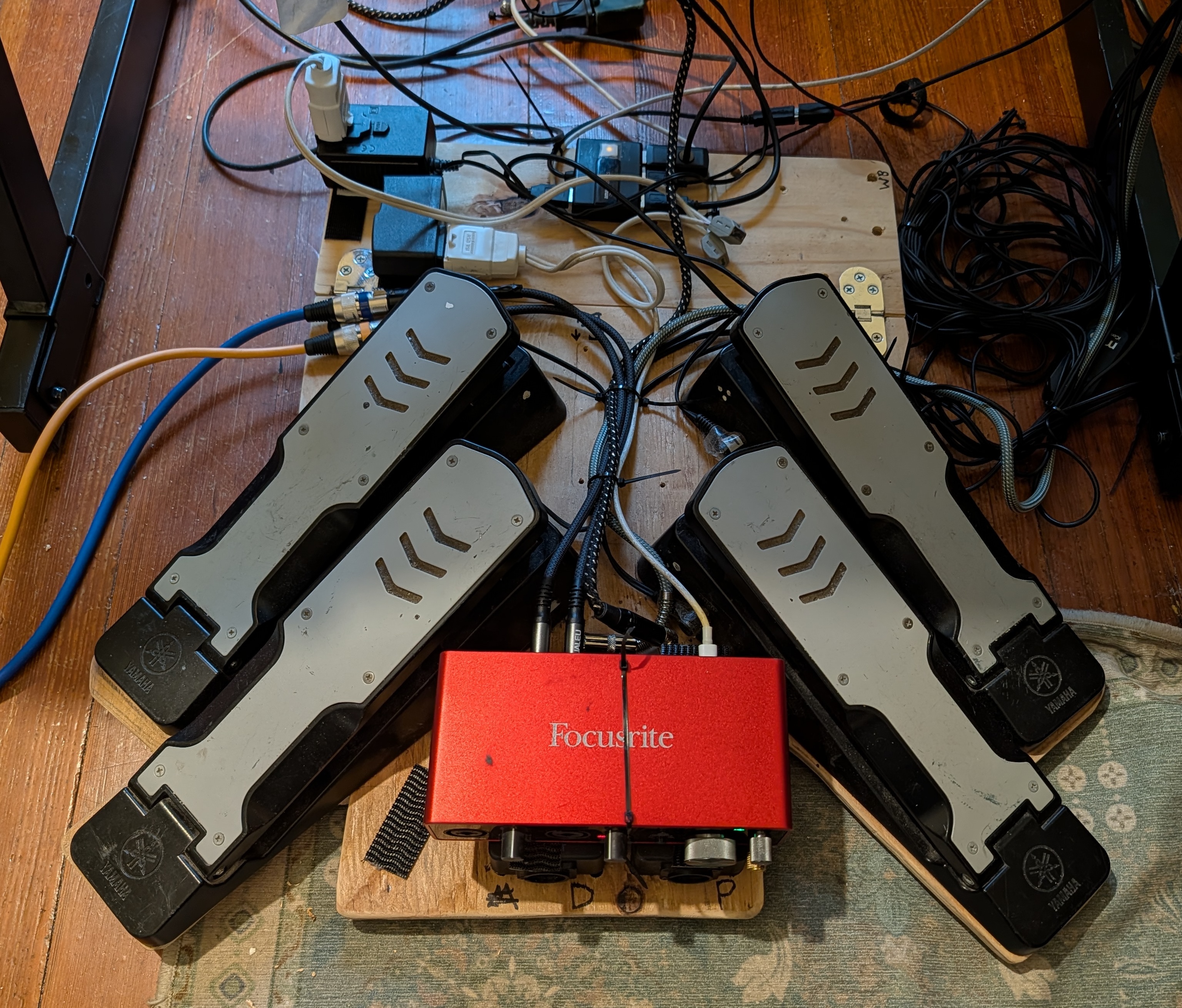
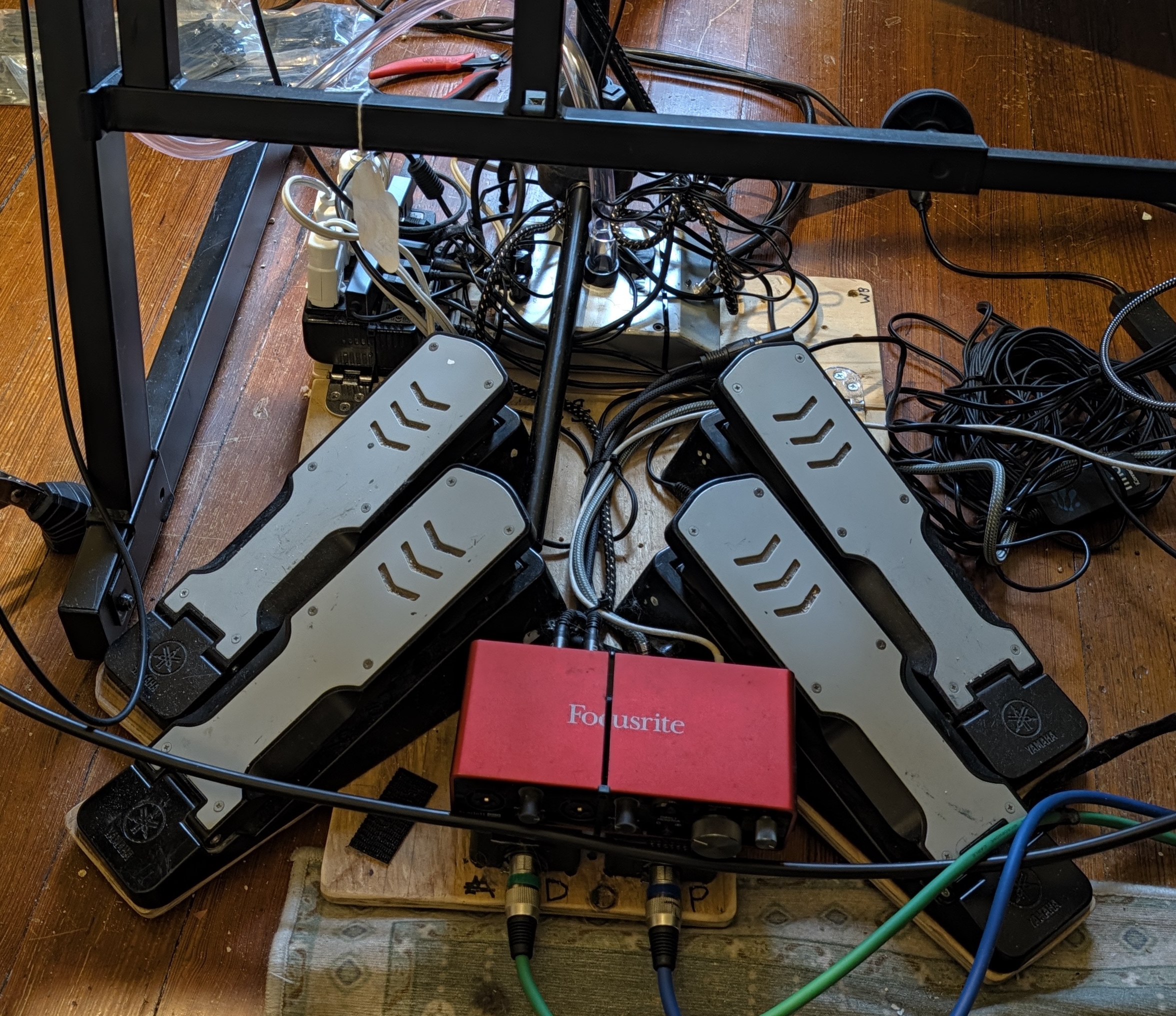
Four fewer pedals, three fewer DIs, two fewer power bricks, and no little computers. Saves ten pounds: 32lb to 22lb. The Mac weighs ~3.5lb, but I'm traveling with it regardless.
Of these savings, 3lb (2.7lb of talkbox + 0.3lb of power supply) was from giving up the talkbox. I liked how this simplified my setup, including less complex audio routing, but after playing Moondance both Cecilia and I really missed it. So I added it back:
A large benefit of moving to the Mac is I can now see what I'm doing. I control my rig with an external keyboard, covered in little labels that remind me what each key does:
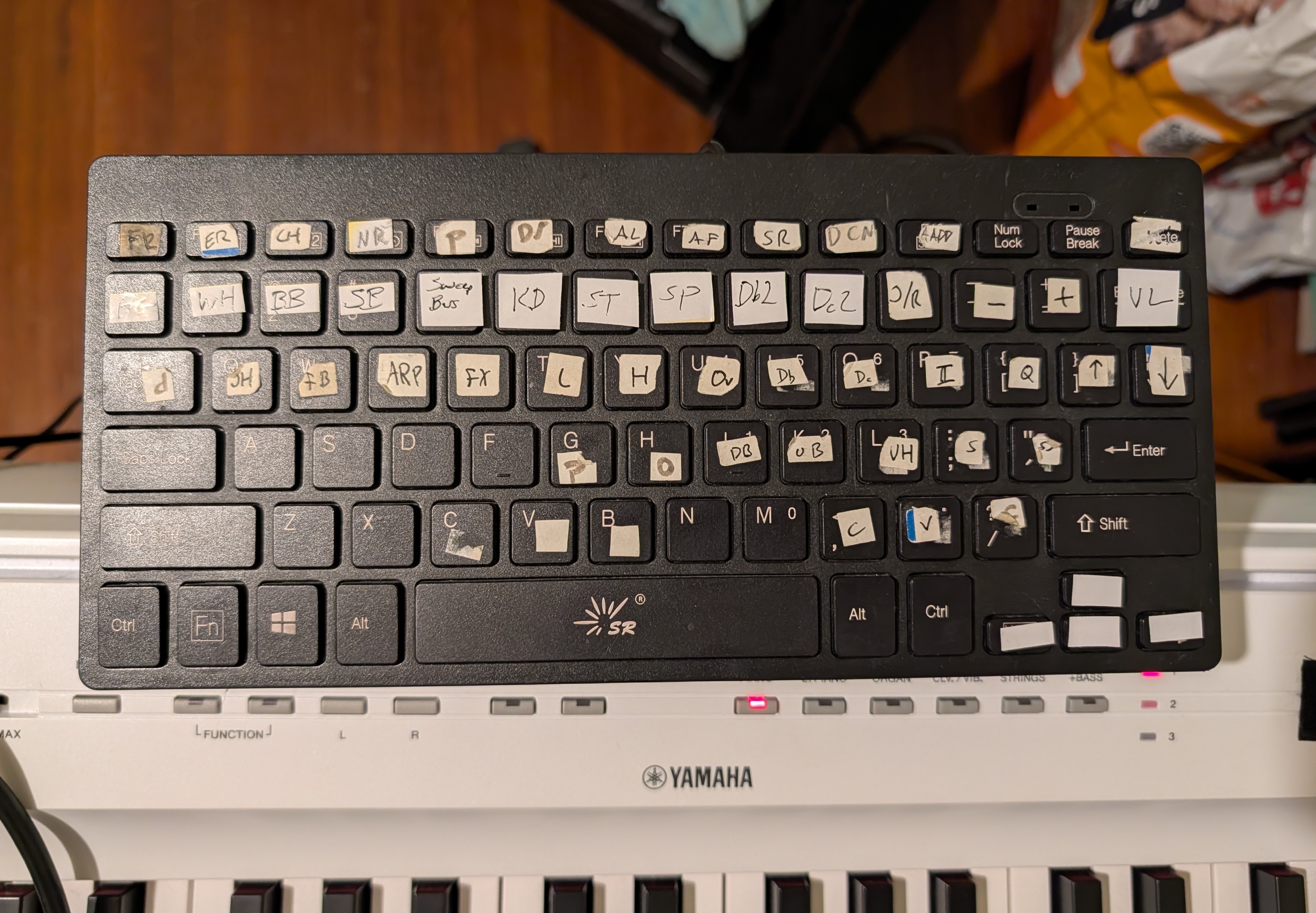
For example, before playing Trip to Moscow I would probably press FB (footbass), S (make footbass play synth bass), FX (breath-controlled keyboard overlay), set the drums to custom kit 63 (electronic kit), and then press L (keyboard velocity-insensitive bass overlay) and change the keyboard to epiano2 when we got all electronic. And press JH (breath-controlled bass-following low bass) at some point partway through for more ability to pulse the offbeat. Without a monitor, I needed to keep this all clear in my head, which was especially important since many settings are modal or interact. I usually didn't mess up, but partly because I tried not to dial in anything with too many presses.
Now I can just represent the state on my monitor:
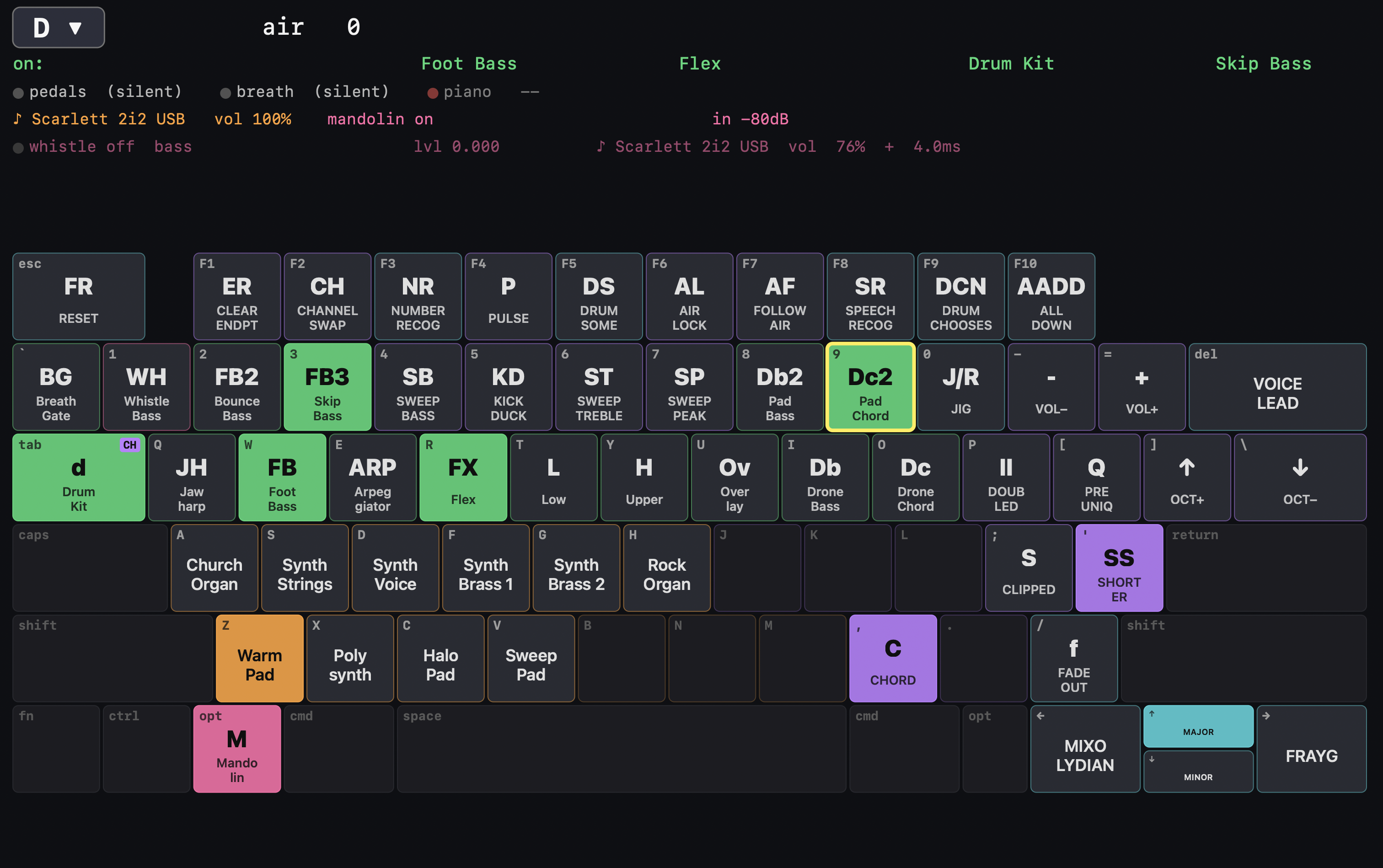
This is also very helpful for showing which voices apply to which instruments. Previously I needed to remember that on FX (breath-controlled overlay) the B key would give me a supersaw, while on Dc (chord drone) the B key was a different voice (I forget what). Now I can choose a set of voices for each instrument that are the ones that sound best with this kind of control, without worrying about how I'll remember which button gives me which sound.
This is basically all "what I had before, but easier to control". Which is good, but the real payoff comes from making it much easier to extend the system. I've done a lot here, with extensive help from Claude Code, and it's going to take me a bunch of time to learn how to play these new options well.
A big one is that because I now route my mandolin through the system I can replace pedals with code, add more effects than it was worth carrying pedals for, and write effects that consider what other things in the system are doing. This includes using the breath controller as an expression pedal, or tonal effects that care about the active chord. Demo video:
I also added speech recognition, where I can turn things on and off vocally, and even call chords. For chord calling I had Claude make me a custom speech recognizing system for the numbers one through seven (Nashville numbers) trained specifically on my voice and optimized for minimizing latency (decision in 40-170ms). It also runs Apple's in parallel, primarily to allow learning from mistakes but also to handle numbers the custom one misses and any non-number commands. Here's a video from earlier today, showing how I was still working to improve both my call timing and the code that triggers the changes; you can hear that many changes are off by a beat:
Here's a short updated video after a bunch of work this afternoon and evening to make number calling more reliable (af196263f). This involved adding a prior that chords run for a multiple of 2 beats on a grid implied by previous called chords, better word boundary identification, and a bunch of parameter tuning where I made recordings as I worked with it. I'm much happier with it now, and the two mis-timed changes in the video below are me calling early (0:59, 1:15):
I'm also trying to figure out new things I can do with the breath controller, and one thing I've been playing around with is percussion:
Other stuff:
- Vocal effects, including ones like a vocoder that care about the currently active chord. Not sure I like any of these enough yet to use live.
- Cecilia needs to hear my mandolin playing, but gets plenty of computer overlays in the monitor wash already. This was a problem with talkbox, which can be fed by either the mandolin or computer. Now that it's all running through my box, though, I can make talkbox go to the mandolin output channel if mandolin is included, and to the computer output channel otherwise.
- I auditioned and added a lot more voices. Including adjusting which voices are available for which instrument by replacing some that didn't work with that instrument's method of articulation. I don't know if any of them are worth it yet, though: I still mostly do the small number of things I like.
- I added French Canadian feet back into the system, after discarding them when I switched to the Raspberry Pi. They're no longer samples, but synthesized, which lets me use how hard I stomp or the breath controller to adjust how hard the hit is. I like these a lot, and used them live to good effect at the one gig I've done since this change.
- I also added a "stompy feet" option which is feet with a bassier kick, a "bare feet" option with sounds synthesized to imitate my own bare feet, and a "hand drums" option which was a Claude "happy accident" that sounded interesting enough to keep. I'm not sure I'd actually use either of the second two, though.
- When used stand-alone, the Focusrite 2i2 takes in a mic (whistle bass, calling chords) and mandolin and gives two channels (computer and mandolin + feet, though really it's "doesn't go to Cecilia's monitor" and "does go to Cecilia's monitor"). I've also added integration for my custom 1818VSL mixer, in which case you skip the 2i2, run the mic and mandolin into channels 1 and 2, and all my processing happens automatically before the mixer sees channels 1 and 2. Kind of an automatic effects loop.
- I added recording to the custom VSL mixer, including logging MIDI signals and keyboard presses so it's easier to evaluate later (or tweak if we wanted to turn recordings into another live CD).
- I'm toying with starting to run our own monitors by default with the VSL, since it has enough output channels to pass my normal outputs to the sound board and then also give a mix to each of us. I'd use XLR Y-cables on the other inputs so the board would also get a full copy of everything.
- Outputs can now be stereo, in case we wanted to switch to in-ear monitors. But I really like stage wedges for feeling connected to the dancers: being responsive to them in the moment is, to me, a big part of the appeal of playing live for dancing. And it would be a fourth thing connected to my head (after the mic, talkbox tube, and breath controller) making me even more borg.
- My keyboard (Yamaha P-121) includes USB audio support, and I already have it connected to my computer over USB for MIDI purposes. Using this stream avoids several lossy steps, and I've made the VSL mixer bring it on as an "input 9" when available. Sadly if I'm ever working with someone's P-125a keyboard, the "a" means that they dropped the USB audio feature.
- I added a bunch of features with technocontra in mind (kick ducks, pads, weird effects) but I don't think I like any of them even for technocontra. Not sure yet.
- I tried a version where whistling picks a chord, but didn't end up liking it at all.
- One cool thing about a whistle-controlled synthesizer and speech recognition is that I can do both of them at once on the same mic: they're very easy to tell apart.
- Overall, I'm still mostly playing live with only a small portion of the possibility space I've built for myself with this instrument. Some of this is that a lot of things that are possible turn out not to be very effective in a noisy dance hall, or just don't sound good anywhere. Some of this is that there are some very neat things that it's possible to do that I haven't practiced well enough to take advantage of. And some is that I just forget to try some things live.
- When I switch to pedals choosing bass instead of being drums it now switches to a preset that's a better fit for that, so I press one button ("DCN": drum chooses note) instead of several ("DCN", "FB", "D", "v", "+", "+", "+", oct up).
This post took me way too long to get out, both because I keep adding to the system and because I'd rather make demo videos once I'm good at controlling the system. Since that kept resulting in not publishing, I've lowered my threshold to get something out. I can always follow up as I do more, and several of the ideas above would have been better as their own posts.
The code is all on github if you or your agent would like to look:
- jammer: most of it
- whistle-synth: the whistle-controlled synth
- vsl1818: the custom mixing app