
How to Use AI for Rust Development: Lessons From an OpenAI Engineer
 1


“Some people use AI to write more code. I use AI to make my code more correct.” Predrag Gruevski’s pinned post sums up his approach to using AI for Rust development. Predrag works on frontier systems at OpenAI, and he created cargo-semver-checks and Trustfall. In his work, there’s very little room for error. Still, he does most of his engineering with AI in the loop, and his quality bar has gone up. But how?

We wanted to know what that looks like in practice, so we invited him to a RustRover livestream. His presentation was part of our AI & Rust livestream series with the Rust Foundation, which looks at real-world use cases, successes, and failures where Rust and AI meet. This post focuses on Predrag’s most practical advice: what to review, how to prompt AI coding agents, how to verify their work, and what to do when they get something wrong
You can watch the full livestream recording here 👇
Which Rust code deserves the most attention when you use AI?
Before you hand anything to an AI agent, sort the work by how much it would cost to get wrong. Not every line of code is equally important. Some lines deserve 1000 times more attention than others. When you typed every line yourself, 10 lines of unsafe Rust and 10 lines of regular code took about the same amount of time to write. Now AI handles the regular code, so you can move that time to the lines where mistakes are expensive.
Think of your code on a risk scale. At one end, a mistake is cheap to spot and fix. At the other, it can stay hidden for months and do real damage. Here are three points on that scale:
Low-stakes code. A GitHub Actions workflow is a good example. You know what it should do, and the agent has read the docs, so let it write the workflow and test it. If a CI bash script breaks and nothing security-related is at stake, ask the agent to fix it.
Logic that other people rely on. cargo-semver-checks catches breaking changes before they ship, and it now runs in Rust’s own CI. In the five years before it was added, it could have caught around half a dozen accidental breaking changes in Rust releases that forced backports. On the other hand, if its logic is wrong and it tells someone their change is breaking when it isn’t, that’s a very serious problem. So while preparing it for Rust’s CI, Predrag asked AI to construct standard library additions that would trigger false alarms. That scrutiny uncovered false alarms that could affect regular libraries, too. Code like this deserves much more of your time.
Unsafe code. A mistake here can mean memory unsafety, security issues, or a Heisenbug that shows up one time in a billion. That sounds rare until you run it in a data center. There, corrupting data 0.0000001% of the time means it happens all the time. In one real case, a problem of this sort was caused by a mere 20 lines in an unsafe block. This is the code worth reading line by line, or even writing manually. Four hours is a fair price to spend on 100 lines of unsafe code.
How do you prompt AI coding agents to write reliable Rust?
Describe what you want, how you want it done, and what “good enough” means. Don’t settle for “these ten lines of code, please”. A single task can use billions of tokens, producing far more code than you’ll ever read, so the engineering has to happen in the prompt. To write a good prompt, you need to do three things:
Sketch the design
Brief the agent the way you’d brief a very skilled, very diligent colleague who doesn’t have your context. At a whiteboard, you’d draw some boxes and arrows. You’d explain how the types work, which functions and fields you need, and what data goes where. Those are the load-bearing bits. Put them in the prompt and let the agent expand on them.
Do the same for tests. The variable names inside a test case matter much less than the test structure. Do the tests cover all the major cases? Does the right thing happen at the right point in time? Describe that structure in the prompt.
Say which assumptions are acceptable
If you tell a model to be thorough and test everything, you’ll get tests for a meteor strike during a power outage. For aircraft software, that’s the right level of care. For most code, it’s wasted effort. Tell the agent which assumptions are fine, and ask it to check whether a scenario could really happen.
Be precise
Rust questions often have conditional answers. Ask whether a particular change is breaking, and the accurate answer might be “yes, with six caveats”. It depends on whether the trait already existed, whether it was implemented on a type that already existed, whether the trait was sealed, and so on. Your prompts need the same degree of precision about what you want and what you don’t.
All of this takes time, and it pays off. To look for speedups in the Rust compiler and standard library, Predrag spent 45 minutes writing one prompt for Codex. It told the agent where to look: hot code nobody had optimized in a while. It said which changes to prefer: small ones that reuse ideas that already worked elsewhere in the project. And it said how to benchmark: interleaved runs, with at least a 1% improvement in geometric mean.
In one PR, Predrag deleted a single line in the new trait solver. The line recomputed something the code had already computed 40 lines earlier. Removing it made the new trait solver up to 7.5% faster. Once someone points that out, everyone agrees the line should go, but finding it took a lot of engineering and thought.
“It’s very easy to think of AI as just a faster horse. This is an example of it not being a faster horse. In principle, we could have done all of this work manually. It just would have taken five years to find these optimizations.”
Predrag Gruevski Software Engineer, Frontier Systems at OpenAI
How do you verify AI-generated Rust code?
Focus your review on the design and on how the code is tested. Once agents followed instructions reliably, reading every line no longer turned up issues for Predrag. So he moved on to higher-level questions. Is the API designed well? Are we testing it in all the right ways?
Why advanced testing is suddenly practical
Code coverage, branch coverage, mutation testing, and deterministic simulation were always available, but they took too much effort to use regularly. An agent that reliably follows a process changes that. Describe the process in the prompt, and the agent does the heavy lifting.
A verification process you can hand to an agent
Say you’re building a component with a state machine inside. Each step should catch something the previous one can miss:
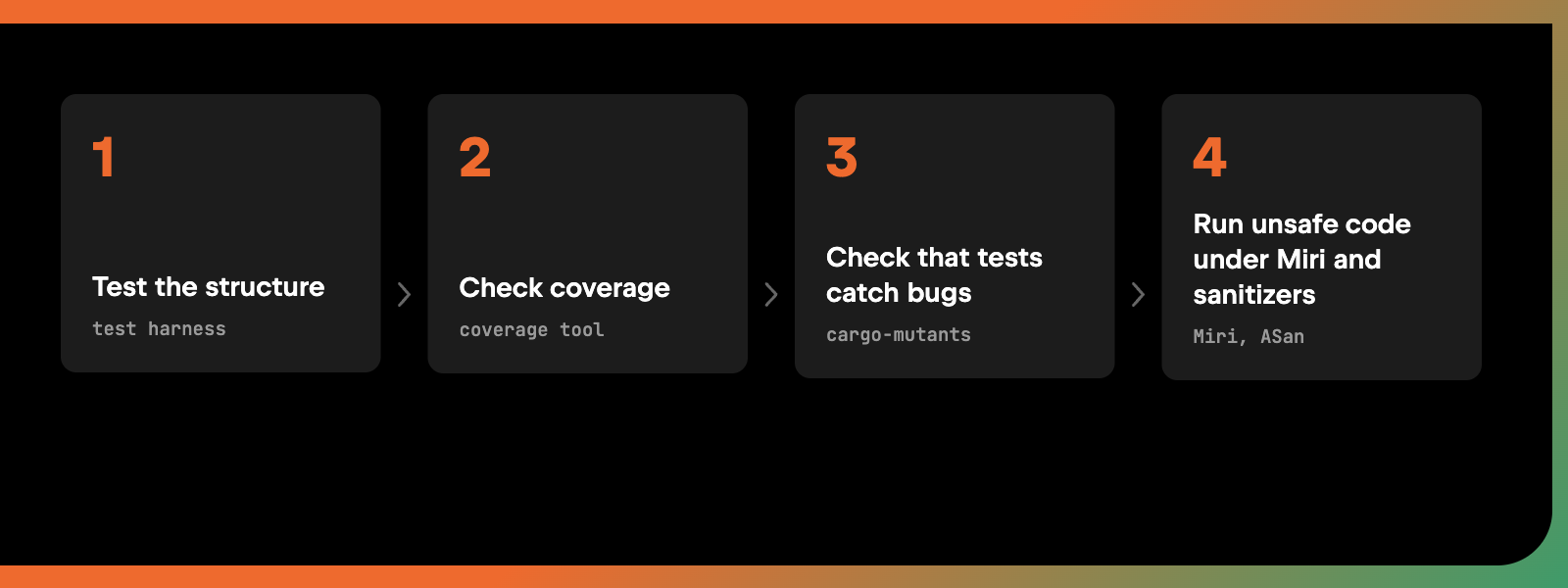
- Test the structure. A harness that tests every state and every transition shows that each one behaves correctly.
- Check coverage on the logic that matters. A coverage tool shows which code the tests execute. Make sure all the non-trivial logic is included.
- Check that the tests catch bugs. Simply executing a line doesn’t prove that the tests check what it does. cargo-mutants intentionally introduces bugs into your code and checks whether any test catches them. Each surviving mutant is a prompt to investigate whether the tests missed an important behavior. Add test cases until the code is pinned down in all the right places.
- Run unsafe code under Miri and sanitizers. Have the agent think through the important cases and test them under Miri and sanitizers like ASan. These tools work alongside the careful review of the safety invariants, which still deserve your full attention.
As a prompt, the process can look like this:
This component has a state machine inside. The states are  and the transitions are . Write a harness that tests every state and every transition and checks that the right thing happens.
Run a coverage tool and make sure the tests execute all non-trivial logic. Panic branches on .unwrap() for illegal input don't need tests. Run cargo-mutants. For each surviving mutant, check whether the tests miss an important behavior, and add test cases where they do.
For any unsafe code, think through the important cases, write tests for them, and run those tests under Miri and ASan. I'll review the safety invariants myself.
What should you do when an AI agent gets it wrong?
Sooner or later, an agent will hand you a result you don’t like. Approach the problem with empathy. Work out why the agent decided on the approach it took and what it would have needed to know to decide differently. If you can’t tell, ask it.
Then put the answer into your setup. If the agent keeps testing unrealistic failures, like that meteor strike, add a line to your agent’s instructions file (such as AGENTS.md). Tell it to make pragmatic assumptions about real-world failures. You can also update your personalization prompt or tweak your skills. Next time, the agent should make a better call.
Nobody is born good at using AI tools. Getting good can take many billions of tokens, and we’re all still learning.
How do you know AI-generated code is good enough to ship?
That depends on what you’re building. Vibe coding is perfectly reasonable for tasks like prototyping, where you just want to know whether an approach works at all, and it’s also fine in apps you build for yourself. If the thing that turns on your lights at 7 pm breaks, it breaks. Vibe coding is fine there.
Production code needs a higher standard. Use AI to reach a level you couldn’t hit alone.
To get there, work backward. Think about how you’d convince someone else that what you built is good, even someone who doesn’t know your domain. For work on the Rust compiler, proof meant a few lines of code, faster benchmarks, a passing test suite, and a change anyone can read and understand. Once you know what proof looks like, set up your workflow to produce it. Pretty quickly, you’ll realize that the person you’re convincing could be you.
Every piece of code you push has your signature on it. It literally comes from your Git client. Use AI to make sure it’s code you’d be proud to put out in the world.
Want more? Watch the full conversation above. For the other side of Rust and AI, read our post on building LLM applications with Rig.
Is AI useful for Rust development?
Yes, especially when you use it to raise your quality bar rather than only to write more code. Agents make it practical to run techniques that used to take too much effort, such as mutation testing, full state-machine coverage, and checking unsafe code under Miri. They can also dig through Git history to find hot code nobody has optimized in a while.
Do you need to read every line of AI-generated Rust code?
No. Match the review to the risk. For low-stakes code like a CI script, testing that it works is usually enough. Logic other people rely on deserves much more of your time, and unsafe Rust is worth reading line by line or writing by hand.
Can AI coding agents write unsafe Rust?
They can, but unsafe Rust needs the most care of any code you work on. Have the agent think through the important cases and test them under Miri and sanitizers like ASan, and review the safety invariants yourself.