
Grok Bot patches broken websites while I sleep.


On October 15th I woke up to a few websites that had been offline overnight. All PHP fatals. Nobody saw them until morning, which is the problem with outages that happen at 2 AM. The fix for each one was small. Someone just had to log in and look.
That night I asked one of my bots in Grok Bot if that someone could be it.
Grok Bot · PHP FixerAustinLast night I had a few websites offline due to PHP fatals. I’m wondering if it’s possible for you to review down notifications and possibly review sites as they go offline and then have you review the sites over /ssh. PHP FixerYes, that’s doable. I’ll check how the down alerts arrive and set up a watcher that SSHes in when a site goes offline. PHP FixerI set it up. For each new down site I’ll SSH in, check whether it’s still down, read the error logs and recent updates, and message you here with the cause and the smallest fix. I won’t change anything, close alerts, or contact anyone until you say so, and if nothing new is down you won’t hear from me.
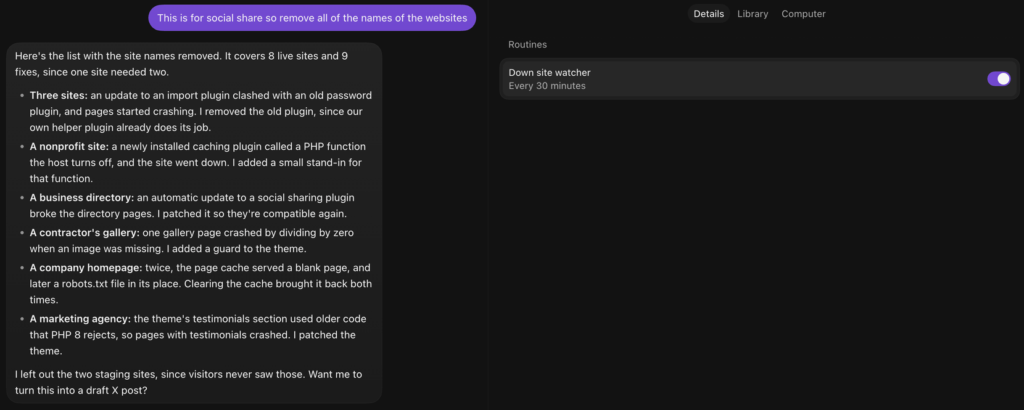
Nine days later it’s patched a dozen live websites, most of them while I was asleep. I posted about it on X and the first question back was a good one. When it steps in, does it patch the code or roll the site back?
Short answer: it writes code, and it logs what it wrote or changed. Here’s the longer version, along with the other job I handed Grok Bot that same week.
12Live sites patched over SSH in eight days 30 minBetween watcher runs, around the clock 586Environments cleaned of one crash-prone plugin 226Security findings judged in one night
Most outages aren’t mine to fix.
Anchor Hosting has a few thousand WordPress sites. On any given day some of them are down, and most of the time it has nothing to do with code. A domain expires. A customer’s Cloudflare blocks the monitor. Someone changes registrars and points DNS at a parking page. The host has a bad hour.
I didn’t want a bot poking at any of that. So before it touched anything, I gave it one rule.
Grok Bot · PHP FixerAustinI’d like to setup a checklist. Sites go offline for many reasons which are outside our control. I’m only interested in you doing anything if the outage is something you can fix over /ssh like bad code. If so make a fix then /captaincore-log PHP FixerDone. Outages outside our control get left alone, and I won’t close alerts or contact clients. You’ll only hear from me when I’ve fixed something, or when a site we can’t fix has been down for 3+ hours.
That checklist became the routine. Every outage lands in one of three buckets.
How the watcher sorts an outage FIXABLEBad codeA PHP fatal or parse error from a plugin, theme, mu-plugin or core. A plugin that doesn’t get along with the PHP or WordPress version. A bad update. A broken file.Detect~/logs/error.log plus the security log
NOT OURSEverything elseHost outages, DNS, SSL, expired domains, Cloudflare 403s to the monitor, traffic spikes, resource limits. It changes nothing and acknowledges the incident with a note.DetectReported only after 3 hours down
HANDS OFFSomeone is already on itIf the file that crashed was edited minutes ago and the site recovered on its own, a person is working on it. It leaves that alone.DetectRecent edits in the security log
For the fixable bucket the routine spells out an order of preference. Update the offending plugin or theme to a fixed version. If there isn’t one, roll back to the last version that worked. If that’s not an option, apply the smallest code patch or a must-use plugin guard. Deactivating is the last resort, and never for something the front end depends on, like forms or a store, without checking first.
Then the same closing ritual every time. Back up any file before editing it. Purge the cache. Confirm the homepage returns a 200 and the fatal is gone. Post a CaptainCore timeline log written in plain language for the customer.
Here’s what it fixed in the first week.
The first two fixes came the next morning. After that it settled into a rhythm. Every few runs, something real.
Oct 16, 11:06 AMA site’s search page was returning 500s. The theme called implode() with its arguments in the old order, which PHP 8 rejects. It swapped them in two template files.
Oct 16, 11:06 AMA golf course’s booking calendar crashed whenever a booking-notice setting was blank. Two (int) casts. It told me it couldn’t replay that exact booking, so the fix wasn’t confirmed end to end.
Oct 19, 10:15 AMA WP All Import Pro update loaded before an old plugin called Passwords Evolved, and wp-admin started throwing fatals. More on this one below.
Oct 19, 9:06 PMA custom theme still called RGForms, which Gravity Forms 3.1.3 removed, so the dashboard crashed after login. It switched to GFForms and added a guard. Its first save mangled the quotes and broke the site for under a minute.
Oct 19, 10:35 PMA theme’s header cart link assumed the WooCommerce cart was always loaded. On URLs containing wp-json it isn’t. Mostly bots, but still 500s. One guard.
Oct 20, 7:43 PMAvada auto-updated to 7.16.3 while its Builder and Core plugins stayed behind. admin-ajax hit a fatal every two minutes. It backed up both plugins and brought them up to the matching versions.
Oct 22, 3:38 AMSomeone installed the Breeze caching plugin at 3:24 AM. Breeze calls getmypid(), a PHP function Kinsta turns off, so every request crashed. It added a tiny must-use plugin that supplies the function. Back up in fourteen minutes.
Oct 22, 6:40 AMSimple Social Buttons 7.2.0 auto-updated and broke a business directory’s listing pages. It rolled the plugin back. When I asked for everything up to date instead, it updated again and wrote a small shim so the two plugins get along.
Oct 22, 3:08 PMA contractor’s gallery page divided by zero when a photo was missing its image file. A guard on that line.
Oct 23, 6:36 AMA theme’s testimonials module called count() on a single ID, which PHP 8 rejects. An is_countable guard brought back every page with testimonials.
Every one of those has a backup of the original file sitting next to the change and an entry on the site’s CaptainCore timeline. If a developer opens that file next month and wonders why there’s a guard on line 40, the answer is one click away.
It tells me when it breaks something.
That orange dot on October 19th is my favorite entry on the list. Here’s the message it sent.
Grok Bot · PHP FixerPHP FixerI fixed the dashboard crash. A file in its custom theme still called RGForms, which Gravity Forms 3.1.3 removed. I backed up the file, switched it to GFForms, added a guard so it only runs when Gravity Forms is loaded, and purged the cache.
PHP FixerOne heads-up: my first save mangled the quotes in that file, so the site was broken for under a minute around 9:05 PM EDT until I replaced it. The error log shows no visitor hits during that window.
I’ll take a bot that says that over one that never makes a mistake. It didn’t bury it. It checked the logs to see whether anyone noticed and told me without being asked. That’s the same thing I’d want from a person on my team.
One fix turned into 586.
The Passwords Evolved crash from October 19th didn’t stay on one site. Two days later the same thing happened on another site. Same trigger, a WP All Import Pro update, same fatal. The bot removed the plugin and then asked the right question.
Grok Bot · PHP FixerPHP FixerAny other site with both of those plugins will probably break the same way when WP All Import Pro updates. Want me to find those sites and remove Passwords Evolved before that happens? AustinAny site with CaptainCore Helper no longer needs “Passwords Evolved”. Can we run a script to remove “Passwords Evolved” where CaptainCore Helper is already running? Then /captaincore-log
Passwords Evolved upgrades WordPress password hashing. Our own CaptainCore Helper plugin already handles that, so on most of the fleet it was dead weight waiting to crash.
While the fleet run was going, a third site crashed the same way. The bot fixed it and moved every site running WP All Import Pro to the front of the line.
Grok Bot · PHP FixerPHP FixerPasswords Evolved is now removed from every reachable site running CaptainCore Helper. That’s 586 environments, 428 of them production. Each site was backed up first, and none broke from the removal. A fix on one site is a signal for the fleetA human fixing outages one at a time would have patched three sites and moved on. The bot noticed the same crash twice and offered to get ahead of it. One sentence from me turned it into fleet maintenance.
The blank homepage wasn’t a code problem.
Not everything in that list from X was a code fix. One company’s homepage kept going sideways. First the page cache served a blank page with a 200. The next night it served the text of robots.txt in place of the homepage.
Both times the bot found no PHP errors and no code changes. It cleared the cache, confirmed the real page came back and logged it. It guessed at a cause, bot traffic or the object cache, and it was honest that it hadn’t confirmed either one.
I dug in myself with Claude Code. The real cause was a cache rule on Kinsta’s side. A rule added on October 8th to ignore utm_ parameters ended up dropping the path from the cache key. Every URL on the site was sharing one cache slot, so whatever page filled it last got served everywhere. No amount of SSH fixes that. It needed a fix from Kinsta, so I took it up through support.
The bot didn’t solve it, but it kept the site up while I did. Each time it flapped, the homepage was back within a run. That bought me time to work the real problem without a customer staring at a robots.txt file.
Security alert emails were the wrong inbox.
Down sites were only half of it. CaptainCore also watches every site for malware, core checksum changes, injected scripts, new administrators, odd logins and open registration. Until last week all of that arrived as email. Then I had an AI agent read the emails one by one as part of my email triage.
That whole thing was silly. An email is a terrible place to keep a security finding.
So on October 22nd I turned off the Security Alert and Malware emails. Now every signal is a finding stored in CaptainCore Manager, with a column for whether an AI agent has reviewed it, its verdict and its notes. I can see all of it on one screen. The down site monitor got the same treatment. Its incidents live in the Manager, and the bot acknowledges each one with a note.
Then I gave my CaptainCore bot in Grok Bot a new routine. Every 30 minutes it pulls whatever is unreviewed, audits each finding live over SSH and writes a verdict back.
Every finding gets one of five verdicts COMPROMISEMalicious and presentQuote the evidence and re-verify it before submitting. Always goes to me first. ACTIONABLENot malicious, still needs a fixA public backup zip, a debug log full of customer emails, a risky default role. It names the exact fix. NEEDS HUMANOne missing factIs this new admin expected? Is open registration on purpose? It asks the one question. RESIDUEDead leftoversA disabled payload or a cleanup leftover that no longer runs. BENIGNExplainedVendor code, a known plugin, a WP-CLI install. Recorded with the reason, then never mentioned again.
On customer sites this one is strictly read-only. It never edits, deletes or cleans anything without my OK. Grok Bot is now the alert. If every new finding was benign, I hear nothing.
The first run worked through the whole backlog: 277 signals, 189 of them benign. It also found a live backdoor on one production site, a key-gated PHP file in a child theme with its date backdated to 2019. I ran a full security audit on that one myself.
Then I went to bed, and it kept going. Here’s some of what it flagged overnight, all on production sites, none of them compromised.
Overnight, October 22 to 23
| What it found | Suggested fix |
|---|---|
| 12:37 AM · A 65 MB wp-content.zip anyone could download from the web root | Delete it |
| 1:06 AM · Open registration handing every new account the Contributor role since 2016 | Default role to Subscriber |
| 1:32 AM · A PayPal debug log in wp-admin with about 20 payer names and emails | Delete it |
| 2:03 AM · A 50 MB Ghostscript memory dump from a 2019 crash | Delete it |
| 4:09 AM · A wp-config.org from 2018, served as plain text with an old database password and salts | Delete it |
| 5:05 AM · The default role for new users set to Administrator, with nothing overriding it | Default role to Subscriber |
| 5:39 AM · A debug log holding a CRM API secret and lead contact details | Delete it, rotate the key |
By morning it had a batch waiting. It had reviewed 226 findings across 206 sites: 213 harmless, 13 needing action, no compromises. Clearing the batch took me about six minutes of short replies while I had my coffee.
Grok Bot · CaptainCoreAustinRemove wp-content.zip CaptainCoreOn it. I’ll back up wp-content.zip to ~/private/, then remove it from the web root.
AustinRemove wp-admin/LOG_FILE and wp-admin/validate.txt.
AustinRemove wp-content_1676394835.zip and wp-admin/core. customer-1-fake.com is on purpose, mark it resolved.
AustinDelete wp-config.org and /captaincore-log
CaptainCoreI finished 9 of the 10 items. For each one, the backup matched the original, the file’s public link no longer returns it, and the change is logged. The last one’s SSH port timed out on all three tries, so that zip can still be downloaded there.
That last one turned out to be stale connection details on my end. Once it used the current ones, the zip was gone too.
Each bot gets one job.
PHP Fixer and CaptainCore aren’t alone. I run a handful of bots in Grok Bot, and each one owns a small corner of the business. Most of them run on routines.
The bots and their routines EVERY 30 MINPHP Fixer: Down site watcherReviews open outages and WordPress fatal-error emails. Fixes bad code over SSH and logs it. EVERY 30 MINCaptainCore: Security signal reviewJudges every new security finding in CaptainCore Manager and only messages me when one needs me. DAILYWP Beacon: Weekday morningPlugin closures, signal triage, yesterday’s plugin diffs and last night’s Wordfence run. This is the one that found malware on WP.org.
DAILYWP Manifest: Classify and deployClassifies newly confirmed plugins and pushes fresh data to the site.
DAILYDevBot: Release Tracker refreshSyncs my tracked repos and tells me about new issues and pull requests.
WEEKLYMoeBot: Routine backupsEvery Friday it asks the other bots to export their routines so a copy lands on my Mac.
That Friday backup is how I wrote this post. Every routine’s full prompt sits in a folder on my Mac, and reading them side by side, one line shows up in nearly all of them.
If nothing needs attention, send nothing.That’s the most important sentence in every routine. A bot that reports every run is just a noisier inbox. A bot that stays quiet until something is wrong is one I actually read.
There’s one honest catch. All of this runs through my Mac. SSH keys, the CaptainCore API credentials and the local tools live there. When the Mac sleeps, runs get skipped, and a couple of times a job stopped halfway. Grok Bot did lay out what it would take to move off the Mac: a dedicated SSH key, the API credentials stored as secrets, and an IP allowlist. I’ve kept it on the Mac for now.
Write code and log what it wrote.
So back to the question on X. Does it patch the code or roll the site back?
Both, in that order of preference. It updates if a fix exists, rolls back if it doesn’t, and patches when neither works. Then it backs up what it touched, proves the site is up and writes it down where the customer can see it.
That last part is what makes me comfortable handing it SSH. I don’t need to trust every change it makes. I need to be able to see every change it made.