
DataGrip and Database Tools User Experience Survey #3 Results
 1


Introduction
Hello, DataGrip community!
We’re back with the results of our third DataGrip and Database Tools User Experience Survey.
A big thank you to everyone who took the time to participate! This year, 1,420 people shared their experiences with DataGrip and the built-in database tools in other JetBrains IDEs.
As with our first and second survey, our goal is to understand what works well, what causes frustration, and where we should focus our efforts to improve your experience.
In this post, we’ll share the key findings, from overall satisfaction and day-to-day usability to performance, reliability, database support, and AI-powered features. We’ll also compare the results with previous surveys where meaningful, taking into account differences in the questions and the respondent demographics.
Finally, we’ll look at what your feedback means for our priorities and the improvements we’re working on.
About you
The first part of the survey focused on who you are, which tools you use, and what your daily database work looks like. This helps us better understand your needs and put the survey findings into context.
Role
Software developers and engineers continue to represent the largest group of respondents, accounting for 70% of participants. Other roles include software architects (6%), team leads and engineering managers (5%), and data engineers (4%).
Experience
Our respondents are an experienced group: 74% have more than five years of experience in their primary role, and half (50%) have over ten years.
When it comes to JetBrains database tools specifically, 37% have been using them for 3–5 years, 25% for 6–10 years, and 8% for more than ten years.
DataGrip and built-in database tools
One of the most notable shifts from the previous survey is how respondents are distributed across our products:
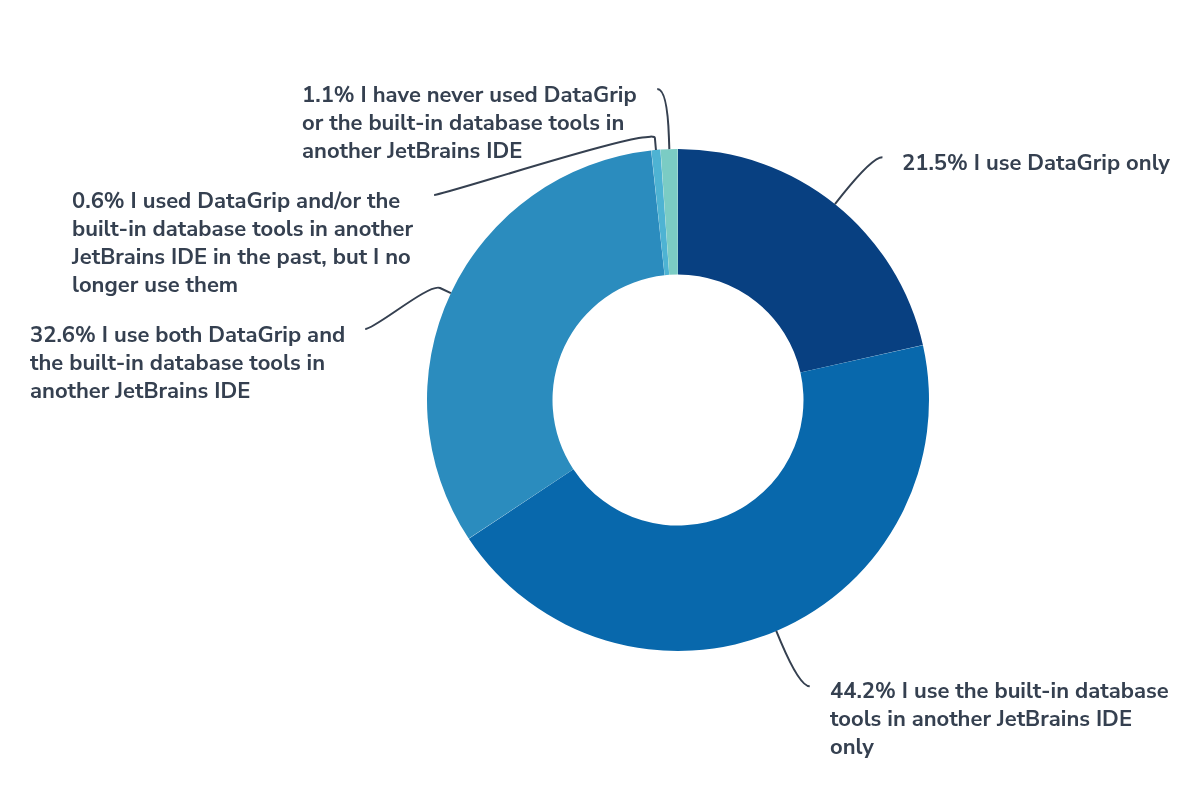
- 44% use only the built-in database tools in other JetBrains IDEs.
- 33% use both DataGrip and the built-in database tools.
- 22% use DataGrip exclusively.
In the second survey, only about 5% of respondents used the built-in database tools exclusively, compared with 44% this time. This difference is likely due to how we promoted the survey. This year, we used in-product notifications across all JetBrains products with database features in addition to the other channels.
Keep this demographic change in mind when comparing satisfaction results with previous years.
Tech stack
PostgreSQL remains the most widely used database among respondents at 77%, followed by MySQL (42%), SQLite (28%), and Microsoft SQL Server (26%).
Other commonly used databases include MariaDB (24%), Oracle Database (23%), Redis (23%), and MongoDB (19%).
Daily routine
We also asked respondents which database-related tasks they had performed over the past month. Here’s what they reported:
- 95% wrote, edited, or executed SQL queries.
- 95% browsed databases, schemas, tables, or other database objects.
- 87% created or configured database connections.
- 86% viewed or edited table data.
- 72% exported data to files.
- 71% created or modified database objects using SQL.
Other common activities include importing data (46%), investigating or optimizing query performance (45%), and comparing table data or query results (34%).
Team size
Most respondents work in relatively small teams: 62% belong to teams of 2–10 people, 15% work in teams of 11–20, and 10% work on their own.
In short, our typical respondent is an experienced developer working in a small team, relying on DataGrip or the built-in database tools in other JetBrains IDEs for a broad range of day-to-day tasks.
Overall satisfaction
As in previous surveys, we measured overall satisfaction using the Customer Satisfaction Score (CSAT) – the percentage of respondents who rated their experience as “Satisfied” or “Very satisfied”.
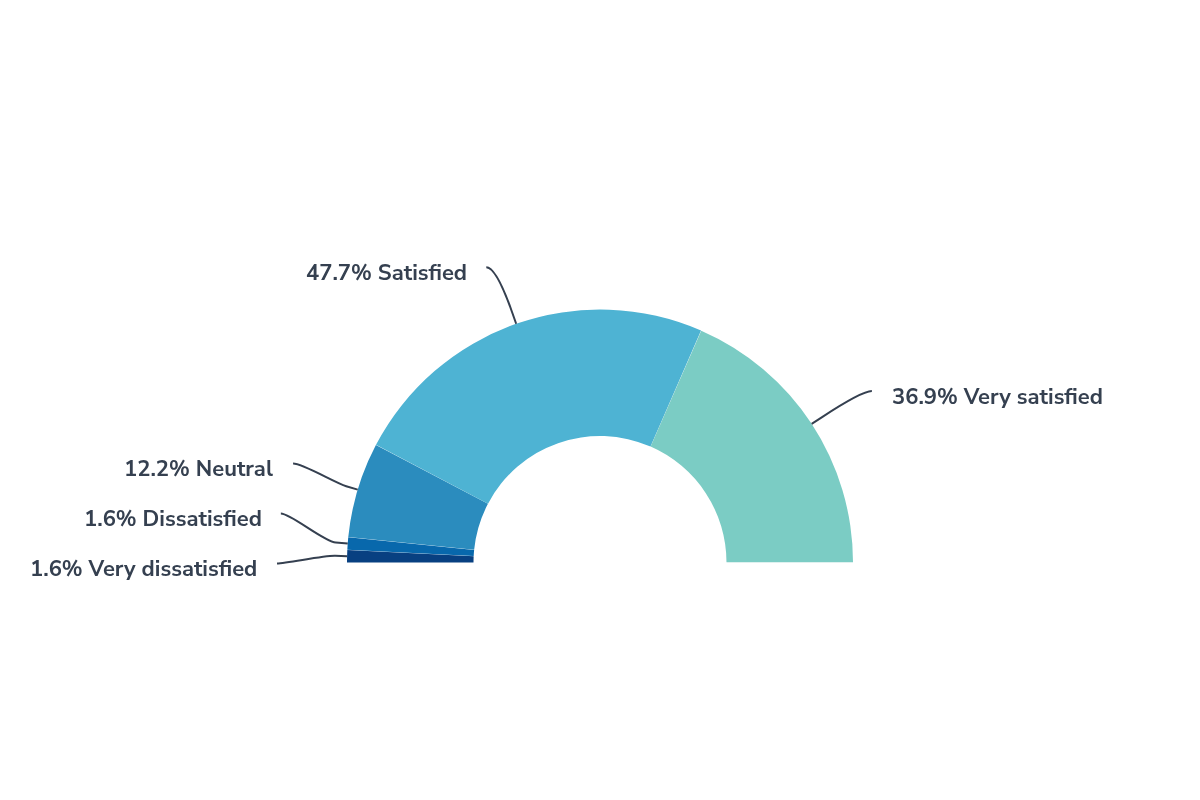
This year, 84.7% of respondents were satisfied or very satisfied with DataGrip and the built-in database tools. That’s slightly lower than the 87.5% recorded in our second survey and 90% in the first.
However, this year’s survey reached a broader audience through in-product notifications in all JetBrains products with database features. To better understand the shift in satisfaction , we compared the CSAT scores across different user groups:
Satisfaction among DataGrip-only users (87.9%) and hybrid users (87.0%) remains high and consistent, while users of the built-in tools exclusively report somewhat lower satisfaction (81.4%). Since built-in-tools-only users make up a much larger share of respondents this year, this difference accounts for the slight drop in the overall CSAT.
Now, let’s look at satisfaction with individual aspects of DataGrip and the built-in database tools.
Experience with specific areas
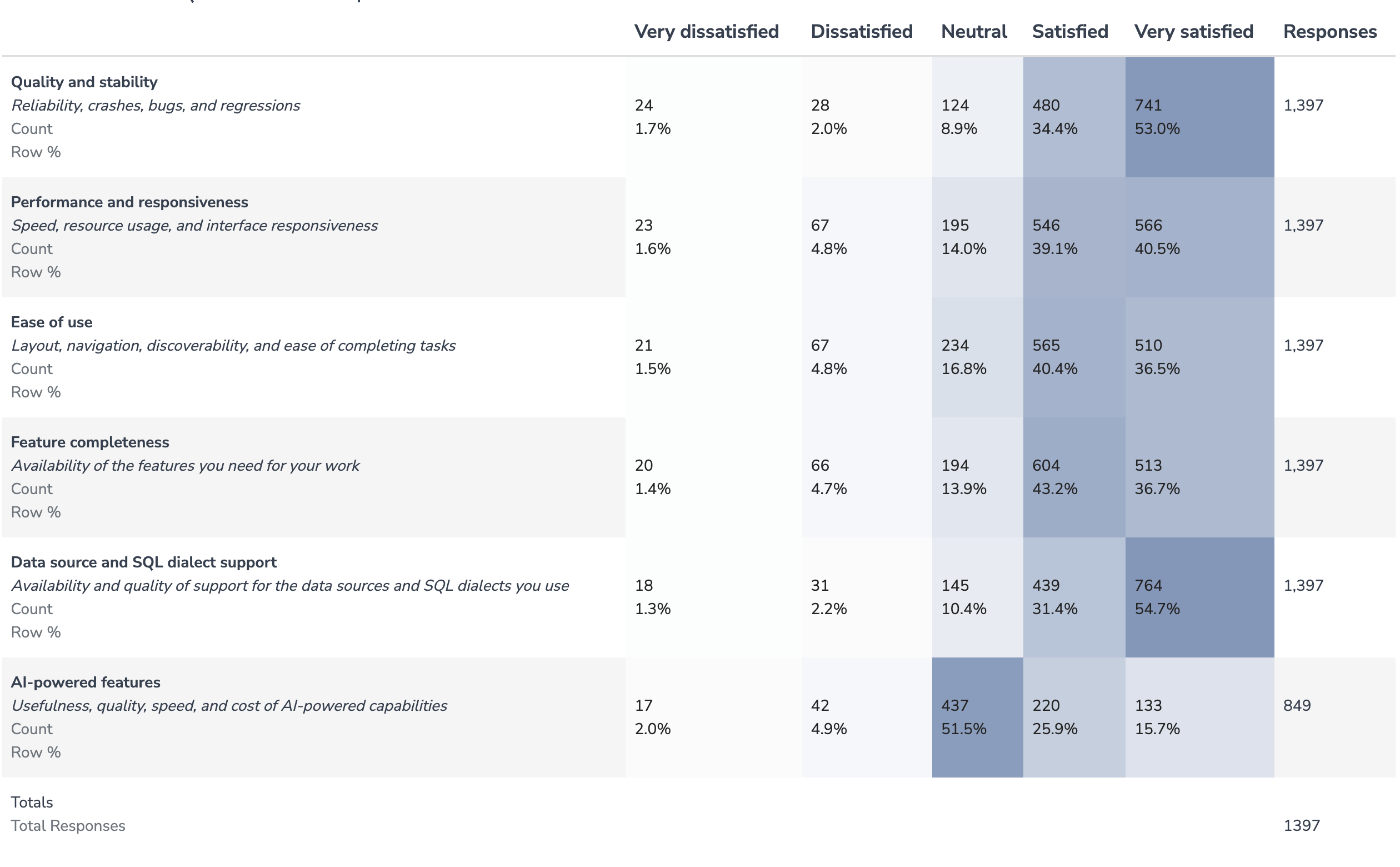
As in previous surveys, we asked you to rate your experience with different specific aspects of DataGrip and the built-in database tools. Here’s how the CSAT scores compare with our second survey:
For quality, performance, and ease of use, we also asked respondents who gave neutral or negative ratings to identify the areas needing the most improvement.
Quality and stability
87.5% of respondents were satisfied with quality and stability.
Among the 175 respondents who rated this aspect neutral or lower, the top areas flagged for improvement were:
- Database Explorer (33%)
- Code editor (33%)
- Code assistance (30%)
Even when issues affect only a small percentage of users, we take them seriously. If you encounter a bug or regression, please report it on our public YouTrack server to help us investigate and prioritize problems.
Performance and responsiveness
Performance received a 79.7% CSAT.
Schema introspection remains the biggest concern. Among the 284 respondents who rated performance neutral or lower, 44% pointed to introspection. Other reported concerns included overall resource usage (24%), IDE freezes (23%), and query execution speed and general UI responsiveness (22% each).
We’re continuing to profile and optimize performance closely. If you encounter slowdowns, freezes, or excessive resource usage, please follow our guide to reporting performance issues. Detailed snapshots and logs help us investigate and resolve problems much faster.
Useful tips to speed up performance:
- Adjust introspection levels: Lower levels load less metadata and can significantly reduce introspection time.
- Deselect unused schemas or databases: Limiting introspection strictly to active databases and schemas eliminates unnecessary background processing.
- Keep DataGrip updated: Every release brings targeted performance improvements and fixes.
Ease of use
With a 77.0% CSAT, ease of use remains the lowest-rated aspect.
Among the 321 respondents who rated it neutral or lower, 48% cited feature discoverability as an issue. Navigation and layout were each selected by 36%, followed by workflow efficiency at 35%.
We’ve delivered several usability improvements in recent releases:
- DataGrip 2026.1 introduced a new workflow for query files, offering more flexibility in organizing your queries and consoles.
- DataGrip 2026.2 added bundled JDBC drivers, an interactive onboarding tour, and a redesigned empty state in Database Explorer to make getting started easier. We also revamped database colors, added schema object grouping by prefix, and introduced customizable query console names in editor tabs.
- Upcoming in v2026.3: We’re actively developing a dedicated Output tool window to replace Services with a database-first interface. It will provide more space for working with result sets and let you open them in editor tabs. You can already play with these features and other improvements in our Early Access Program (EAP).
Useful tip: Try Find Action (⇧⌘A on macOS or Ctrl+Shift+A on Windows/Linux) to quickly find settings, tools, and actions without digging through menus.
Feature completeness
Feature completeness received an 80.0% CSAT.
Your feedback highlighted the need for more flexible import/export pipelines, better schema comparison and migration tools, and richer data-editing utilities.
The DataGrip team listens to your feedback and adapts to your evolving needs, continuously improving workflows and adding new features. Here are some of the improvements we’ve introduced in recent releases:
- Data source templates: Easily reuse database connection settings across JetBrains IDEs.
- SQL expressions in the data editor: Evaluate database functions and custom expressions directly when editing cell values.
- Two-session mode: Keep database introspection separate from active query execution and other database operations, preventing background metadata refreshes from locking query sessions.
You can explore these and many other improvements on our What’s New page.
There’s more on the way! Our Early Access Program includes a new Workspace data source that lets you run queries across multiple data sources, along with other improvements.
If a feature is missing from your workflow, please submit a feature request or vote for an existing one on YouTrack.
Data source and SQL dialect support
86.2% of respondents were satisfied with data source and SQL dialect support, making it one of the highest-rated product areas.
Your feedback centered on demand for deeper support in existing databases, including Oracle, MongoDB, Redis, ClickHouse, and Databricks.
We’ve also made progress in this area:
- DataGrip 2026.2 brought improved SQL support for ClickHouse and Snowflake, including additional statements, functions, and syntax recognition.
- DataGrip 2026.1 added support for PostgreSQL 18.
- Our current Early Access Program includes DuckDB support and improved MariaDB support.
If there’s a database you’d like us to add or improve support for, please vote for existing requests or submit a new one on YouTrack.
AI-powered features and database workflows
This year, we expanded the survey to better understand how you use AI-powered tools, both within and outside JetBrains IDEs, particularly for database-related tasks.
AI adoption and tooling
- 61% of respondents use AI-powered features in JetBrains IDEs regularly or occasionally.
- 8% haven’t tried them yet but plan to.
- 16% have tried AI features but aren’t currently using them.
- 11% don’t intend to use them.
Among those who use AI in JetBrains IDEs, 70% apply it to database-related tasks at least occasionally.
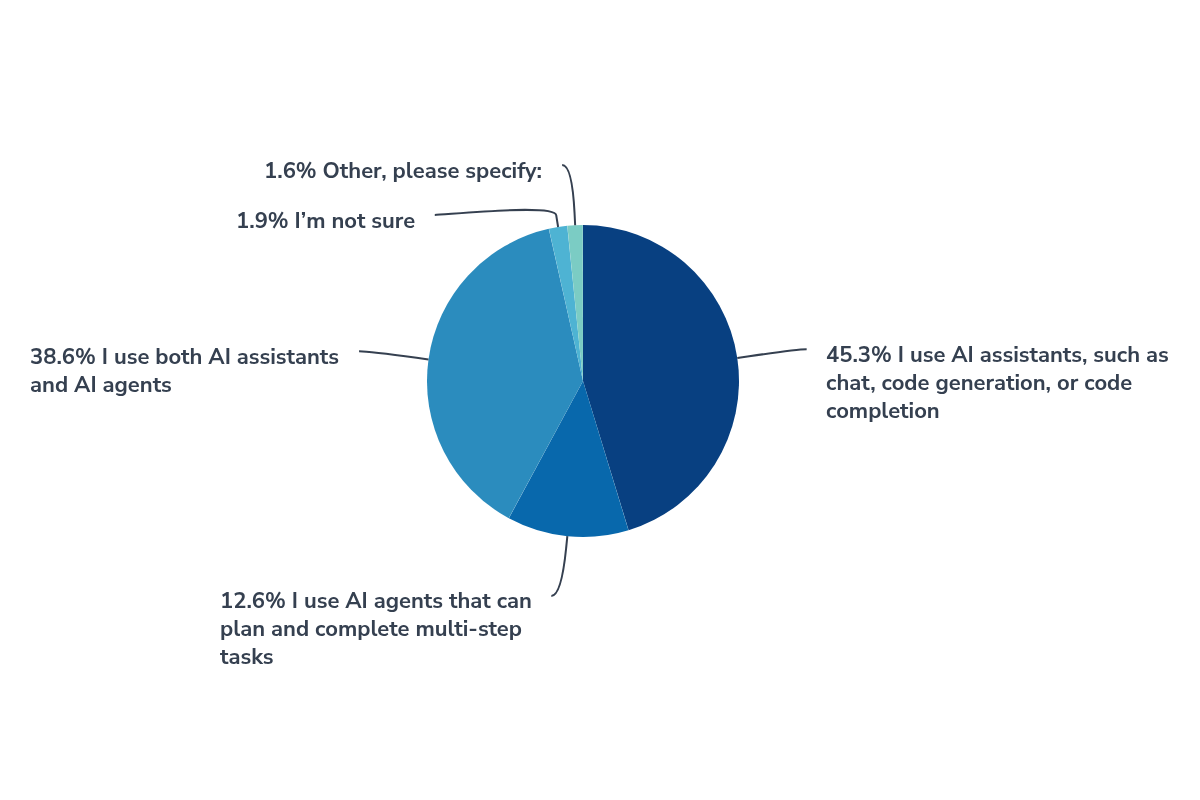
While conversational assistants remain popular, agents are also becoming part of your workflows. 45% of respondents use assistants exclusively, 39% use both assistants and agents, and 13% rely strictly on agents.
The most widely adopted tools among our respondents were JetBrains AI Assistant (63%) and GitHub Copilot (41%). Many respondents also mentioned Claude Code, Codex, and other tools.
AI for database tasks
SQL-related tasks dominate AI usage in database workflows:
- Writing or completing SQL queries – 64%
- Explaining SQL queries – 50%
- Diagnosing or fixing SQL errors – 41%
AI is also used for generating database objects, analyzing query results, and creating migration scripts, though less frequently.
Satisfaction and areas for improvement
AI-powered features received a 41.6% CSAT, while 51.5% of respondents rated their experience as neutral. These results are based on 848 respondents who rated AI-powered features, rather than the full survey audience.
When asked what needs improvement, respondents most frequently selected accuracy of AI responses (25%), understanding of database schemas and relationships (23%), and costs, usage limits, or their predictability (22%).
Among those who don’t currently use AI for database tasks, the leading reasons were lack of opportunity to try it (38%), using AI tools outside JetBrains IDEs instead (38%), or simply preferring to perform these tasks without AI (29%).
What we’ve improved
We’re continuing to expand AI capabilities in DataGrip, focusing on better integration with AI agents, a smoother experience when working alongside them, and greater control over AI-powered database operations.
- DataGrip 2026.1 integrated AI agents, including Claude Agent and Codex, and introduced database-specific MCP tools. These allow agents to explore schemas, work with data, and execute SQL queries.
- DataGrip 2026.2 introduced database-specific AI agent skills for database exploration, connection management, and natural-language-to-SQL workflows. We also expanded MCP tools and improved how agents interact with databases.
One particularly important improvement is our security layer for AI agents. Introduced in v2026.1 and extended in v2026.2, it gives you control over what agents can access and modify in your databases. Agents request permission for database operations, including those initiated through the CLI, so you can review and approve their actions.
Check out our YouTube video to see how AI agents can help with database tasks in JetBrains IDEs:
What’s next
We’re now introducing a new experience for working with AI agents: JetBrains Air in IDEs. Available in Early Access as a plugin for DataGrip 2026.2 and built into 2026.3 EAP builds, Air provides a dedicated interface for working with multiple agents, managing their sessions, tracking progress, and reviewing changes without leaving the IDE.
We’re also working on an enhanced security layer with more powerful and granular settings, giving you greater control over how AI agents interact with your databases. In addition, we’re improving how agents work with query history, allowing them to access and use the full history for better context.
These and other enhancements will make working with AI agents more flexible, secure, and efficient. Stay tuned for more updates!
Thank you!
A big thank you to all 1,420 participants in our third DataGrip and Database Tools UX Survey!
We appreciate your honest feedback, detailed comments, and suggestions. They help us understand what works well, identify the challenges you face in everyday database workflows, and prioritize improvements that matter to you.
Survey prizes
As a special thank you, we’ve selected ten respondents who shared particularly thoughtful and constructive feedback to receive prizes!
Our winners:
1-year JetBrains All Products Pack subscription:
- Nathan from the United States
- Louis from China
- Shavkat from Uzbekistan
- Ivan from the UK
- CrazyKid from China
USD 100 Amazon Gift Card:
- Jose from the United States
- Celso from Brazil
- Wiktoria from Poland
- Manthan from India
- Matias from Portugal
We’ve contacted the winners directly at their email addresses.
Keep sharing your feedback
You don’t have to wait for the next survey to let us know how we’re doing. You can always report an issue or suggest a feature on YouTrack, reach us through our feedback form, or leave a comment below.
Thank you for being part of our community and helping us make DataGrip and our database tools better with every release!