
Junie Eco Mode
'%20fill-opacity='.8'%20d='M3.256%203.913a3.083%203.083%200%200%200-.003%204.397L8%2012.998l4.743-4.684a3.085%203.085%200%200%200%20.001-4.4c-.6-.593-1.4-.914-2.233-.914a3.17%203.17%200%200%200-1.91.635L8%204.087l-.601-.452A3.17%203.17%200%200%200%205.489%203c-.834%200-1.634.321-2.233.913m10.19%205.111-4.748%204.69a.996.996%200%200%201-1.397%200L2.549%209.02a4.083%204.083%200%200%201%20.004-5.82A4.17%204.17%200%200%201%205.488%202c.907%200%201.787.29%202.512.835A4.17%204.17%200%200%201%2010.51%202c1.093%200%202.146.422%202.936%201.202a4.085%204.085%200%200%201%200%205.822'%20/%3e%3c/svg%3e) 1
1'%20stroke-opacity='.75'%20stroke-width='1.5'%20stroke-linejoin='round'/%3e%3c/svg%3e)

Not every step of a coding task needs the smartest model in the world.
Junie Eco Mode uses your selected model to investigate a coding task and create a plan, then hands implementation and testing to a lower-cost model. In two internal benchmarks, this approach reduced average model cost per task by 48% and 57%, while average resolve rates changed by less than one percentage point.
Watch any AI coding agent work on a task and you’ll see it moves in small steps. It opens a file, searches the project, makes an edit, runs the tests, reads an error message, fixes a missing line, runs the tests again. That’s simply what writing software looks like, and experienced engineers work the same way. Only a handful of those steps call for hard judgment, understanding the request, finding the right place in the code, deciding on an approach. The rest is execution, carrying out a decision that has already been made.
Yet, coding agents usually run one AI model for the whole task. If that’s the smartest, most expensive model available, you pay its premium price for every single step, including the twentieth “run the tests again”.
Think about how a building gets built. You hire an architect to design it, not to lay every brick. The architect makes the hard decisions, writes them down, and a construction crew does the building.
Eco mode brings that idea to Junie. The model you chose (Opus, Fable, Grok, GPT) acts as the architect, it studies the code and writes a plan. A much cheaper model acts as the builder, it takes the plan and does the actual work. In our latest internal benchmarks, Eco mode cut average model cost per task by about half: 57% on benchmark B and 48% on benchmark A. Average resolve rates across the tested configurations changed by less than one percentage point.
Eco mode is currently available to JetBrains Air EAP users in IDEs: in IntelliJ IDEA 2026.3 Beta, with other IDEs’ Betas to follow, and in 2026.2 versions of JetBrains IDEs. It is generally available in the Junie CLI starting with version 26.10.20. Eco mode is on by default for supported model-and-effort configurations.
How Junie Eco mode works
Eco mode splits a coding task into two parts and gives each part to the model that suits it best.
Step 1: the architect makes a plan. When you ask Junie to change your code, it first hands the task to the model you chose, at the effort level you chose. In this phase the model is only allowed to look: it reads and searches the code but doesn’t change anything. (The one exception: if you reported a bug, it may write a small test that shows the bug happening.) It already knows everything you’ve discussed with Junie so far, so you never have to repeat yourself. It’s built to be quick, usually about 15 steps, and it stops as soon as it knows what to change and how.
The result is a short plan with a fixed structure:
- Goal: what the change should achieve
- Scope: what is in and what is out
- Where to change: the specific files and parts of the code
- Approach: how to make the change
- Tests: how to check that it works
- Risks and corner cases: what could go wrong
Step 2: the builder follows the plan. Junie then hands the same conversation, plan included, to a much cheaper model (currently GPT-6 Luna). The builder does the long, hands-on part: it edits files, runs the build and the tests, fixes what breaks, and finishes the task.
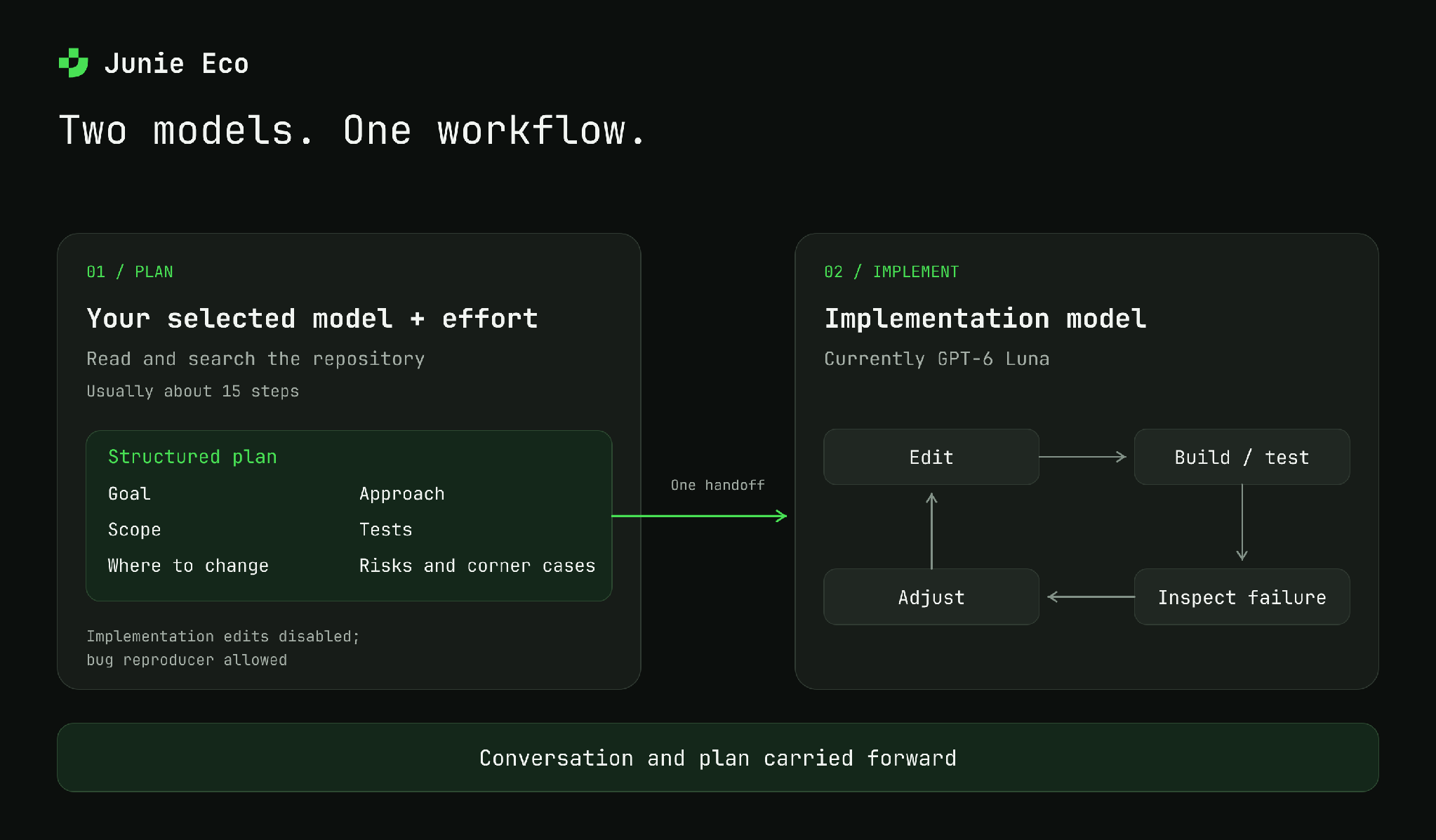
Junie investigates with your selected model, then hands the conversation and structured plan to a lower-cost model for implementation.
This works because of how the cost of a task adds up. Planning takes only a few steps, but it needs good judgment. Building takes many steps, and most of them just follow the plan. With Eco mode, you pay premium prices only for the part that needs premium judgment.
Why not just pick a model for each task?
The obvious alternative is to look at each request and guess up front whether it’s hard (use the expensive model) or easy (use the cheap one). We don’t think that works well:
- You can’t tell how hard a task is from the request alone. “Fix the test that sometimes fails” might be a one-line fix or a week-long investigation. Guessing up front means deciding before anyone has looked at the code. Eco mode has the smart model look first.
- Every task still gets top-quality thinking. The cheap model never decides what to build. It only carries out decisions the smart model has already made.
- The handoff is a written plan, not a guess. Because the plan always has the same structure, the builder starts out knowing which files to touch, how to test the change, and what to watch out for.
One handoff per task
Some tools let a cheap model “call a smarter friend” for advice whenever it gets stuck. Each of those calls means re-sending a big chunk of the conversation to the expensive model, and that adds up quickly. Eco mode hands off once, from architect to builder, and never switches back and forth. That keeps things simple and cheap.
When Eco mode stays out of the way
Eco mode only steps in where it’s likely to help:
- Only for tasks that require code changes. The planning step runs only when your task calls for a code change you intend to keep. Questions, explanations, setting up a project, “run this and tell me what happens”, all of these stay with your chosen model from start to finish.
- Off where it doesn’t save money. Eco mode is unavailable in
/remotesessions and with certain model-and-effort combinations, including Opus 5.5 at low effort and Sonnet 5.5.
Benchmark results
For each tested model-and-effort configuration, we ran the same tasks with Eco off and on. Our latest evaluation covered two internal benchmarks: benchmark B (29 paired configurations) and benchmark A (21 paired configurations). These are configuration counts, not task counts. Each pair compares Eco with the same model-and-effort baseline.
Both benchmarks consist entirely of real-world tasks of varying complexity drawn from private repositories. Benchmark B covers a broad range of private repositories of different sizes and project contexts. Benchmark A includes tasks from very large repositories, whose scale makes many tasks significantly more challenging.
Resolve rate is the share of benchmark tasks marked as successfully resolved by the evaluation. We report model cost per task and resolve rate averaged across the tested configurations.
Model cost and resolve rate
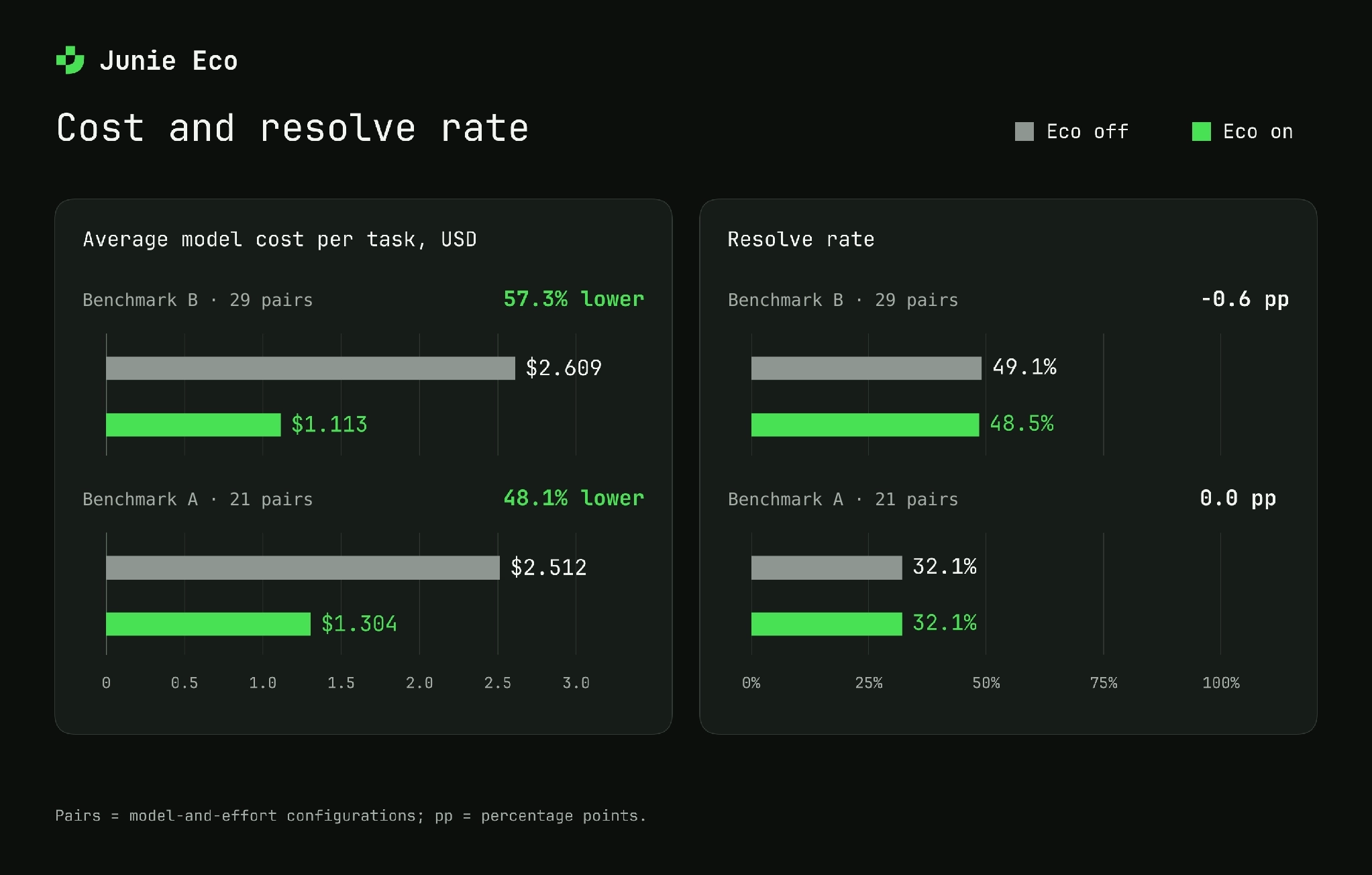
Latest internal evaluation. Averages across 29 model-and-effort pairs on benchmark B and 21 on benchmark A. Results vary by model and workload.
On benchmark B, average model cost per task fell from \$2.61 to \$1.11 (57.3%), while the average resolve rate moved from 49.1% to 48.5%, a decrease of 0.6 percentage points.
On benchmark A, average model cost per task fell from \$2.51 to \$1.30 (48.1%). Average resolve rates round to 32.1% both with and without Eco.
Individual configurations can show larger changes in resolve rate. The percentages for cost reduction are calculated from the more precise values shown in the chart; dollar amounts in the text are rounded to cents.
Examples from evaluation
The following examples come from an evaluation on 100 real coding tasks from benchmark B. In that evaluation, Eco reduced the model cost per task by approximately 63% for Opus 5.5 at max effort.
Try it
Eco mode is available in:
- JetBrains Air in IDEs: In 2026.2 versions of JetBrains IDEs and in IntelliJ IDEA 2026.3 EAP starting with the Beta build, with other IDEs’ 2026.3 EAP builds to follow.
- Junie CLI: Generally available in version 26.10.20 and later.
In these environments, Eco mode is on by default for Opus 5, Opus 5.5 (medium effort and above), Fable 5.1, Grok 4.5 / 4.6 / 4.7, GPT-5.6 Sol, GPT-6 Sol, GPT-5.6 Terra, and GPT-6 Astra. You can turn Eco off whenever you want one model to handle the entire task.
Use the model picker to turn Eco on or off. Pick the model you trust to do the thinking, and Eco mode will take care of the rest.
One model per task is becoming a thing of the past
The smartest AI models keep getting better, but still come at a higher cost. Meanwhile, cheap models have quietly become good enough to do most of the hands-on work, as long as someone tells them exactly what to do. We don’t think the future of AI coding assistants is a single model, or a system that guesses one model up front. It’s a team where each part of the job goes to the model best suited for it.
Eco mode is our first step in that direction. Try it on your real work and tell us where it works well and where it falls short.