
Separating Storage From Compute on EC2, Part 3: Terraform and Warm DR Volumes
'%20fill-opacity='.8'%20d='M3.256%203.913a3.083%203.083%200%200%200-.003%204.397L8%2012.998l4.743-4.684a3.085%203.085%200%200%200%20.001-4.4c-.6-.593-1.4-.914-2.233-.914a3.17%203.17%200%200%200-1.91.635L8%204.087l-.601-.452A3.17%203.17%200%200%200%205.489%203c-.834%200-1.634.321-2.233.913m10.19%205.111-4.748%204.69a.996.996%200%200%201-1.397%200L2.549%209.02a4.083%204.083%200%200%201%20.004-5.82A4.17%204.17%200%200%201%205.488%202c.907%200%201.787.29%202.512.835A4.17%204.17%200%200%201%2010.51%202c1.093%200%202.146.422%202.936%201.202a4.085%204.085%200%200%201%200%205.822'%20/%3e%3c/svg%3e)
'%20stroke-opacity='.75'%20stroke-width='1.5'%20stroke-linejoin='round'/%3e%3c/svg%3e)

TL;DR One Terraform module, with a mode per region, describes the database cluster everywhere it can run, so a DR copy cannot drift from the primary. In the DR region, automation turns each new snapshot copy into a hydrated volume with no compute in front of it and tags it ready, and that is all a restore needs to find; the log comes from S3. The restore itself is Part 4.
Part 2 left off with Data Lifecycle Manager copying multi-volume snapshot sets of the database host into a second region. What lands there is a copy of the data volume’s snapshot, with its own ID, its own completion time and its own best-effort event, while the WAL or binlog keeps arriving in the S3 archive on its own. Nothing in the service creates a volume from the copy, makes it fast in that region, or says when it is safe to attach. The gap between the copy landing and a volume existing that a restore can attach is this post, and it starts with where the definition of the cluster lives, because that decides whether the DR region is a copy of production or a second thing to maintain.
One cluster block for every environment
The primary database host is described in Terraform somewhere: instance type, AMI lookup, instance profile, security groups, volumes, DNS record, and the engine configuration that Part 2 already put restore_command into. If that same module also describes every DR copy, a copy in another region is the same module applied there with a different mode. The point of doing it this way is to stay DRY, and the reason that matters here more than it does for ordinary infrastructure is drift. A DR copy that lives in its own configuration gets the kernel parameter, the volume layout change, the new engine flag, a quarter after the primary does, or never, and nobody finds out until the day the copy has to carry production. One definition for all of them removes the place where that drift would live.
What the definition describes is a cluster, not a list of instances. The key is the cluster’s name, each entry under it is keyed by a region the cluster can run in, and the only thing an entry says is the state the cluster is in there right now. There is no primary or secondary in the block on purpose: those are roles, and a role is what the mode already expresses, so naming them separately would only create a second place for the two to disagree. The mode names are nothing special either. cold, warm and live are what this series needs; a replica that keeps a streaming standby up, or a paused that stops the instance and keeps the volumes, is the same block and one more branch in the module. This post uses warm and live, and cold is in the example to show where the copies land:
1
2
3
4
5
6
7
8
9
# One cluster. Each entry is a region it can run in and its state there:
# cold - snapshot copies and the log archive land here; nothing is restored
# warm - a volume exists, built from the newest snapshot copy; no compute
# live - compute up, volume attached, engine replayed and promoted
test-sql = {
 us-west-1 = { mode = "live" }
 us-east-1 = { mode = "warm" }
 eu-west-1 = { mode = "cold" }
}
With Terragrunt this comes out as one terragrunt.hcl per environment, each with its own copy of the block and all of them calling the same module. Production is the only environment that needs more than one entry: live in one region, warm in a second as a standing standby, cold in a third where the copies land. Dev and QA carry a single live entry, because nobody is going to fail over a dev database, and the module does not care how many entries it is given. Where production is actually up is then a matter of flipping modes.
In cold, backups are shipped to the region and nothing else happens there. The stack creates only what has to exist before the day it is needed, the subnet and security group, the instance profile, the log archive bucket, and the parameter the tracker writes into, and no restore ever runs. warm, us-east-1 above, creates the volume from the newest snapshot copy and keeps it hydrated, with no compute in front of it, so the slow part of a restore is already paid for when the day comes. live adds the instance, attaches the volume, replays the log from the archive and promotes, and that is Part 4’s subject. The one real difference between the regions is where the data volume comes from. On the primary it is an ordinary volume. In a warm region it is built from the newest snapshot copy, and knowing which copy that is, and when it is usable, is where EventBridge comes in.
One layout detail makes the rest of this workable. The module is applied as two Terragrunt units rather than one: a volumes unit that owns the parameter, the snapshot lookup and the EBS volume, and a compute unit that owns the instance, the attachments and the DNS record and declares a dependency on the first. Both read the same cluster block. The reason for the split is the state lock. A warm region’s volume gets replaced every time a new copy lands, and that apply should lock a state file holding one volume, not the one holding the instance that production is running on. It also means the compute unit never needs to know how the volume came to exist. It reads the volume ID from the volumes unit’s outputs for its own region and attaches it, whether it was created empty at bootstrap, built from a snapshot in a warm region, or inherited when a region flipped to live:
1
2
3
4
5
6
7
8
9
# One unit per region; each exports only itself. Terragrunt assembles the map.
output "member" {
 value = {
 region = var.region
 mode = var.mode
 snapshot = local.has_copy ? data.aws_ssm_parameter.dr_copy[0].value : null
 volume_id = local.volumes ? aws_ebs_volume.data[0].id : null
 }
}
The mode gates resources inside one apply; it does not pick a pipeline. What has to be decided is when the apply runs, and there are three triggers: a live flip is a person and the weekly drill is a schedule, both in Part 4, and a new copy in a warm region is the state machine below, which starts the apply through whatever already runs them. Nothing runs a plan on its own, and a nightly apply would leave the warm volume a day behind.
EventBridge decides when a copy is usable
When a cross-region copy finishes, EBS emits a copySnapshot event in the destination region. The EBS EventBridge reference documents it with a detail-type of EBS Snapshot Notification, a result of succeeded or failed, the copy’s ARN in snapshot_id, and the source snapshot’s ARN in source. What it doesn’t carry is anything about the volume the copy will become: whether it is the newest copy of this cluster’s data volume, whether anything fast has been enabled on it in this region, or whether a volume built from it is ready to attach.
There is a second caveat that shapes everything downstream. The DLM monitoring page says these events “are emitted on a best effort basis,” and the EventBridge troubleshooting guide adds that “in rare cases, the same rule can run more than once for a single event.” Put those together and the handler is going to see some events twice and some events never. Anything built on top of it has to be fine with both.
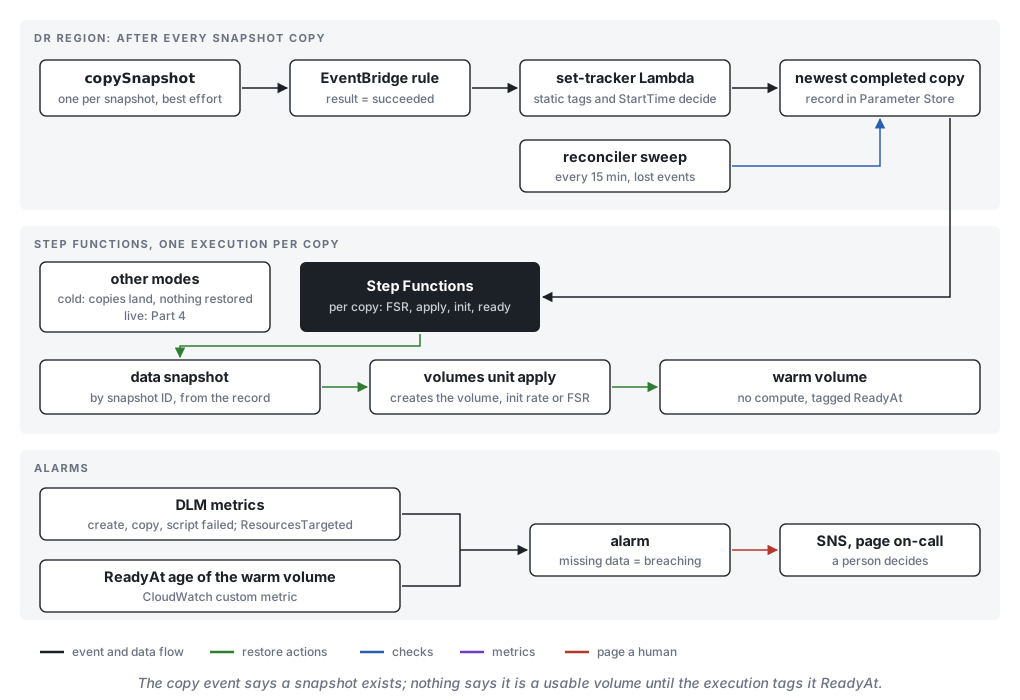
The rule itself is small, and it is the pattern the EBS docs themselves use for acting on snapshot events. It matches successful copies, and a second rule with "result": ["failed"] goes straight to an SNS topic so somebody hears about a copy that didn’t make it. Every field here is from the documented event:
1
2
3
4
5
{
 "source": ["aws.ec2"],
 "detail-type": ["EBS Snapshot Notification"],
 "detail": { "event": ["copySnapshot"], "result": ["succeeded"] }
}
The event has no tags, so the handler describes the copy. Two of Part 2’s tags are there, DrSet naming the cluster and the volume’s role, both static. The per-run timestamp is not: DLM resolves variable tags such as $(timestamp) on the source snapshot only and, per its own docs, “does not propagate them to cross-Region or cross-account copies, even when tag copying is enabled.” So the copy’s identity is the two static tags, its order is its own StartTime, and what the handler wants is the data copy, completed, started later than the one recorded. If so it writes the copy’s snapshot ID to Parameter Store, the value the Terraform below reads. Anything else, a duplicate, an older copy, the wrong role, changes nothing.
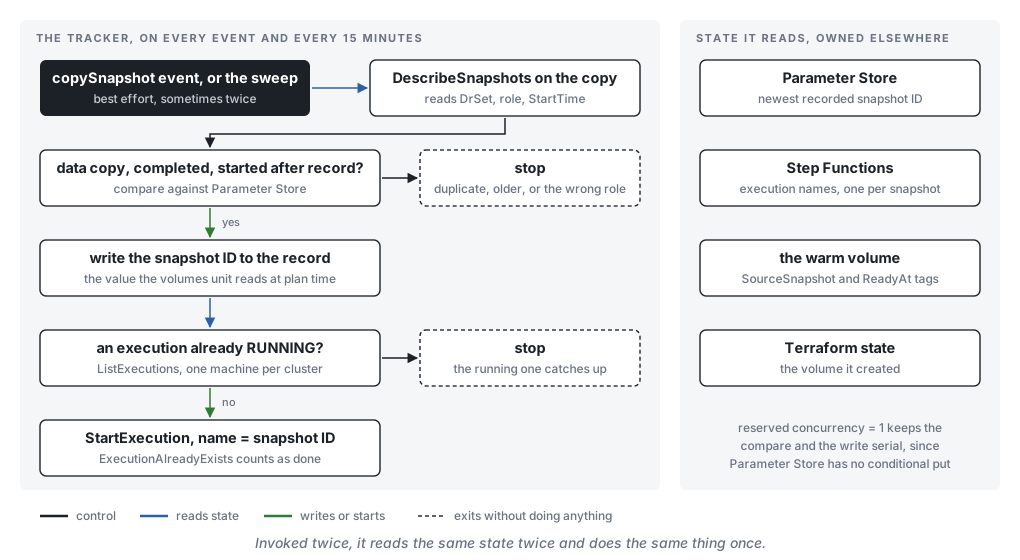
Then it starts one Step Functions execution per copy, named after the snapshot ID, unless one is already running for the cluster, in which case the running one re-reads the record when it finishes. StartExecution refuses a duplicate name, so a second event cannot start a second execution. The handler owns no state; it reads Parameter Store, Step Functions and the volume’s tags and acts on what it finds, with reserved concurrency of one because Parameter Store has no conditional write. What the execution does is the next section.
Best-effort delivery means you also need a way to look without being nudged. A scheduled rule runs the same Lambda every 15 minutes with no event payload at all, and it lists the tagged copies and does the same computation. The event path keeps the record fresh within seconds; the sweep is what makes it correct on the days an event never shows up, and if it finds a completed copy with no execution for it, it starts one. That Lambda is the only one in the design, and it finishes in seconds, because everything that has to wait happens somewhere else.
From the copy to a warm volume
A volume created from a snapshot is usable immediately and slow until its blocks have come down from S3, and Part 2 priced the two ways of dealing with that: Fast Snapshot Restore on the snapshot, or a provisioned initialization rate on the volume. What Part 2 could not do is apply either one in the DR region, because DLM’s FSR rule only names zones in the policy’s own region. So the DR region does it itself, and because every step waits on something that reports progress only through a best-effort event, the work is a Step Functions Standard workflow, one execution per copy: EnableFastSnapshotRestores on the copy, poll DescribeFastSnapshotRestores until enabled, start the volumes unit’s apply and wait for the build, wait for the new volume to initialize, disable FSR on the previous copy, tag the volume ReadyAt. Every wait has a TimeoutSeconds, so a copy that never gets there fails loudly, and the execution history answers “why is the warm region a day old” without a log search.
How long that takes is not the same twice: copy time follows the change rate, FSR’s optimizing runs about an hour per TiB, and the build and initialization add their own variance, so copy-to-ready is anywhere from twenty minutes to a few hours. With hourly copies the next one can land mid-execution, which is why the tracker never starts a second execution for the same cluster. The running one re-reads the record after tagging and, if a newer copy has landed, starts the next execution itself; copies in between are skipped. Its last state also publishes its own duration, which the alarm threshold is built from.
The order matters in one place. Disabling the previous copy’s FSR before the new one reads enabled would be the natural shortcut, and it leaves a window with nothing fast to restore from, because a freshly enabled snapshot spends a while in optimizing with an empty credit bucket. During the overlap two of the five FSR snapshots a region allows by default are in use, which leaves room for two clusters per region before the quota has to be raised.
Only the data volume crosses the region Part 1 put the log on its own volume and Part 2 snapshotted both at one instant. The DR region does not need the log volume’s copy, because the log is already there: Part 2 ships WAL or binlogs to the S3 archive continuously, and Part 4 replays from it. That holds on one condition. Crash recovery runs before any archive replay, and its inputs have to be on the data volume or reachable from it. On PostgreSQL they are reachable: recovery.signal makes the server fetch WAL through restore_command from the snapshot’s checkpoint onward, so the archive has to reach back at least that far, which the coverage alarm in Part 4 checks. On MySQL they are not: InnoDB’s redo log has to be on the data volume, in the same snapshot, because binlog replay cannot stand in for redo. A MySQL layout with redo on the log volume needs that volume in the set, and then everything in this post is done for a pair, with one extra step: the copies carry no shared run tag, so pairing them means following the copySnapshot event’s source ARN back to the source snapshots and reading $(timestamp) there.
The other route is to pre-create the volume from every new copy with a VolumeInitializationRate (100 to 300 MiB/s, per the CreateVolume reference); EBS sends an initializeVolume event within five minutes of it finishing, and the execution’s wait polls for it since the documented example spells the value with a leading space. At the pricing page’s example rate of $0.0036 per GiB at 300 MiB/s, re-initializing a 1 TiB volume every four hours is around $660 a month before storage, against the $540 a month Part 2 worked out for one FSR-enabled snapshot in one zone, and initializing only at restore time costs about $3.69 per TiB with the whole initialization inside the RTO. Pre-created and kept current is what the cluster block calls warm. The volumes unit creates it from the snapshot ID in the tracker’s record rather than asking for the most recent snapshot, and the same resource serves the live region, where the volume is created once and never sourced from a snapshot again:
 1
 2
 3
 4
 5
 6
 7
 8
 9
10
11
12
13
14
15
16
17
18
19
20
21
22
23
24
25
26
27
28
29
30
31
32
33
34
35
36
37
38
39
40
41
locals {
 volumes = contains(["warm", "live"], var.mode)
 compute = var.mode == "live"
 # a DR region has a recorded copy; the cluster's first region never does.
 # Conditional, not &&: HCL evaluates both sides of && even when count is 0.
 has_copy = local.volumes ? data.aws_ssm_parameter.dr_copy[0].value != "none" : false
}

# Created in cold mode; the tracker writes the value, so Terraform must not.
resource "aws_ssm_parameter" "dr_copy" {
 name = "/dr/${var.cluster}/snapshot"
 type = "String"
 value = "none"
 lifecycle { ignore_changes = [value] }
}

data "aws_ssm_parameter" "dr_copy" {
 count = local.volumes ? 1 : 0
 name = aws_ssm_parameter.dr_copy.name
}

# By ID, not by tag and most_recent: the tracker already chose.
data "aws_ebs_snapshot" "data" {
 count = local.has_copy ? 1 : 0
 snapshot_ids = [data.aws_ssm_parameter.dr_copy[0].value]
}

resource "aws_ebs_volume" "data" {
 count = local.volumes ? 1 : 0
 availability_zone = var.availability_zone
 type = "gp3"
 size = var.data_size_gib
 # Built from the recorded copy when there is one (warm, or a cold region
 # flipped straight to live). Empty for the cluster's first region.
 # Never rebuilt once it exists.
 snapshot_id = local.has_copy ? data.aws_ebs_snapshot.data[0].id : null
 lifecycle {
 ignore_changes = [snapshot_id]
 create_before_destroy = true
 }
}
The compute local does nothing in this unit. Part 4’s compute unit defines the same one from mode and uses it to gate the instance and the attachments.
Two lifecycle lines carry more weight than their size suggests, because they are Part 1’s argument written down in HCL: the volume is the durable thing, and the instance in front of it can be recreated as often as patching demands while the attachment follows it and the volume never notices. The live region’s volume is constant: created empty when the cluster is born, or from the recorded copy when a region flips to live, and then kept for the cluster’s lifetime. ignore_changes on snapshot_id is what makes that true; a newer copy changing what the data source resolves to is not a reason to rebuild, and the same line on the parameter’s value keeps an apply from resetting what the tracker wrote. The warm volume is the exception, replaced on purpose rather than by drift: the state machine runs the apply with -replace on the volume address, create_before_destroy retires the old one only after the new one exists, and the resource address never changes. Nothing ever issues -replace against a live region.
The ReadyAt tag is written last, only when the volume is initialized and the old FSR is gone, and it lives on the volume, next to a SourceSnapshot tag the apply sets, so that a lookup by tag:SourceSnapshot plus tag-key = ReadyAt returns a ready volume and says since when. It is separate from the tracker’s record on purpose: the two disagree for the minutes between a copy landing and its volume existing, and a flip to live must not land in that gap, so Part 4 looks for the tag, not the record. The tracker decides, the state machine completes, the sweep repairs.
Terraform does not roll back, so if the new volume’s creation times out partway, the apply ends with the old volume still in state and the new one not. The fix is to run the apply again, which for this resource is idempotent, and it is worth knowing that before the night it happens.
Warm is optional Everything in this section exists to take initialization out of the RTO. If the RTO has room for it, cold is enough: the copies land, the tracker keeps the record, the execution still moves FSR onto each new copy, and a flip straight to live creates the volume from the recorded copy and pays for initialization once, at about $3.69 per TiB at the top rate, with the whole thing inside the clock. Part 2’s arithmetic says how much room that takes: data size over the initialization rate, added to the replay time, against the RTO. If the sum fits, the warm volume is storage and FSR hours spent on a problem the plan does not have.
What the standby costs depends on the mode. cold is a few dollars a month of standing resources. warm adds the volume’s storage and, each time a new copy lands, either the initialization charge or the FSR hours from above, plus a few state transitions at $0.000025 each, well under a cent per copy, while the compute still does not exist until someone asks for it.
Alarm on the volume, not the snapshot
DLM does publish its own CloudWatch metrics, in the AWS/EBS namespace under a DLMPolicyId dimension, in the policy’s region. Four of them deserve an alarm at anything above zero: SnapshotsCreateFailed, PreScriptFailed, PostScriptFailed and SnapshotsCopiedRegionFailed. Be aware that the last one “includes unsuccessful retries within 24 hours from the scheduled time,” so a failed copy can take a day to show up. ResourcesTargeted dropping below the number you expect catches the quietest failure DLM has, which is a database instance that lost its tag and is now getting no snapshots and no errors. The DLM Policy State Change event, with state ERROR and a cause string, can go to the same SNS topic as the failed-copy rule.
None of that says anything about the DR region, though. Whether the warm volume holds a recent copy is written on the volume itself, and the sweep publishes two metrics from it on every run. The first is the age of the ReadyAt tag, which says how long since the warm volume was last rebuilt. Its threshold is the snapshot interval plus DLM’s one-hour start window plus the p95 of the execution-duration metric over the last two weeks, which CloudWatch computes for you; for the first week, until there is a history, it is the sum of the copy time from the copySnapshot event’s startTime and endTime and the docs’ hour per TiB for FSR, and it will be wrong in one direction or the other. The second metric is how many completed data copies are newer than the one in the volume’s SourceSnapshot tag, which the sweep already lists. It is normally zero or one, it climbs when executions fail or fall behind, and it is the one that pages, because a warm volume that is two copies behind is a plan that has quietly stopped working while the age graph still looks healthy. A failed execution goes to the same SNS topic through the status-change event Step Functions emits to EventBridge, so a copy that got stuck is a page and not a slowly aging graph. The missing-data setting matters as much as the threshold. CloudWatch gives you four options and defaults to missing, which means a sweep that died shows up as a gap in a graph that nobody is looking at. Setting it to breaching turns that gap into a page. Each metric runs $0.30 a month and each alarm $0.10.
The topic itself is a convenience, not a requirement. Four senders page in this design, the failed-copy rule, the DLM policy event, the alarms and the execution failures, and one SNS topic gives them a single destination whose subscribers can change without touching any producer. If alerting already lives on EventBridge, the same four can land on one rule, since alarm state changes are events too, with an API destination calling the pager directly. What matters is that every failure ends at the same place, not which service that place is.
That lag is the number to watch for this half of the plan. If it is zero, the warm volume was built from the newest copy, FSR has moved onto it, and the tag says when. Whether the log archive reaches back to that copy, and what the engine does when it is finally put in front of that volume, is Part 4.