
The Control Strip: five live modules in one corner
'%20fill-opacity='.8'%20d='M3.256%203.913a3.083%203.083%200%200%200-.003%204.397L8%2012.998l4.743-4.684a3.085%203.085%200%200%200%20.001-4.4c-.6-.593-1.4-.914-2.233-.914a3.17%203.17%200%200%200-1.91.635L8%204.087l-.601-.452A3.17%203.17%200%200%200%205.489%203c-.834%200-1.634.321-2.233.913m10.19%205.111-4.748%204.69a.996.996%200%200%201-1.397%200L2.549%209.02a4.083%204.083%200%200%201%20.004-5.82A4.17%204.17%200%200%201%205.488%202c.907%200%201.787.29%202.512.835A4.17%204.17%200%200%201%2010.51%202c1.093%200%202.146.422%202.936%201.202a4.085%204.085%200%200%201%200%205.822'%20/%3e%3c/svg%3e)
'%20stroke-opacity='.75'%20stroke-width='1.5'%20stroke-linejoin='round'/%3e%3c/svg%3e)

The Control Strip is the row of tiles at the bottom left of exe's Mac OS 9 desktop in the browser. With no window open, it shows if your Cloudflare tunnel is up, if Tailscale is connected, what SOL is doing, how full your Claude Code or Codex plan is, and how busy the machine is.

A tray from Mac OS 9
Mac OS 9 kept a Control Strip in the same corner, and exe's is sampled pixel by pixel from a running Mac OS 9: a strip 24 pixels tall that floats over your windows, as the original did. Click a tile, or right-click it, for its menu, which does more than watch.
The strip fits the machine it runs on. The Tailscale module is there only where Tailscale is installed, agent usage once Claude Code or Codex is, and activity on Linux. The tab at the right end folds the strip down to the tab alone, and the arrows at its ends scroll the row when it holds more than the screen shows. Your browser remembers the fold and what you chose on each tile.
Cloudflare: what your sites send out
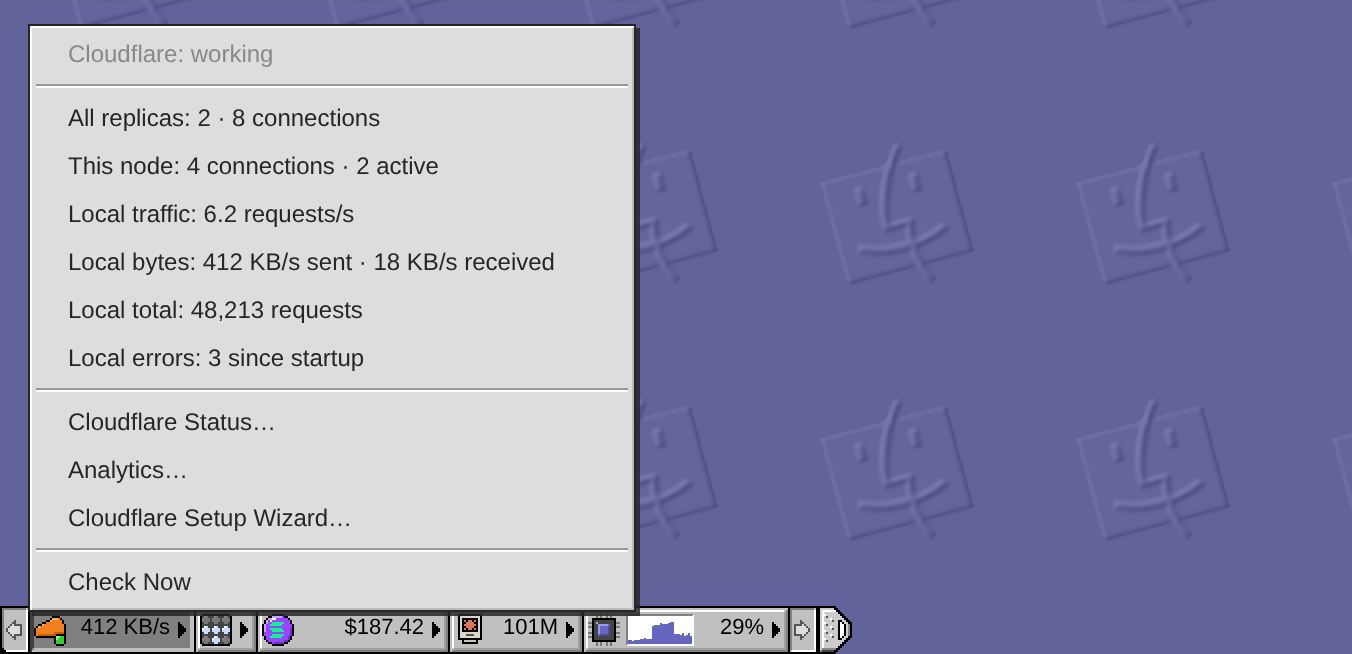
The lamp on the cloud is green while the tunnel is healthy, yellow when it needs attention or is not set up yet, and grey while exe is still checking. On a computer, the figure beside it is how many bytes a second this machine's connector is sending out: its answers, what visitors download.
The menu opens the tunnel up: the replicas and edge connections, then this machine's own connections, active requests, requests a second, bytes sent and received, total requests and origin errors. While the menu is open, this machine's figures refresh every five seconds and the tunnel-wide counts every 30 seconds. For what Cloudflare counted at its edge, Analytics… opens the Analytics app.
Tailscale: switches, not only lamps
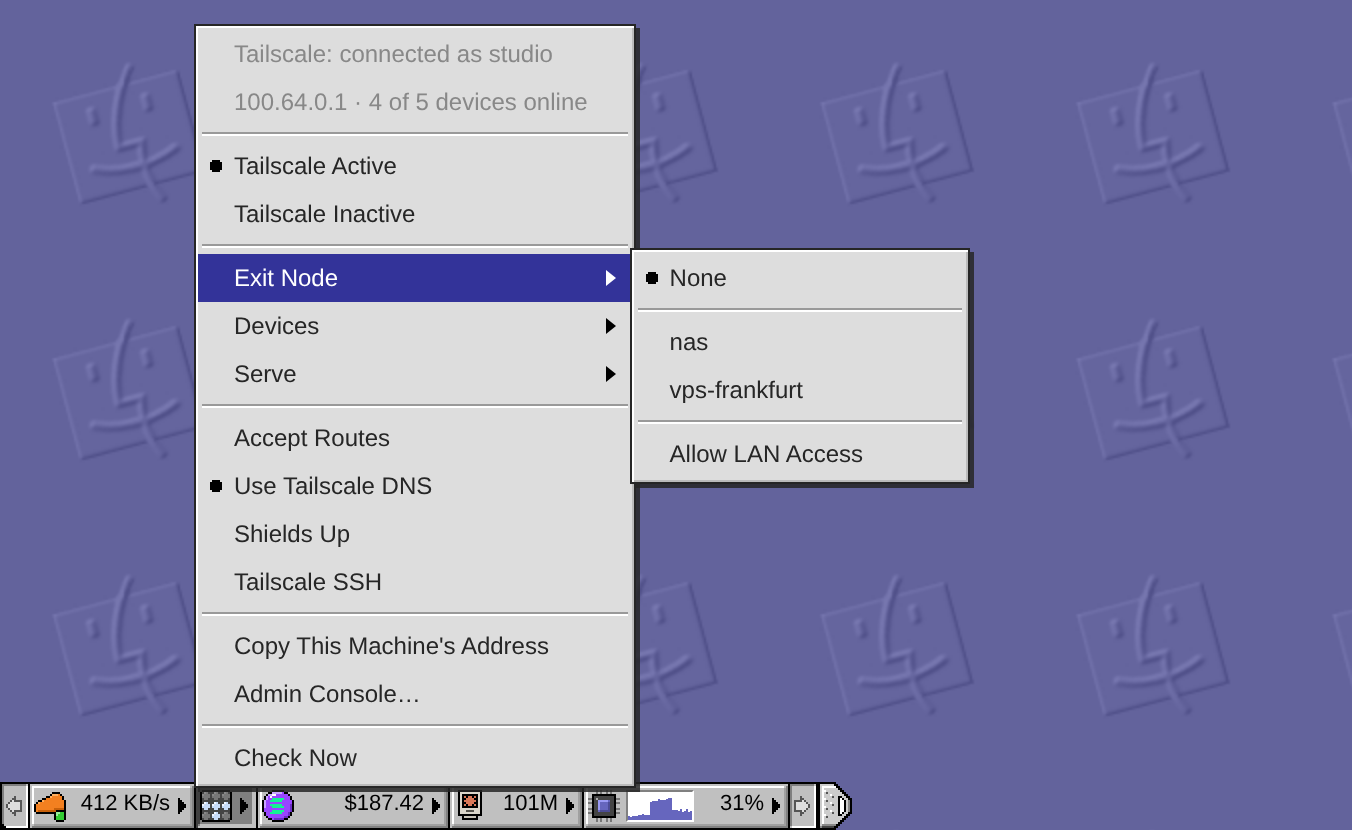
The Tailscale module is a panel of nine lamps, and four of them are Tailscale's. They are lit while this machine is on your tailnet, the private network Tailscale makes of your devices. They turn blue when its traffic leaves through an exit node, another of your devices that carries it to the internet, and yellow when something needs attention, such as a login that is due. All go dim when Tailscale is off.
The menu is where you change things. Tailscale Active and Tailscale Inactive turn Tailscale on and off, a pair of marked lines like OS 9's AppleTalk Switch module. Exit Node picks one of your devices that offers one, with Allow LAN Access in the same submenu. Devices lists what is online and Serve your Tailscale Serve rules; pick a row and its address is copied. Accept Routes, Use Tailscale DNS, Shields Up and Tailscale SSH are switches, and each says what it does when you rest the pointer on it.
The daemon makes these changes with the tailscale command, without sudo, and changes nothing else. For that, the account exe runs as must be Tailscale's operator. It also knows how you reached the desktop. Turn Tailscale off or raise the shields while the desktop itself comes to you over Tailscale, and it asks first, because the desktop would go with it. Choosing an exit node while you reach the desktop over the local network, with Allow LAN Access off, asks too.
The ticker, and the switch for every push
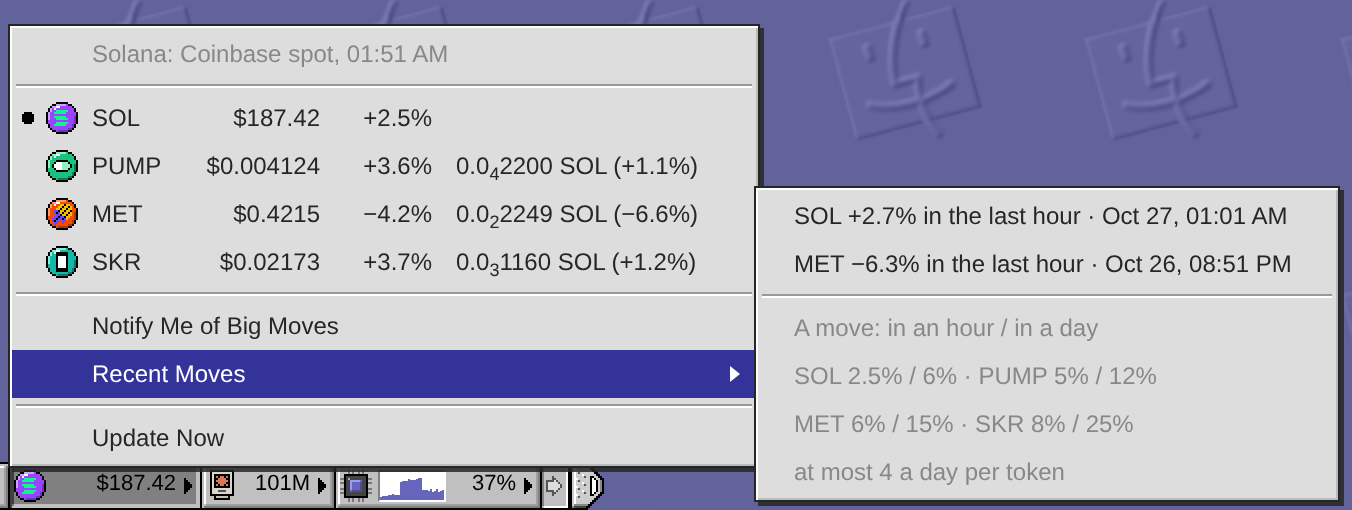
The ticker wears a coin and its dollar price: SOL, PUMP, MET or SKR, whichever you pick from its menu. The menu lists all four with their day change, and the other three with their price in SOL as well, where a long run of zeros folds into a small count: 0.00003717 SOL reads 0.0₄3717 SOL. The prices are Coinbase's spot prices, fetched once a minute by the daemon for every desktop on the machine, with Jupiter's filling in when Coinbase has none.
The daemon keeps watching when no desktop is open. Choose Notify Me of Big Moves, and a move that is rare for its token reaches your phone or computer. SOL has to move 2.5% in an hour or 6% in a day; PUMP 5% or 12%, MET 6% or 15%, SKR 8% or 25%. A token has to cross its threshold on two successful checks in a row before an alert fires.
There are never more than four alerts per token in 24 hours, and a wild day's later alerts need bigger moves: one and a half times the threshold for the second, twice for the third and fourth. Moves held back by that limit are counted into the next alert, if they are less than a day old. A newer alert for the same token replaces the older notification instead of stacking, and Recent Moves lists the last eight.
That menu item is the one switch for every push exe sends; nothing else has a setting of its own. With it on, the daemon also watches the sky over the first city in your Weather app, for rain in the next hour, dangerous heat, high wind and fire weather. It says Claude Code finished or Codex finished when a turn ends in a desktop session more than a minute after you last typed there. And a script on the machine can send its own words:
$ curl -s 127.0.0.1:7777/v1/push \
    -d '{"title":"Backup",
         "body":"Done."}'
Agent usage: what the agents spent
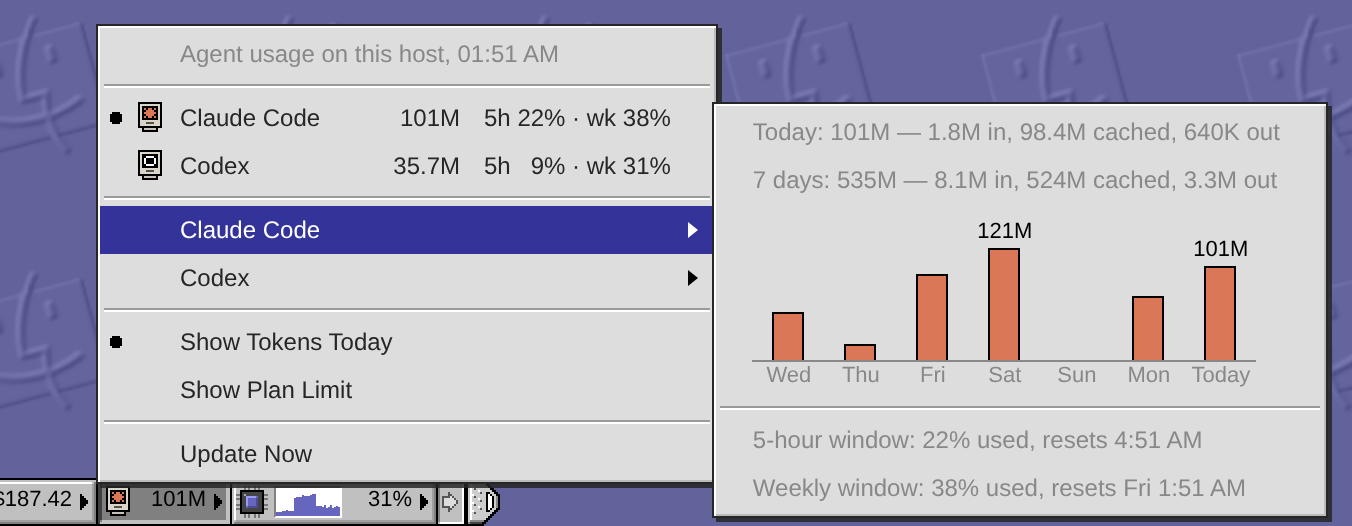
The agent usage meter shows how many tokens Claude Code or Codex has used on this machine today. Choose Show Plan Limit, and the tile shows the fullest of that agent's usage windows instead, such as "46% wk", so the limit stays in view all day.
The menu lists both agents with today's tokens, and their five-hour and weekly windows lined up in columns. Each agent's submenu has the detail: today and the last seven days, split into input, cached and output tokens; the week as a column a day, with a figure on the busiest day and on today; and how full each window is and when it resets.
The daemon counts from the CLIs' own logs, Claude Code's transcripts and Codex's rollouts, so a session you run in your own terminal counts as well as the ones opened from the desktop. Claude Code's windows are as fresh as its last reply in a Claude Code window on the desk. Codex's come from its ChatGPT sign-in, normally checked at most once a minute, or from Codex's own logs when that check cannot be made.
Activity: the machine itself
The last module charts this machine: CPU, memory, GPU, network and disk, a sample every two seconds. The tile shows the last minute of one of them and its figure now. The menu charts them all over the last four minutes, two on a phone, moving while you watch. Pick a row to put it on the tile.
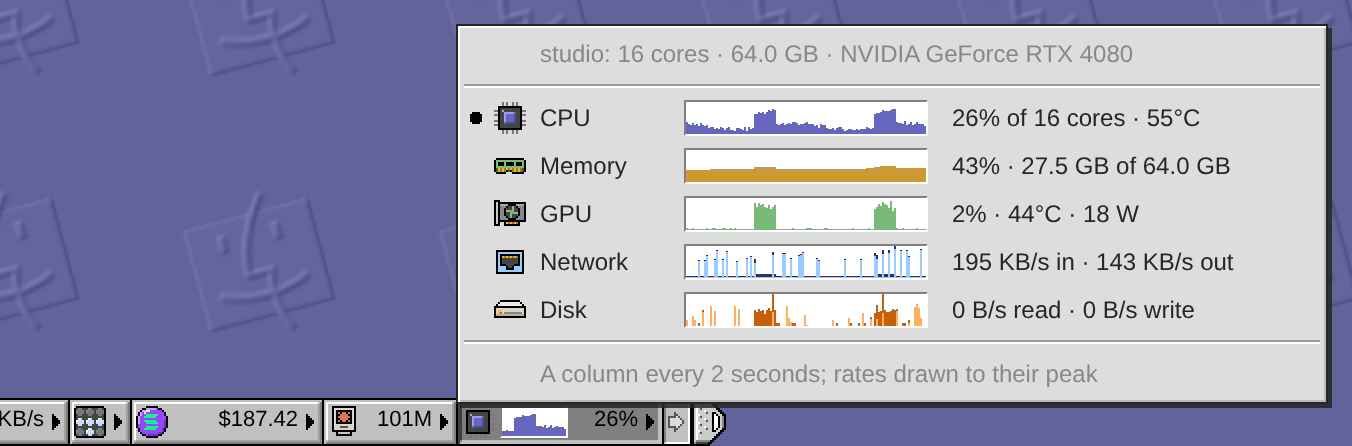
CPU says its share of all cores and its hottest sensor's temperature. GPU says its use, temperature and power, from nvidia-smi; a host without it has no GPU row. Network and Disk count only the physical interfaces and disks. On a machine full of VMs that matters: a VM's traffic crosses its tap, the bridge and the network card, and counting the card alone counts every byte once.
The daemon samples only while a desktop reads. It starts when the strip opens and stops ten minutes after the last desktop folds the strip away or goes hidden.
Try it
On your own exe desktop:
- Click the ticker and choose Notify Me of Big Moves. Allow notifications when the browser asks.
- Choose Send a Test Notification in the same menu, and watch it arrive.
- Click the agent usage meter and choose Show Plan Limit.
- On Linux, click the activity tile and pick the measure you want in your corner.
On a phone, add the desktop to the Home Screen first: that app is where a phone gets notifications. The manual has each module in full, and Notifications: turn them on has the rest.