
Busy Plugin Developers Newsletter – Q3 2026
'%20fill-opacity='.8'%20d='M3.256%203.913a3.083%203.083%200%200%200-.003%204.397L8%2012.998l4.743-4.684a3.085%203.085%200%200%200%20.001-4.4c-.6-.593-1.4-.914-2.233-.914a3.17%203.17%200%200%200-1.91.635L8%204.087l-.601-.452A3.17%203.17%200%200%200%205.489%203c-.834%200-1.634.321-2.233.913m10.19%205.111-4.748%204.69a.996.996%200%200%201-1.397%200L2.549%209.02a4.083%204.083%200%200%201%20.004-5.82A4.17%204.17%200%200%201%205.488%202c.907%200%201.787.29%202.512.835A4.17%204.17%200%200%201%2010.51%202c1.093%200%202.146.422%202.936%201.202a4.085%204.085%200%200%201%200%205.822'%20/%3e%3c/svg%3e)
'%20stroke-opacity='.75'%20stroke-width='1.5'%20stroke-linejoin='round'/%3e%3c/svg%3e)

Your quarterly dose of plugin dev news, tools, and tips from JetBrains
⚡JetBrains Plugin Developer Conf 2026 Is Coming!
November 10, 2026 | Online | Free
Join our annual free virtual event on developing plugins for JetBrains products. You’ll hear talks from SAP, Broadcom, JetBrains experts, and independent plugin authors.
🤖 AI meets plugins: ACP and MCP integrations, plus where AI-assisted development helps – and where it doesn’t.
⚙️IntelliJ Platform updates: The latest Gradle Plugin, Plugin DevKit, Plugin Verifier, and API updates.
💻 Real-world techniques: LSP, WSL, Dev Containers, web-based UIs, and plugin architectures that scale.

🧩 Marketplace Updates
New Way to Edit Plugin Description
Keeping your plugin page up to date just got easier! You can now edit your plugin description directly on the plugin’s page. The description is stored separately from the plugin archive, so you can update it without uploading a new plugin version. Learn more →
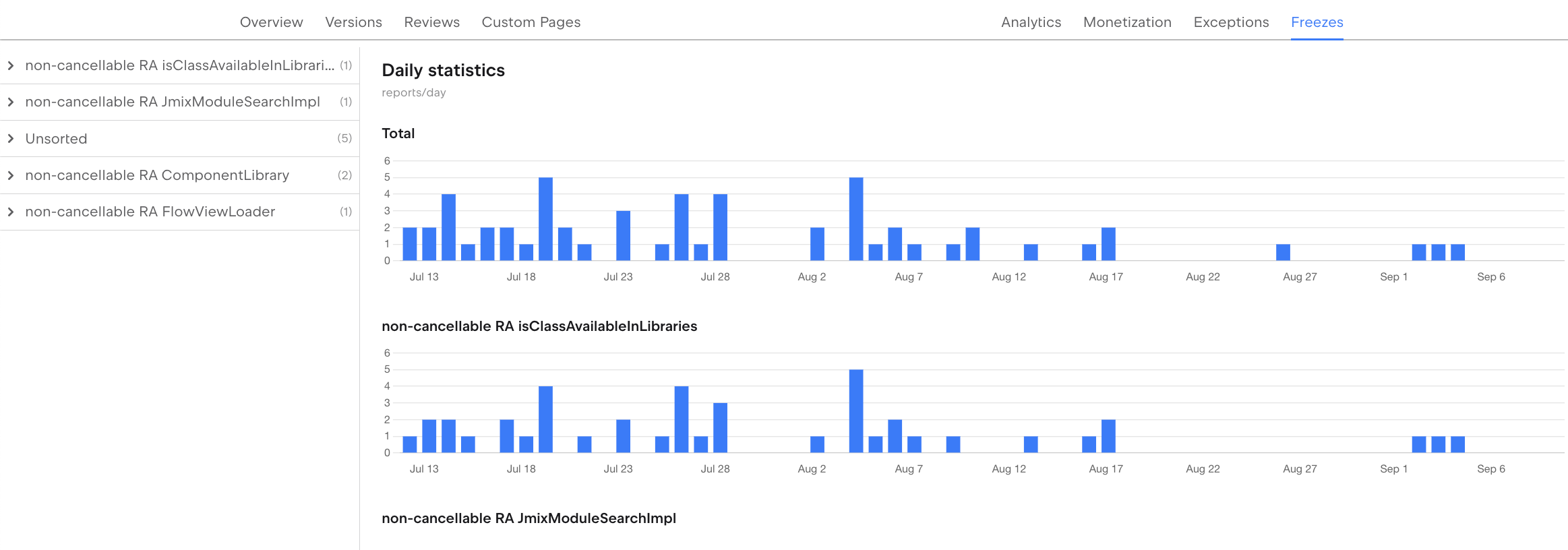
UI Freeze Reports Are Now Available in the Freezes Tab
Users say the IDE froze, but you can’t reproduce it? JetBrains Marketplace now collects UI freeze reports for your plugin, with full thread dumps and CPU snapshots. In his guide, Jakub Chrzanowski explains how to read the reports, enable reporting, and use an AI agent to find the cause. You can also watch his video or see the Marketplace documentation →.
🔧 Plugin Development Tooling Updates
IntelliJ Plugin Verifier 1.411
Tool that checks binary compatibility between IntelliJ-based IDE builds and plugins.
- Content modules are now supported in dependency resolution, dependency trees, and module visibility checks, and
dependencies.txtlists each plugin’s content modules. - New public APIs for plugin name validation, rebuilding dependencies, and keeping only direct dependencies in verification results.
- Lower memory usage for
check-trunk-apiand report generation, which now streamsdependencies.txtand HTML reports. - Reports are now written in UTF-8.
- Updated Gradle, Bouncy Castle, and Byte Buddy.
IntelliJ Platform Gradle Plugin 2.19.0
Plugin that helps configure your environment for building, testing, verifying, and publishing plugins for IntelliJ-based IDEs.
- New
buildPluginVariantstasks build Linux, macOS, and Windows plugin distributions forx86_64andarm64(2026.1+). - New
testFrameworks()helper, more test framework options, and per-plugin bundled-library exclusions. - Full
--offlinesupport, and Kotlin stdlib and Coroutines are no longer bundled into the sandbox by default. verifyPluginnow runs against each IDE’s own bundled JBR and fails based on report files.- Removed the deprecated
setupDependenciestask (breaking change), and tasks are now organized into separate groups. - Plus fixes for download URL resolution, signature verification, and cache writes.
💡 Tip of the Quarter
Use Release Channels for Pre-releases
Deploy plugins to non-default release channels (alpha, beta, canary, eap) to share work-in-progress with limited user groups and gather feedback before public release. This lets you test with real users without affecting your main release.
📚 Resources & Learning
📖 Blog
IDE Plugin Generator – The New Beginning
Creating an IntelliJ Platform plugin no longer means choosing between the IDE wizard and the GitHub template. The new web-based generator combines both, with dependency selection, GitHub workflows, and Split Mode support, all from the IDE or your browser. Find out why we made the change and what’s coming next. Read →
The Evolution of WSL Support in JetBrains IDEs
After trying three other approaches, JetBrains IDEs now open WSL projects in Native mode, up to 38% faster. Learn how the IJent agent and EelApi make this work, and how your plugin can run the same way in WSL, Docker, and Dev Containers. Read →
Why We Still Need an IDE
Agents write the code, but someone still has to steer, verify, and own it. Read why the IDE is becoming the cockpit for agentic development, and why its tools matter as much to agents as they do to developers. Read →
⭐ Community Spotlight
Native Calls in IntelliJ Platform Plugins: JNA vs FFM
The IntelliJ Platform is moving native integrations from JNA to Java’s Foreign Function and Memory API. In this video, Patrick Scheibe shows how to configure the IDE-bundled JNA, when your existing code can stay, and how to start with FFM if your plugin calls native code.
Save State in IntelliJ Plugins in 3 Lines!
Need your plugin to remember a setting after an IDE restart? In this short video, Róbert Novotný shows how to save booleans, numbers, strings, and string lists with PropertiesComponent in just three lines of Kotlin.
💌 Until next time — happy plugin development!
JetBrains Marketplace team