
iOS 27 has some weird Dynamic Island behavior
'%20fill-opacity='.8'%20d='M3.256%203.913a3.083%203.083%200%200%200-.003%204.397L8%2012.998l4.743-4.684a3.085%203.085%200%200%200%20.001-4.4c-.6-.593-1.4-.914-2.233-.914a3.17%203.17%200%200%200-1.91.635L8%204.087l-.601-.452A3.17%203.17%200%200%200%205.489%203c-.834%200-1.634.321-2.233.913m10.19%205.111-4.748%204.69a.996.996%200%200%201-1.397%200L2.549%209.02a4.083%204.083%200%200%201%20.004-5.82A4.17%204.17%200%200%201%205.488%202c.907%200%201.787.29%202.512.835A4.17%204.17%200%200%201%2010.51%202c1.093%200%202.146.422%202.936%201.202a4.085%204.085%200%200%201%200%205.822'%20/%3e%3c/svg%3e)
'%20stroke-opacity='.75'%20stroke-width='1.5'%20stroke-linejoin='round'/%3e%3c/svg%3e)

Thought I’d make a quick blog post about some weird behavior I’m seeing on iOS 27 and Dynamic Island live activities, that I initially thought was restricted to the Duo, but turns out affects everything. Yay. Maybe this post can save some others some time, and hopefully Apple can fix it.
Long story short, ever since iOS 16.1 introduced “Live Activities”, where we can display handy little widgets in the Dynamic Island, there’s been a bunch of different configurations for showing things up there: something on the left, the right, when expanded, when two apps are showing things and yours gets a bit smaller, and on the lock screen.
One interesting one is if you only need to show a small indicator in the Dynamic Island (screen recording indicator, electric vehicle charging status, etc.) you can do so, which just shows on the left on older iPhones, and on the Duo a single one below the camera cutout.
Apple describes how to do this in their developer documentation (emphasis added):
If you can’t find a solution to display views for leading and trailing compact presentations with limited width, provide a compact leading presentation that best represents your Live Activity, such as the view you use for the minimal presentation, and an empty view for the trailing compact presentation. The system hides the empty trailing view automatically.
Unfortunately, in iOS 27 (and 27.1, and 27.2), this only half works, due to a new addition in iOS 27: isDynamicIslandLimitedInWidth. It’s a variable that basically tells you if the Dynamic Island is even narrower than normal, presumably because they knew the Duo was coming with its vertical Dynamic Island, but also because as of iOS 27, Live Activities now show in the Dynamic Island when the device is in landscape too. So it’s handy to know if you have a bit less space than usual.
In this new narrow view however, it seems like they didn’t test all the configurations thoroughly, as if you provide EmptyView for that trailing compact presentation, it’s not empty at all, and in fact enforces a quite large minimum size so the Dynamic Island looks hilariously tall.
In other words: The system hides the empty trailing view automatically
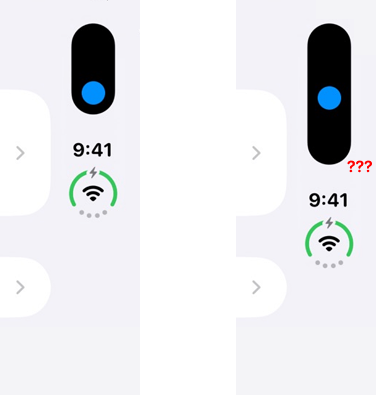
You can imagine this is especially rough on the Duo, where navigation buttons, toolbar buttons, tab bar buttons, etc. are all competing for precious space on the right.
But that’s only half true. It displays perfectly fine (hiding it) when isDynamicIslandLimitedInWidth is false (AKA how it always used to be), but in the new cases where it can be true, like the Duo and iPhones in landscape, that’s when it breaks.
So tl;dr: In iOS 27, Dynamic Island Live Activities are improperly sized if you use the listed EmptyView configuration and isDynamicIslandLimitedInWidth is true. This makes it especially bad on the Duo, womp womp.
Complications
Now, you might be saying “That’s weird, I haven’t seen that behavior! This is nothing but hogwash!”. But it is not hogwash, just a little complicated. There’s basically three categories of apps.
Apple apps
Maps, for instance, displays this single, small Dynamic Island live activity perfectly well and sized, and has been beautifully compiled with the iOS 27.2 SDK. By all accounts it should show this bug, too!
Apple apps don’t have to use the same APIs as us normies, so funnily enough through really cool tools like REA we can disassemble the iOS Simulator and see that it’s in fact true, the Apple Maps live activity just completely bypasses WidgetKit and instead just renders plain UIKit through MapsBannerViewController which shows the cute little cyan widget through a ManeuverAccessoryView and then for the hidden trailing view simply returns a DistanceAccessoryView with CGSizeZero, which iOS actually respects, unlike our paltry SwiftUI EmptyView.
Third-party apps NOT updated to iOS 27
If your app hasn’t been compiled with any of the iOS 27 SDKs, it only knows about iOS 26, and thus doesn’t know about (or have to worry about) the new, troublesome isDynamicIslandLimitedInWidth property, so it just… displays perfectly well.
Here’s the Rivian app, which hasn’t been updated for iOS 27 yet, which shows the Live Activity displaying perfectly sized on the Duo (indicating vehicle charging):
(Technical disassembly detail for the nerds: iOS shows the app’s minimal config, a smaller config normally used when multiple apps are in the Dynamic Island together, rather than the normal compact config, so it bypasses this issue entirely.)
Developers who updated their apps for iOS 27
Unfortunately if you are a good developer who updated their app for iOS 27 and all the new features, you kind of get punished through this bug, because your live activity displays the improperly sized way described above, and you can’t just use raw UIKit like Apple.
So you’re kinda stuck where I am: do I ship a weirdly sized Dynamic Island experience for everyone? Do I shove something extraneous in the compactTrailing spot just so it doesn’t look as empty? Do I not update the app at all until Apple fixes this bug?
Widgets are techincally a separate extension from your main app, so you could compile them with a different SDK (26) than your main app (27) which fixes this bug, but I’m not sure Apple approves of that.
Apple
On the bright side hopefully it’s an easy enough fix, treating EmptyView like you used to on iOS 26 and per the documentation (the part that is weirdly right beside the mention of the new API that introduces this craziness in the first place).
Radar/feedback assistant ID: FB25301955
Easy reproduction code if you’re curious:
import ActivityKit
import SwiftUI
import WidgetKit

struct CircleAttributes: ActivityAttributes {
    struct ContentState: Codable, Hashable {}
}

struct BlueCircle: View {
    var body: some View {
        Circle()
            .fill(.blue)
            .frame(width: 20, height: 20)
    }
}


@main
struct CircleLiveActivity: Widget {
    var body: some WidgetConfiguration {
        ActivityConfiguration(for: CircleAttributes.self) { _ in
            BlueCircle()
        } dynamicIsland: { _ in
            DynamicIsland {
                DynamicIslandExpandedRegion(.center) {
                    BlueCircle()
                }
            } compactLeading: {
                BlueCircle()
            } compactTrailing: {
                EmptyView() // pls respect me
            } minimal: {
                BlueCircle()
            }
        }
    }
}