Why is GitOps so good?

I have done my fair share of tinkering. Poking around in servers and fixing things; iterating through and trying different settings until it finally worked; not to mention clicking around in various cloud portals, only to realise I have no idea how I ended up with the deployment I now have in front of me… “At least it works”, some might say and be content, but not me. What if I need to do this again? Or what if something stops working and I don’t remember exactly how things were configured and therefore cannot see what changed?! Documentation is good (when it’s accurate, unambiguous, and kept up-to-date – which it seldom is) but do you know what’s even better?
$ git log --oneline -1 -- manifests/longhorn/backup.yaml
e958922 longhorn: write pollInterval as 5m0s so Argo stops self-healing

$ git show e958922 -- manifests/longhorn/backup.yaml | grep '^[-+] '
-  pollInterval: "300s"
+  pollInterval: "5m0s"
Code. Code is better.
About a year ago, I wrote a post on the topic of automation, talking about how:
The primary reason to automate something is not to save time, it is to codify knowledge and ensure reproducibility.
I think it’s still worth a read.
In this post, I want to expand on the idea of what can be codified by talking about GitOps.
GitOps
GitOps is the practice of running everything you can “as code”, by utilising best practices from software development, and having an automated way of continuously reconciling the code in all aspects of a product’s tech stack and life cycle.
According to me, that is… If you want a more formal definition, OpenGitOps (v1.0.0) boils GitOps down to four principles.
The desired state of your system is:
- Declarative – A system managed by GitOps must have its desired state expressed declaratively.
- Versioned and immutable – Desired state is stored in a way that enforces immutability, versioning and retains a complete version history.
- Pulled automatically – Software agents automatically pull the desired state declarations from the source.
- Continuously reconciled – Software agents continuously observe actual system state and attempt to apply the desired state.
Most people talk about GitOps in the context of Kubernetes (and so will I) but you can (and should) absolutely apply the above principles even if you don’t run your workloads in Kubernetes. All you need is something like this:

Note that the Agent above is not Claude Code or OpenAI Codex. In Kubernetes, the agent is often a tool like Argo CD or Flux and the act of reconciling your desired state is handled by the agent running kubectl
apply, helm upgrade, or some more esoteric variant of these commands. But there’s nothing hindering you from writing your very own agent, tailored for your specific needs. If you can describe your desired state in code, observe what your actual state is, and figure out a nifty way to automate the reconciliation operation; you’re good to go!
Degrees of deranged
Naturally, you can do GitOps well and you can do it poorly. How well you succeed comes down to how precisely you describe your desired state and how well you implement the three actions your agent will do. I do understand that I am contradicting myself a little bit here, since I started this post saying that code is unambiguous, but stay with me as I give you a (silly?) example showing four different ways to tackle principles 1 and 2 listed above: by ordering a spaghetti bolognese (S&B).
Let’s say you want to run Longhorn in your Kubernetes cluster (and eat a nice plate of S&B at your favourite restaurant). You can achieve this in many different ways:
# 1. YOLO
helm install longhorn longhorn --repo https://charts.longhorn.io \
  --namespace longhorn-system --create-namespace
The name of the chart (longhorn) is the dish, the repository (--repo https://...) is the restaurant. When you run helm install, Helm generates the manifests (recipe) for how to deploy Longhorn, using whatever defaults the maintainers (chef) of the Helm Chart have decided, and applies it to your cluster. Once. Neither Helm nor the chef sticks around to check what happens once they’re done cooking. Maybe you have conflicts in your cluster? (Or the waiter has an accident walking the plate to your table.) And if you try to place the same order again, you’re told that you already have one. The YOLO approach trusts that you’ll get what you want, and that you can order the same thing tomorrow and be equally pleased, by relying on the upstream maintainers.
(OK. This analogy is becoming complex and it’s falling apart on the first example. Bear with me.)
# 2. YOLO, but with preferences
helm install longhorn longhorn --repo https://charts.longhorn.io \
  --namespace longhorn-system --create-namespace --values values.yaml
Now there are some options for you to consider. Some might have reasonable defaults (determined by the maintainer/chef) and there might be options for which you must provide an input. If you save a copy of your choices you can bring it back tomorrow and order the same variant of S&B. But what if the menu has changed? Unless the chef is unusually thorough (i.e., the chart ships a values.schema.json), Helm silently ignores any option it doesn’t recognise. Ask for “extra parmesan” after it has been renamed to “cheese” and you get no cheese, and nobody tells you why.
# 3. Almost respectable
helm upgrade --install longhorn longhorn --repo https://charts.longhorn.io \
  --namespace longhorn-system --create-namespace --values values.yaml --version 1.12.1
The third option is what I would consider good enough or acceptable. You now have the opportunity to say: “I want my S&B to be made with these options and I want you to follow version 1.12.1 of your recipe.” In doing so you can be quite confident that you will get the same S&B every time you order! We also use helm upgrade which allows us to “re-order” the same dish again, and again, and again, circumventing the “you cannot order twice” issue from examples 1 and 2.
Rendered Manifests Pattern
Good enough isn’t great, though. I propose you take this one step further, because there’s still room for interpretation and for things to be modified. For instance, what happens if the chart generates a password using randAlphaNum? Every helm upgrade renders a new one, and your login is silently rotated. Or what if the chart references a mutable image tag, like latest, or the maintainer re-publishes 1.12.1 with a “small fix”? Your command is identical, but the result is not. And since helm upgrade renders and applies in a single step, you never get to see the manifests before they hit your cluster.
This is why I encourage you to follow the Rendered Manifests Pattern. Nothing is applied from a URL or using helm directly. Instead, every component is vendored into the repository:
CHART_VERSION := 1.12.1
NAMESPACE     := longhorn-system
REPO          := https://charts.longhorn.io

render:
	helm template longhorn longhorn \
	 	--repo $(REPO) \
	 	--version $(CHART_VERSION) \
	 	--namespace $(NAMESPACE) \
	 	--values values.yaml > base.yaml
	kustomize build . > rendered/out.yaml
Running helm template is like asking the chef for the exact recipe for the S&B. What ingredients? How much of each? Exactly how to prepare and cook the dish? Naturally, you then ask the chef (the agent) to do the actual cooking… but at least you have the instructions. If your dish all of a sudden does not live up to your expectations, you can compare and see what changed from last time you ate it.
OK. I’m dropping the cooking analogy here…
The key takeaway here is that by running helm template we can extract the exact recipe – the verbatim Kubernetes manifests – to disk, for inspection. In the snippet above, this is done using a Makefile so you can: bump the version, run make render, then check git diff base.yaml to see what changed in the new upstream version. If you want to make alterations to the manifests you can use Kustomize and ensure you do the same alterations, the same way, to every new version of the application, and write the output to a file like out.yaml. Now you have exactly your new desired state and can run git diff out.yaml to see what your agent will reconcile towards.
I want to make it crystal clear though: The point is not the tooling. The point is that the change you review and commit should be the exact change that your agent runs.
Keep on reconciling. Keep on reconciling.
The purpose of the continuous reconciliation in principle four is two-fold:
- If there is a way to do manual alterations to your application, principle four ensures those alterations are not persistent. The code shall always win!
- If your agent observes that your application keeps diverging from its desired state, something is likely wrong with your deployment.
The most recent case – in the very cluster I use for my own development – was when Argo was syncing Longhorn roughly 288 times a day, on a repository nobody had touched. It turned out that I had written pollInterval: 300s in Longhorn’s BackupTarget manifest. Longhorn parses that value and writes it back in canonical form: 5m0s. Argo saw drift on a field it owned and “fixed” it. Five minutes later Longhorn “fixed” it back. Forever.
Without reconciliation, that disagreement would never have surfaced. I changed the pollInterval to 5m0s in the config and made my deployment just a little bit better. In this case it was not a big issue, but the point was still made clear: GitOps doesn’t just deploy your config, it audits it. Constantly.
Bootstrapping
Regardless of whether you use a Kubernetes cluster or adhere to GitOps in another environment, there is a bootstrap problem: Somehow you need to set up your agent, maybe some pipelines, and the environment itself. In the environments I manage I talk about being above or below the GitOps line.
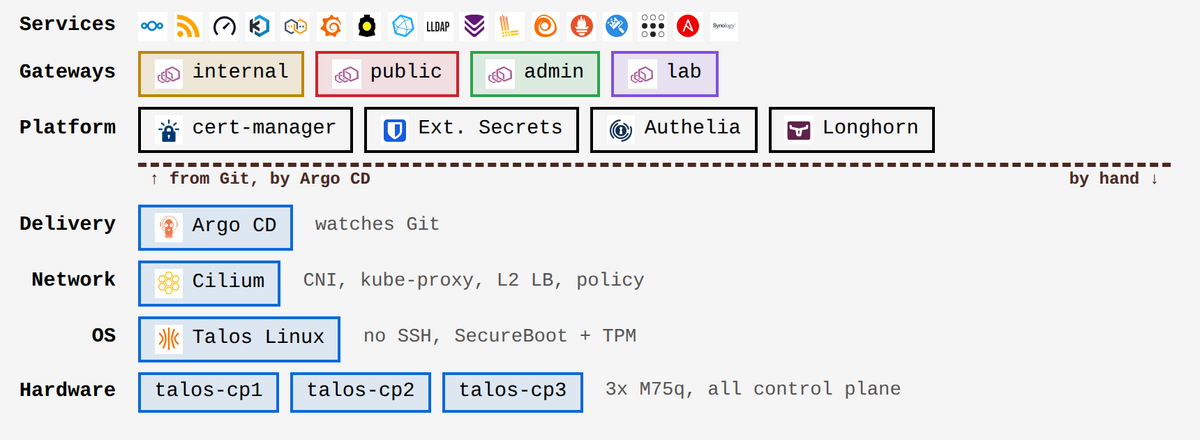
In the cluster I manage for my own business, Talos (my operating system of choice), Cilium and Argo CD itself are below the GitOps line and therefore installed “by hand”. Technically, the bootstrapping could’ve been to install Cilium and Argo once and then let Argo reconcile those deployments as well, going forward. I don’t like that approach. I believe that the agent should not be able to break itself (at least not too easily) and therefore I refrain from having the agent manage things that are part of its own bootstrapping.
Naturally, I don’t just wing the bootstrapping! Here’s the Makefile in my bootstrap/ directory:
.PHONY: render
render:
	$(MAKE) -C gateway-api-crds render
	$(MAKE) -C cilium render
	$(MAKE) -C argocd render
and in each subdir there’s another Makefile. Here’s the one for Cilium:
VERSION   := 1.20.2
NAMESPACE := kube-system
REPO      := https://helm.cilium.io
HELM      ?= helm
KUSTOMIZE ?= kustomize

.PHONY: render base l2
render: base l2

base:
	$(HELM) repo add cilium $(REPO) >/dev/null
	$(HELM) repo update cilium >/dev/null
	$(HELM) template cilium cilium/cilium \
	 	--version $(VERSION) \
	 	--namespace $(NAMESPACE) \
	 	--values values.yaml > base.yaml
	$(KUSTOMIZE) build . > out.yaml

l2:
	$(KUSTOMIZE) build l2 > l2/out.yaml
Whenever I want to make a change to Cilium I update the Makefile, I render the manifests, I diff them against main, and if everything is to my liking, I run kubectl apply. I want to adhere to the GitOps principles as much as possible, even when I don’t let an agent be in charge of the reconciliation. The price is that principles three and four no longer hold below the line: nothing pulls, nothing reconciles, so if someone (me) fat-fingers something, the cluster drifts from main and stays that way until the next time I apply.
GitOps has a cost
As with all things that are worth doing, there’s a cost. And as always, the result you get is a function of what you put in. If you YOLO your deployments and ask for whatever S&B the chef feels like making today, you might get a tasty dish, but you will most likely not get the same dish twice; nor will you know what’s in it. Determinism is imperative. If you follow the Rendered Manifests Pattern you must put some effort into ensuring two consecutive renders are identical, or the pattern falls apart.
I’m hesitant to say that there’s a learning curve to using GitOps or even the Rendered Manifests Pattern. Sure, you need to write code to do the actual rendering and you need to set up the agent – so there is work that needs to be done – but the pattern ultimately asks you to use simpler primitives: plain, easy-to-read Kubernetes manifests as opposed to complex Helm charts. But I shall not shy away from the fact that there are more pieces to lay. The huge benefit is that the pieces stay where they are once you’ve placed them. (Yet another analogy? Well…)
All I can say is: It is not only worth it, it’s a necessity once your environment becomes even slightly complex.
Conclusion
So, why is GitOps so good?
The short answer is: Because code, when written well, is unambiguous, and ambiguity has no place in software life cycle management.
The longer answer is that being able to reproduce your entire tech stack (like a Kubernetes cluster) and every setting, policy and application inside of it is amazing, and having an agent that constantly audits that it stays that way is even better. Pair GitOps with a good backup strategy and you have the foundation for an excellent disaster recovery plan. I have backup jobs (as code, naturally) and jobs that verify my backups (also as code, duh) running regularly. If my cluster were deployed on a virtual platform, I could have everything up and running, and data read back from off-site backups, in a matter of hours. Can your business do that? If you need to get people to keyboards and start installing stuff by clicking around, you probably cannot.
BTW: I plan a post on the topic of observability, which is one that I hold as dear as I do GitOps. Keep your eyes peeled!

 点赞
点赞 收藏
收藏 点踩
点踩 分享
分享