Start Your Next KMP App With Kotlin Toolchain 0.13

The Kotlin Toolchain is a unified entry point into Kotlin. It lets you build JVM, Android, iOS, multiplatform, and server-side applications with a simple declarative configuration.
With the release of v0.13, we now recommend the Kotlin Toolchain for most new Kotlin Multiplatform (KMP) projects.
Earlier this year, we promoted the Kotlin Toolchain to Alpha. Since then, our Slack channels and issue tracker have been very active. So many of you in the community have joined us to create a great build experience for Kotlin. Thank you – your continuous feedback helped us get here!
Not using the Kotlin Toolchain yet? Experience automated environment setup and an intuitive CLI that works well with your AI agents.
To access the latest Kotlin Toolchain features from your IDE, use IntelliJ IDEA 2026.2.3, Android Studio Rabbit 1 | 2026.2.1 (or newer). Make sure the latest version of the Kotlin Toolchain plugin is installed.
How the Kotlin Toolchain simplifies getting started
Getting started with Kotlin Multiplatform often means working with unfamiliar platforms. Android developers might be discovering iOS for the first time, while other teams are expanding to web or desktop. Every platform comes with its own tools to install and build configurations to understand.
The Kotlin Toolchain changes that. It is a single CLI entry point for configuring the environment, creating, building, testing, and publishing your KMP apps and libraries. It comes with a declarative project configuration and set of all necessary tools – everything you need in one place.
In recent releases, we’ve refined the CLI and IDE experiences, added support for web and cinterop, and made many other improvements based on your feedback. Our internal dogfooding and positive community feedback have given us the confidence to recommend it for new projects!
We’ll feature the Kotlin Toolchain in our KMP getting started guides, web and IDE project wizards. These updates will make it easier for both developers and AI agents to select the Kotlin Toolchain when it’s most appropriate for the task at hand.
Direct support for agentic workflows
From early on, we designed the Kotlin Toolchain to be reliable and easy to use for both developers and IDEs. It turns out that the automatic environment setup, declarative configurations, and clear, actionable error messages provide an ideal foundation for AI agents as well.
We’ve taken this further by introducing a Hot Reload MCP server and dedicated AI agent skills, included in the official AI agent skills for Kotlin. You can install them with:
npx skills add kotlin/kotlin-agent-skills
Eventually, these skills will be delivered directly through the Kotlin Toolchain. In our benchmarks, AI agents already generate and maintain Kotlin Toolchain projects more reliably while consuming fewer tokens.
What’s new in the 0.13 release
New project creation with kotlin new
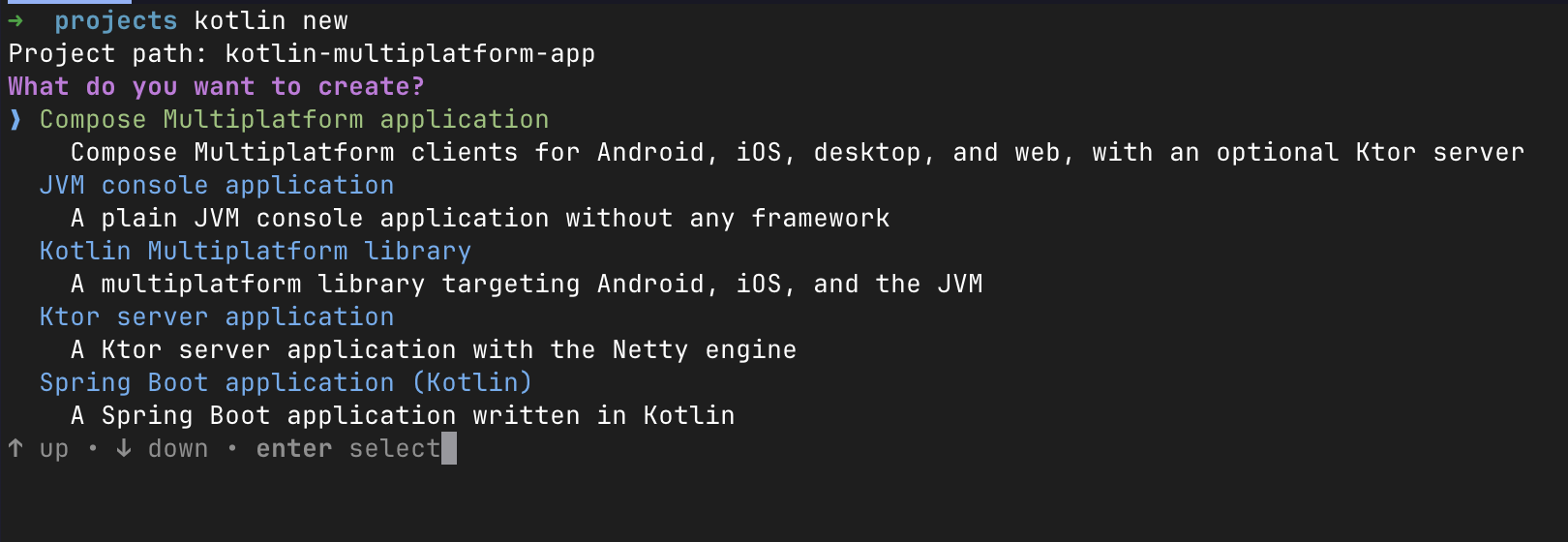
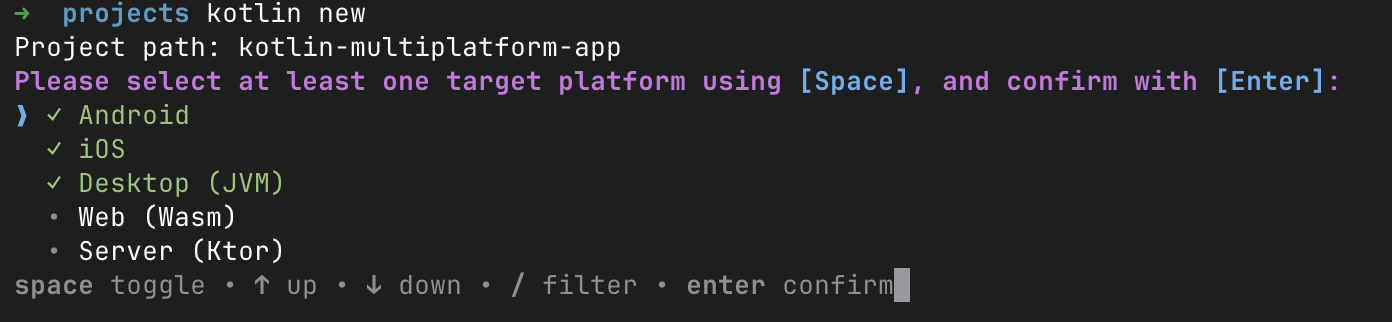
Version 0.13 introduces the kotlin new command, offering an interactive setup flow similar to the Kotlin Multiplatform Wizard. Note that the kotlin init command remains available; it has been updated to match the behavior of kotlin new, but it generates project files directly inside your current directory.
When you run kotlin new, the first prompt asks you to select your application type:
For Kotlin Multiplatform applications, you can choose your target platforms in the second step:
Better onboarding UX for iOS applications
Setting up iOS applications on a clean machine is now significantly smoother:
- Better Xcode installation diagnostics: Get clear, actionable messages regarding Xcode license acceptance and first-run status.
- iOS simulator runtimes are downloaded automatically when needed. An iOS simulator is created automatically if none exists.
Download progress reporting in the CLI
The TUI now displays rich download progress bars when the Kotlin Toolchain downloads required tools, such as JDKs, Android SDK components, iOS runtimes, and compilers.

Android improvements
In previous versions, the Android SDK was automatically provisioned when running kotlin build or kotlin run but not when opening the project in an IDE. If you opened a project in your IDE before running a build, missing SDKs could cause setup errors.
We have aligned CLI and IDE behavior, and the Kotlin Toolchain now automatically provisions missing Android SDK components on project import.
Additionally, we’ve also tightened validation for namespace and application ID definitions so you don’t accidentally publish app or library builds with sample IDs like com.example.app.
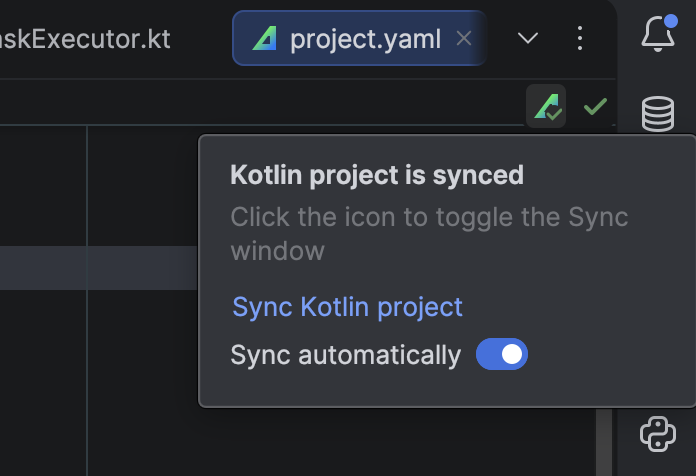
Sync status in the IDE editor
You can now monitor the current IDE sync status inside your file editor:
SPM import
The Kotlin Toolchain now supports Swift Package Manager dependencies for Apple platforms.
Modules with Apple platform support (e.g. kmp/lib, ios/app) can import Objective-C APIs from Objective-C and Swift code using SwiftPM dependencies:
product: ios/app

dependencies:
  - swiftPackage:
      repository: "https://github.com/firebase/firebase-ios-sdk.git"
      version: "12.17.0"
      products: [ "FirebaseCore", "FirebaseFirestore", "FirebaseAnalytics" ]
Imported Objective-C APIs are namespaced using the swiftPMImport prefix and ending with the module name:
// app/src/app.kt
import swiftPMImport.app.FIRAnalytics
import swiftPMImport.app.FIRApp
Kotlin Toolchain also supports local SwiftPM packages using the localSwiftPackage key. See our documentation for more details.
Multiplatform library publication improvements
When publishing multiplatform libraries, your Compose Resources and SwiftPM dependencies metadata are published along with your build artifacts.
Compose Resources are also resolved from third-party multiplatform libraries.
Kotlin/Native compiler caches
Kotlin/Native rebuilds just got faster. With KTC-5422, the Kotlin Toolchain caches compiled native dependencies and reuses them across builds and even across projects. Project code gets per-file caches, letting the compiler rebuild only the affected code during linking. Once the caches are populated, small edits mean less work and faster edit–build–run cycles for native apps and tests.
The feature uses the existing settings.kotlin.compileIncrementally setting and supports non-optimized debug binaries on compatible targets. Compilation to .klib files continues to run in full.
What’s next for the Kotlin Toolchain and KMP
We have some exciting milestones on our roadmap, including:
- Installing the Kotlin Toolchain via
brew install kotlin. - Providing AI skills out of the box.
- Supporting Swift Export as it stabilizes.
- Streamlining and automating app store publishing workflows.
Much of our immediate focus will be on understanding new user feedback and closing existing gaps, including those for existing Gradle projects, before recommending migrations.
To achieve this, we want to hear from you! As we refine the functionality, some changes may require adjustments to your projects, and we’ll do our best to support you through those migrations and make them as smooth as possible.
Join the conversation in the #kotlin-toolchain Slack channel (get invite: kotl.in/slack) or share your suggestions and ideas in JetBrains YouTrack. Your input and use cases help shape the future of the Kotlin Toolchain!
Install Kotlin Toolchain 0.13.0
Ready to give the Kotlin Toolchain a go? Check out our Getting started guide to dive into code examples, tutorials, or our comprehensive user guide.
Already using the Kotlin Toolchain? Simply run kotlin update in your terminal to upgrade.

 点赞
点赞 收藏
收藏 点踩
点踩 分享
分享