
Folders for Marked Share
'%20fill-opacity='.8'%20d='M3.256%203.913a3.083%203.083%200%200%200-.003%204.397L8%2012.998l4.743-4.684a3.085%203.085%200%200%200%20.001-4.4c-.6-.593-1.4-.914-2.233-.914a3.17%203.17%200%200%200-1.91.635L8%204.087l-.601-.452A3.17%203.17%200%200%200%205.489%203c-.834%200-1.634.321-2.233.913m10.19%205.111-4.748%204.69a.996.996%200%200%201-1.397%200L2.549%209.02a4.083%204.083%200%200%201%20.004-5.82A4.17%204.17%200%200%201%205.488%202c.907%200%201.787.29%202.512.835A4.17%204.17%200%200%201%2010.51%202c1.093%200%202.146.422%202.936%201.202a4.085%204.085%200%200%201%200%205.822'%20/%3e%3c/svg%3e)
'%20stroke-opacity='.75'%20stroke-width='1.5'%20stroke-linejoin='round'/%3e%3c/svg%3e)

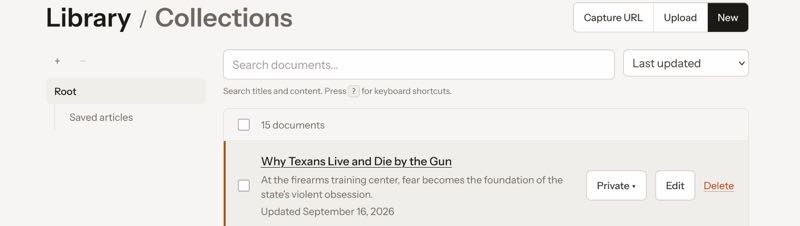
Marked Share finally has folders. Not collections pretending to be folders. Actual places a document can live in your library, nested the way a notebook app would nest them.
I have been wanting this for a while, mostly because I keep thinking about nvUltra. One folder on disk, one library on Share, and someday a real two-way sync, kind of like Simplenote.
What shipped
Your library is no longer a flat pile. You can make folders, nest them, drag documents in, and filter the list by the folder you are looking at. Empty folders exist too. That sounds obvious until you remember that a lot of “folder” APIs only exist as a side effect of the last file you saved.
On the web, the sidebar is a tree. Selecting a folder shows that folder and everything under it. Documents still have a title. The folder is just where the file sits.
A document still belongs to one folder, or to the library root if you leave it unfiled. Collections are unchanged. They are still the shareable lists and blogs. A note can live in Work/Client A and also appear on a public collection. Those are different jobs.
How a path works
Internally each owned document has a library_path. The stored value is the full file path: folder plus a leaf taken from the title.
If you file “Meeting notes” in Work/Client A, Share stores:
Work/Client A/Meeting notesSlashes in a title become ` - , because a slash is how nesting works. Two documents with the same title in the same folder become Meeting notes and Meeting notes 2`. The title you see does not change. Only the path leaf does.
Root is not a fake folder named “Library.” No folder means the stored path is just the title. That is the same as today’s unfiled document.
Folders are first-class now
The first slice of this was “path on the document.” That is enough to display a tree, but it is a terrible sync primitive. You cannot list an empty folder. You cannot create Inbox without publishing a dummy file into it. An app that wants to offer a picker has nothing to fetch.
So folders are their own records now. Compatible apps can list them and create them without touching a document.
GET /api/v1/folders
Authorization: Bearer YOUR_TOKEN
[
  { "path": "Inbox" },
  { "path": "Work" },
  { "path": "Work/Client A" }
]
No ids. No nested JSON. Identity is the path string. Split on / and build a tree on the client. Counts stay small, so that is fine.
Create is one request for the full path. Missing ancestors appear automatically. If the path already exists, you get 200 instead of an error, so “make sure this folder is there” is safe to call every time.
POST /api/v1/folders
Authorization: Bearer YOUR_TOKEN
X-Device-Key: YOUR_DEVICE_KEY
Content-Type: application/json

{ "folder": { "path": "Work/Client A" } }
When you publish a document, send the folder only. Do not send Work/Client A/My Title. Share composes the leaf from the title.
{
  "document": {
    "title": "Shared from Marked",
    "body_markdown": "# Hello",
    "visibility": "unlisted",
    "library_path": "Work/Client A"
  }
}
One sharp edge: a brand-new single segment like Brand New is treated as a filename, not a folder, unless you created that folder first. If Marked (or nvUltra) wants “New folder…”, it sends POST /folders and then publishes.
You can also list the documents in a folder and its descendants with GET /documents?folder=Work. Unknown folder is 404. Empty folder is an empty page, not “here is your entire library.” That distinction matters if an app is about to sync.
What the web already does
The library page is the reference implementation. You can create a folder from an empty row, drag a document onto a folder, drag a folder onto another folder (or out to the root), and delete a folder after a confirm. Delete can refile the documents or take them with the folder.
Search still works across the library, and it matches path as well as title. Click a result and you are in the right place.
The document editor no longer asks you to type Folder 1/File 1 by hand. There is a folder picker. Finish editing still handles collections separately, which is the point.
Why this is not sync yet
Two-way folder sync is a different product. nvUltra would need to:
- map a local directory tree onto these paths
- create and rename folders
- pull
GET /documents?folder= - push creates and updates with
If-Match - decide what a conflicted copy looks like when both sides changed
Share has optimistic concurrency already. Captures and Marked publishes already send a device key so a 409 can say which machine won. Folders give those documents a place to sit that looks like a disk.
What I have not shipped, on purpose:
- rename, move, or delete folders over the API
- children-only document lists (no
depth=1yet) - nested folder JSON from the server
- webhooks
- a “this folder is the nvUltra library” setting
If I bolted a sync client onto path-on-document alone, empty folders would vanish, “new folder” would require a dummy note, and a rename would be a guess. First-class folders are the boring foundation. Sync can lie less if the server actually knows the tree.
Where this goes
Marked will grow a folder picker next to the collection picker on Publish. Same credentials as today. Additive. If the folders request fails, publish like it always has and file at the root.
After that, something like nvUltra can treat a Share folder as a remote notebook. One local folder, one remote path, then maybe several pairs. Multi-folder sync is the dream. I am not going to pretend the API is a Dropbox replacement this week.
I am going to keep the paths simple, keep collections out of that job, and keep If-Match in the write path. When two-way sync does show up, I want it to be a client on top of this, not a second filing system I have to migrate.
The public notes are on the under Folders. If you want to try wiring an app, start there.
Like or share this post .
BrettTerpstra.com is supported by readers like you. Click here if you'd like to help out.
Find Brett on Mastodon, Bluesky, GitHub, and everywhere else.