
Abusing CD-Rs, DVD-Rs, and BD-Rs for Science
'%20fill-opacity='.8'%20d='M3.256%203.913a3.083%203.083%200%200%200-.003%204.397L8%2012.998l4.743-4.684a3.085%203.085%200%200%200%20.001-4.4c-.6-.593-1.4-.914-2.233-.914a3.17%203.17%200%200%200-1.91.635L8%204.087l-.601-.452A3.17%203.17%200%200%200%205.489%203c-.834%200-1.634.321-2.233.913m10.19%205.111-4.748%204.69a.996.996%200%200%201-1.397%200L2.549%209.02a4.083%204.083%200%200%201%20.004-5.82A4.17%204.17%200%200%201%205.488%202c.907%200%201.787.29%202.512.835A4.17%204.17%200%200%201%2010.51%202c1.093%200%202.146.422%202.936%201.202a4.085%204.085%200%200%201%200%205.822'%20/%3e%3c/svg%3e)
'%20stroke-opacity='.75'%20stroke-width='1.5'%20stroke-linejoin='round'/%3e%3c/svg%3e)

I’ve been on an optical media kick lately, having a grand old time burning discs and whatnot. One bit of advice that consistently comes up: don’t let your burned discs get exposed to sunlight; the dye layer is UV after all, and since the sun is a deadly laser it can damage your precious bits.
Naturally, this advice needs to be tested to determine what actually happens if you disregard it.
I had a friendly LLM shart out some scripts to generate max-size iso images and sha256sum them from the disc, and burned using k3b:
- Verbatim CD-R (at max speed, 40x)
- Verbatim CD-RW (at max speed, 40x)
- Verbatim DVD-R (at max speed, 16x)
- I also have a second DVD-R that long story short had 615 buffer underruns while burning. It passed verification, but it seemed like a poor test subject. I exposed it though because it would be interesting if using Burnfree made it degrade faster
- Verbatim BD-R (at max speed, 12x)
The CD and DVD were burned with a brand new (old stock) Hitachi-LG data storage GHD0N, the Blu-ray with a brand new LG WH16NS60. The blanks were also just purchased from Amazon, so hopefully they are fresh.
I verified each burn with k3b as well as my slop-script, and placed them in a ziplock baggie (so they don’t get physically dirty and ruin by readers) with the media side facing west in a window. They’ll get blasted by the sun for hours each day, and are physically warm to the touch.
I’ll update this post as I go along.
Updates
2026-09-06
Hung the discs in the window.
2026-09-21
Finally had time to check on these. Looks like I waited too long.
- CD-R: Read fine
- CD-RW: Read fine
- DVD-R: I could tell these were toast before I even put them in the drive. Visibly discolored ring around the middle, and an odd intrusion on the side of one as well. No longer have a blue tint.
- BD-R: Didn’t seem visibly damaged and my drive still recognizes it. The sector analysis software was able to get at least one good sector off of it after retying a few times, but it seems like this disc is toast too. Scan tool output</summary>
</details>Comparing 12219392 sectors from /dev/sr2 against /optical-stress-bd-r.iso Scan plan: start LBA=0, forward with wrap, chunk=256 sectors (524288 bytes), slow-read warning=5s Loading first source chunk: LBA=0-255 offset=0 bytes=524288 Reading first device chunk: LBA=0-255 offset=0 bytes=524288 Slow device read: phase=chunk LBA=0-255 offset=0 bytes=524288 elapsed=5s; optical drive or kernel may be retrying Slow device read: phase=chunk LBA=0-255 offset=0 bytes=524288 elapsed=10s; optical drive or kernel may be retrying device read returned: phase=chunk LBA=0-255 read=0/524288 elapsed=10.3s error=read /dev/sr2: input/output error Chunk read failed: LBA=0-255 read=0/524288 elapsed=10.3s error=read /dev/sr2: input/output error; bisecting range Slow device read: phase=recovery LBA=0-127 offset=0 bytes=262144 elapsed=5s; optical drive or kernel may be retrying Slow device read: phase=recovery LBA=0-127 offset=0 bytes=262144 elapsed=10s; optical drive or kernel may be retrying device read returned: phase=recovery LBA=0-127 read=262144/262144 elapsed=10.7s error= Compared 256 / 12219392 sectors (0.0%); last LBA 0-255; good=256 bad=0; 0.02 MiB/s; elapsed=26s ETA=342h31m10s Chunk read failed: LBA=512-767 read=65536/524288 elapsed=4.8s error=read /dev/sr2: input/output error; bisecting range Unreadable sector: LBA=544 read=0/2048 elapsed=1.5s error=read /dev/sr2: input/output error (unreadable count=1) Unreadable sector: LBA=545 read=0/2048 elapsed=1.9s error=read /dev/sr2: input/output error (unreadable count=2) Unreadable sector: LBA=546 read=0/2048 elapsed=1.7s error=read /dev/sr2: input/output error (unreadable count=3) Unreadable sector: LBA=547 read=0/2048 elapsed=1.8s error=read /dev/sr2: input/output error (unreadable count=4) Unreadable sector: LBA=548 read=0/2048 elapsed=1.7s error=read /dev/sr2: input/output error (unreadable count=5) Unreadable sector: LBA=549 read=0/2048 elapsed=1.6s error=read /dev/sr2: input/output error (unreadable count=6) Unreadable sector: LBA=550 read=0/2048 elapsed=1.6s error=read /dev/sr2: input/output error (unreadable count=7) Unreadable sector: LBA=551 read=0/2048 elapsed=1.4s error=read /dev/sr2: input/output error (unreadable count=8) Unreadable sector: LBA=552 read=0/2048 elapsed=1.2s error=read /dev/sr2: input/output error (unreadable count=9) Unreadable sector: LBA=553 read=0/2048 elapsed=1.7s error=read /dev/sr2: input/output error (unreadable count=10) Compared 768 / 12219392 sectors (0.0%); last LBA 512-767; good=692 bad=76; 0.00 MiB/s; elapsed=5m56s ETA=1574h43m27s Chunk read failed: LBA=768-1023 read=0/524288 elapsed=2.8s error=read /dev/sr2: input/output error; bisecting range Compared 1024 / 12219392 sectors (0.0%); last LBA 768-1023; good=930 bad=94; 0.00 MiB/s; elapsed=7m20s ETA=1458h25m20s Slow device read: phase=chunk LBA=3072-3327 offset=6291456 bytes=524288 elapsed=5s; optical drive or kernel may be retrying device read returned: phase=chunk LBA=3072-3327 read=65536/524288 elapsed=6.4s error=read /dev/sr2: input/output error Chunk read failed: LBA=3072-3327 read=65536/524288 elapsed=6.4s error=read /dev/sr2: input/output error; bisecting range Unreadable sector: LBA=3109 read=0/2048 elapsed=2.4s error=read /dev/sr2: input/output error (unreadable count=100) Slow device read: phase=recovery LBA=3200-3263 offset=6553600 bytes=131072 elapsed=5s; optical drive or kernel may be retrying device read returned: phase=recovery LBA=3200-3263 read=65536/131072 elapsed=5.8s error=read /dev/sr2: input/output error ^Cmake: *** [Makefile:86: map-bd-r] Interrupt
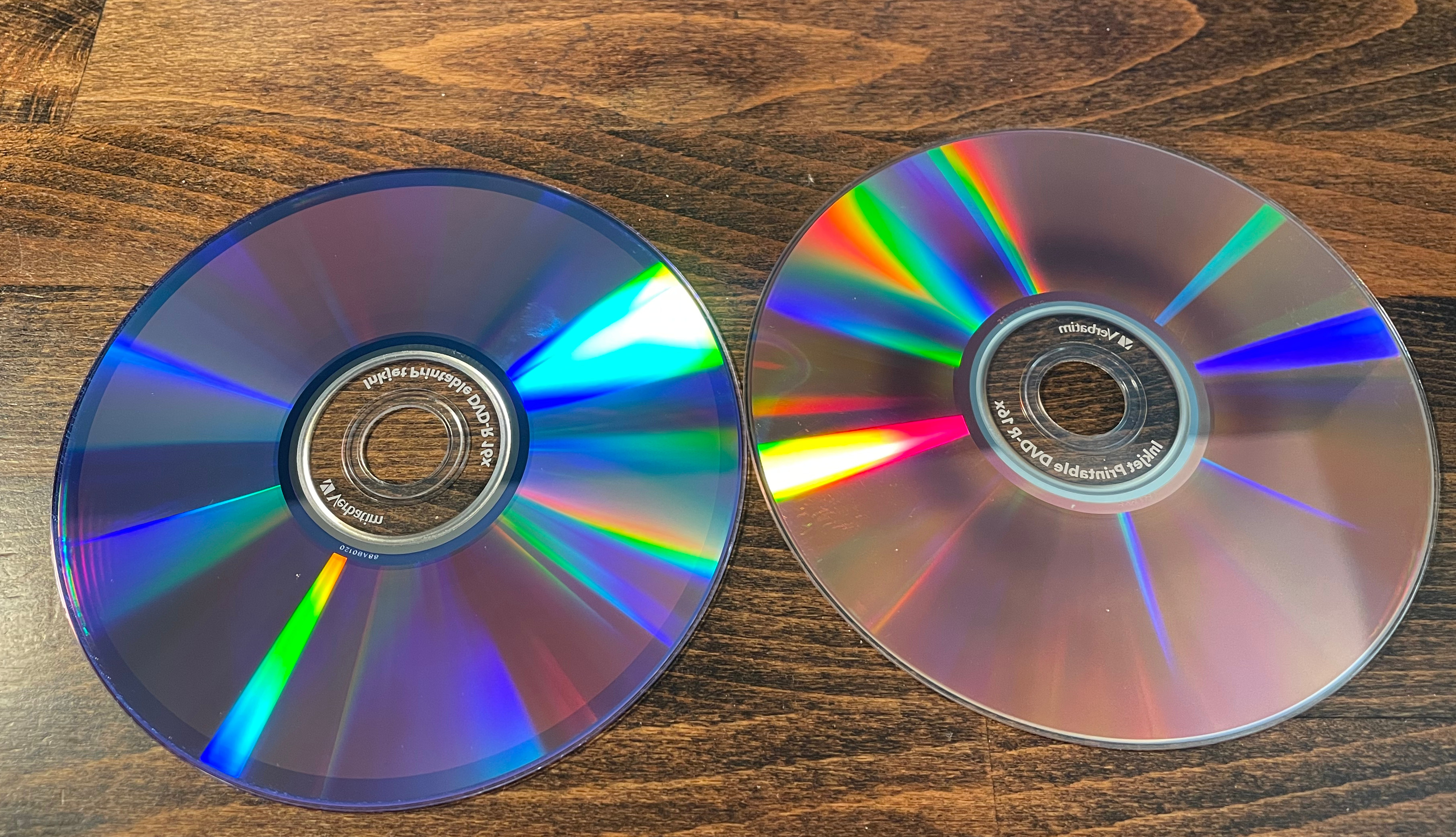
I’ll hang them back up and check in again later.