
Beyond jj: config & tools ecosystem
'%20fill-opacity='.8'%20d='M3.256%203.913a3.083%203.083%200%200%200-.003%204.397L8%2012.998l4.743-4.684a3.085%203.085%200%200%200%20.001-4.4c-.6-.593-1.4-.914-2.233-.914a3.17%203.17%200%200%200-1.91.635L8%204.087l-.601-.452A3.17%203.17%200%200%200%205.489%203c-.834%200-1.634.321-2.233.913m10.19%205.111-4.748%204.69a.996.996%200%200%201-1.397%200L2.549%209.02a4.083%204.083%200%200%201%20.004-5.82A4.17%204.17%200%200%201%205.488%202c.907%200%201.787.29%202.512.835A4.17%204.17%200%200%201%2010.51%202c1.093%200%202.146.422%202.936%201.202a4.085%204.085%200%200%201%200%205.822'%20/%3e%3c/svg%3e) 3
3'%20stroke-opacity='.75'%20stroke-width='1.5'%20stroke-linejoin='round'/%3e%3c/svg%3e)

This post was originally given as a talk at JJ Con 2026. The slides are also available.
Hello! Welcome to “beyond jj”, where we’re going to take a look at the jj ecosystem: commands, configurations, and tools made to work with jj. It’s partly a follow-up to my talk at JJCon last year, where I surveyed jj configurations across the community, but we’ll get there in a minute.
My practical qualifications to give a talk about jj basically come down to “I like trying new things, and I’m very excited about jj”. My impractical qualifications to give a talk about jj come down to “Steve Klabnik was my roommate once, so I can ask him to put my ideas into the official jj docs”. Thanks in advance, Steve!
Like I mentioned, this talk is partly a sequel to last year’s talk, where we worked through the entire idea of jj configuration, from configuring your name, to templates, revsets, commands, and aliases. We even managed to briefly touch on aliases that wrap shell scripts that wrap python scripts that automate workflows – aliases can be quite complex.
This year I’m going to talk less about what jj config is, and talk more about the bigger question: once you have jj, what do you do with it? we’ll start by looking at things you can do with pure jj, move on to things you can do by configuring jj, and wrap up by looking at things you can do completely outside the jj CLI itself.
Some of these things are mentioned in the jj docs, some of these things are mentioned in the jj wiki, some of these things are mentioned in the awesome jj git repo, but no source has pulled all of them together before. Plus I have a bunch of additions that weren’t listed in any of those places, as well.
inside jj
You can do a truly surprising amount with jj even if you never add another tool, helper, or script. By adding custom templates, revsets, and aliases, you can shorten or automate quite a bit. Beyond the jj config that we talked about last year, the biggest things I want to report on are things added to jj core that previously required external scripts or tools.
First, let’s talk about features that moved from config to built-ins.
jj bookmark advance / jj b a
Last year, I talked about jj tug, an alias that looked for the closest bookmark and then moved it to the closest pushable change. I’m happy to report that today we don’t need tug anymore, because jj bookmark advance (and the shortcut jj b a) now do the same thing that tug used to do. By default, bookmark advance will advance the bookmark to the working copy. If you prefer the version of tug that only advances to the closest pushable commit, you can configure revsets.bookmark-advance-to and set it to the same pushable revset.
jj bisect run
The jj bisect tooling pulled in something that used to require a wrapper script, and you can now bisect run to automatically find the change that you’re trying to bisect for. In my personal opinion this was a big functionality gap between jj and git, so I’m very glad to see it integrated now without any need for fiddling to hunting down a script.
jj run
What if you don’t need to bisect, but you still want to run a script to modify every change in a revset? that’s what jj run is for, give it a script and a revset, and the script will get run, and every change will get updated if any files were modified. The entire tree of changes will stay unchanged (or, seen from another angle, will be automatically rebased as the run progresses through each change).
jj fix
But wait, you’re probably thinking. Don’t jj fix and jj run do the same thing? take a range of changes and update those changes by (potentially) modifying the files in those changes? Sort of, but not really.
jj fix exists specifically to make changes only to files that were changed. it doesn’t create a checkout of each change, and it only provides a single file at a time to the script, accepting a modified version of the file as output.
if you need a checked out set of files on disk to run a script against, jj fix can’t do that. but if what you want is to retroactively apply a formatter or a linter to every file that changed, across a whole revset, jj fix is going to be incredibly faster than jj run.
jj tag
jj tag is an example of functionality moving inside jj not from a config or a script, but from git itself. You don’t have to use git tag to manage your tags anymore, you can now use jj tag set and jj git push --all to push all your bookmarks and tags. (You can also push a single tag, with jj git push --tag NAME). Now that we have jj tag, my own day to day work no longer includes running the git command at all. Great progress since last year, everyone!
jj arrange
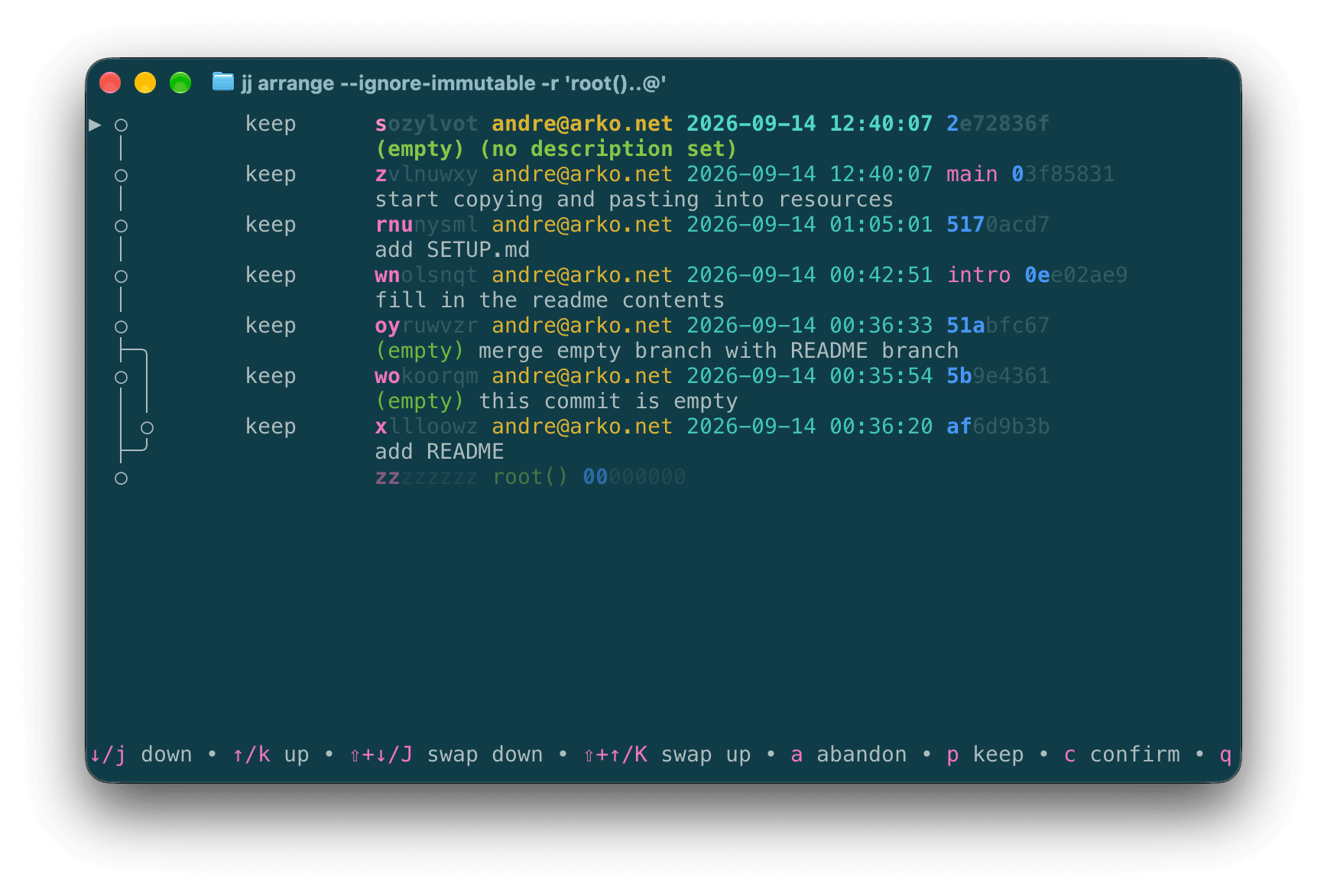
jj arrange is like having git rebase -i but interactive. you don’t have to edit a text file, you can just select or move the changes directly around in a log-like graph. It’s great to save time if you don’t want to run three commands to look up the name and move a recent change.
jj converge
The converge command is the newest but possibly the most useful. Any time you update a change in two separate places, it can diverge. When I gave my talk a year ago, divergent changes were a huge pain to deal with — we didn’t have the /N syntax to easily refer to each side of the divergence, and it was easy to accidentally diverge by running a command from two different terminal windows at the same time, or by pulling a remote branch.
Today, it’s not only much easier to refer to divergent changes, hopefully making it easy to rebase or combine the branches, you might not even have to do that! the converge command tries to take the two divergent change streams and combine them into a single non-divergent change stream. This might create merge conflicts, but better a merge conflict than two separate branches that you have to manually reconcile. I’m personally very excited to have converge and to be able to use it in the future.
around jj
Now let’s move beyond things that are fully intrinsic to jj and take a look at things that are integrated with the jj CLI.
subcommand aliases
The first kind of integration I’d like to talk about is a just incredible hack to allow jj aliases to have subcommands. This is taken from a comment by @tjjfvi on issue #6611. The core conceit is that jj will let you define an alias command that contains a space, so you can do a jj → jj → jj → bash → jj execution flow.
aliases.subcommand = ["util", "exec", "--", "bash", "-c", 'jj "$0 $1" "${@:2}"']
aliases.foo = ["subcommand", "foo"]
aliases."foo bar" = ["..."]
aliases."foo baz" = ["..."]
So after you’ve set up this config, you can run:
jj foo bar ARGS
which will run the alias named foo, but that’s an alias, so it transforms into:
jj subcommand foo bar ARGS
and then subcommand is also an alias, so that expands to:
jj util exec -- bash -c 'jj "foo bar" ARGS'
which of course, after you strip the wrapping jj and then the wrapping bash, works out to the command:
jj "foo bar" ARGS
and of course that is the subcommand alias that we defined, so now our subcommand runs! This is completely deranged and I love it.
Hopefully next year I’ll be able to report that we now have built-in support for some kind of subcommands. But even if not, we can configure our own subcommands successfully for now!
something like git push
The next category of aliases that are incredibly popular (even though they aren’t always identical) is manually recreating git push. That almost always means:
- some kind of preflight check (hook run? pushable? bookmark?)
- some kind of
tug, no, wait,bookmark advance - some kind of pushing the bookmark to the origin
- some kind of tracking the bookmark if not tracked
publish = ["util", "exec", "bash", "--", "-c", '''
  jj git-hooks-run-pre-push @ &&
  jj bookmark advance -t 'closest_pushable(@)' &&
  jj git push -b 'closest_bookmark(@)' &&
  jj track-if-untracked 'closest_bookmark(@)'
''']
My current position is that this is now the biggest gap in jj’s built-ins. I realize that you can create and push a branch with push -c, but that doesn’t give you a human name for discussion or review.
If there’s a heroic person out there thinking about contributing to jj in the near future, myself and many others would sing your praises if you got some consensus around pre-push hooks and shipped a built-in command that bundles all of this together, sending the latest changes from your client to the current repo’s backend. I personally like jj publish, since that would keep it from getting confused with git push.
alias directory
I’m going to wrap up the discussion of configuration and aliases by pointing everyone at the web directory of jj aliases. Add your own! Vote for existing aliases! Find some new aliases you can’t live without, and then petition to add them to jj core! The possibilities are endless.
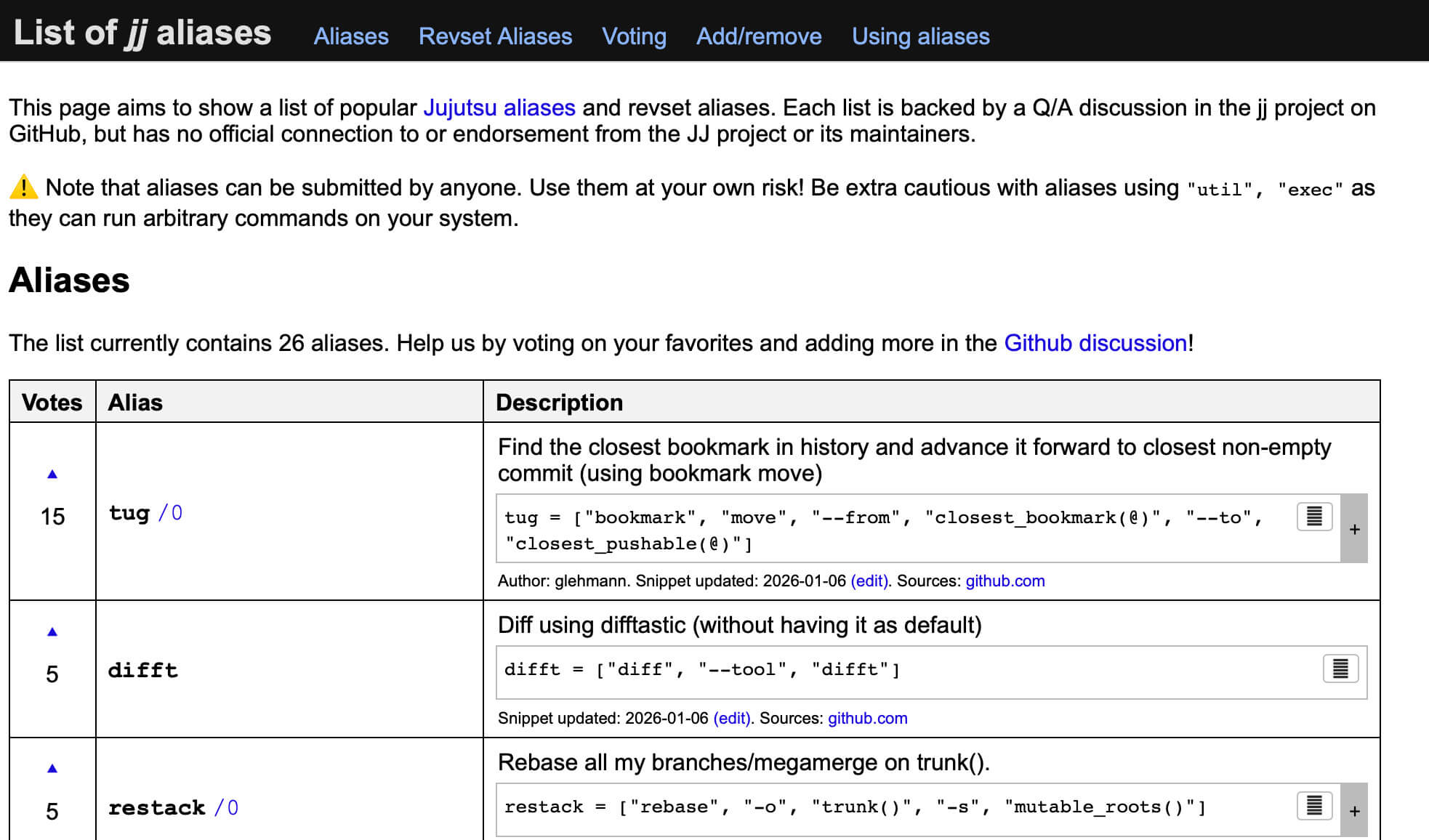
Check it out here: the web directory of jj aliases
forge support
The last area of integration with jj that I want to look at is forge support. This has had some visible movement since last year, but is probably the area with the most room to grow in the future. Today, three forges have explicitly documented or implemented support for jj-style development.
On GitHub, that’s the feature they call “stacked PRs”. GitHub has built server-side and gh CLI support for a stack of changes that can be pushed as a set of PRs that depend on one another. This is a slightly smarter version of creating a chain of PRs that point at one another, something you may have already done in the past. There are also a few standalone jj tools already to help integrate jj stacks into regular GitHub PRs, and we’ll look at them later on.
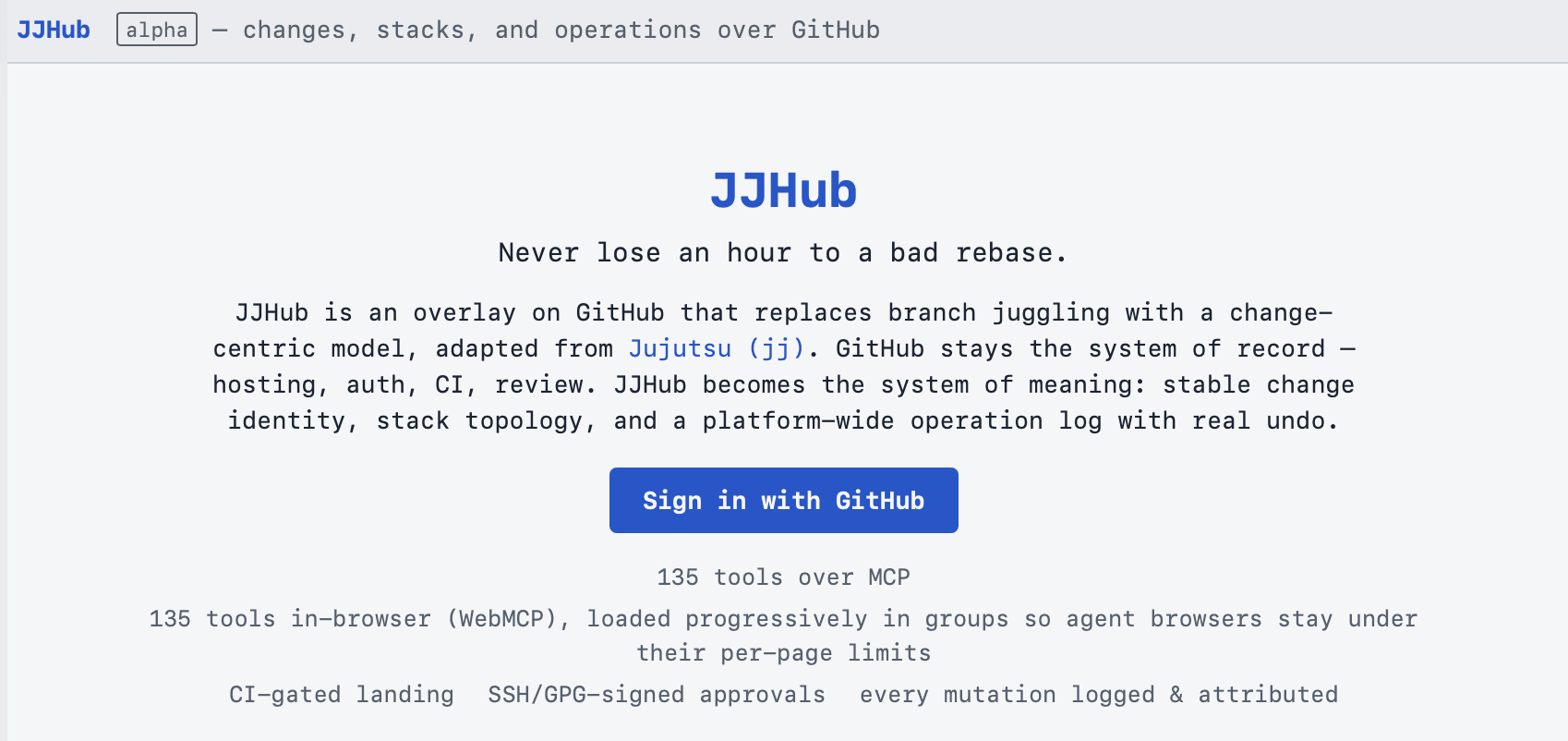
Another style of GitHub integration is JJHub from Erisera, which calls itself “an overlay on github”. That overlay offers consistent change IDs and skills and MCP servers for agents to use.
Radicle, which is a peer-to-peer forge, has written about how to use jj with their patch requests, which are closer to the git email flow rather than explicitly stacked. Their published flow shows how to use jj to create and revise patches in Radicle until they are accepted and merged.
Today, the forge I’m personally most excited about is Tangled. Tangled is a public forge hosted at tangled.org, built around ATProto identities. You control your identity and data about your actions, and you can maintain a single identity across all ATProto applications, including Bluesky for posts, Tangled for repos, Leaflet for blogs, and a growing ecosystem of online tools built around users owning their own data on the web.
Tangled has consistently been at the forefront of support for jj, including explicit support for “stacking”, which uses jj change IDs to allow reviewing diffs between different versions of a PR. Beyond just supporting change IDs, though, Tangled has a new UX around reviews in public preview at next.tangled.org, with what I would call full support for jj. It allows reviewing a single, or the interdiff between, revisions of a pull request, as well as allowing review of any set of changes at a time, with explicit tracking of jj change IDs.
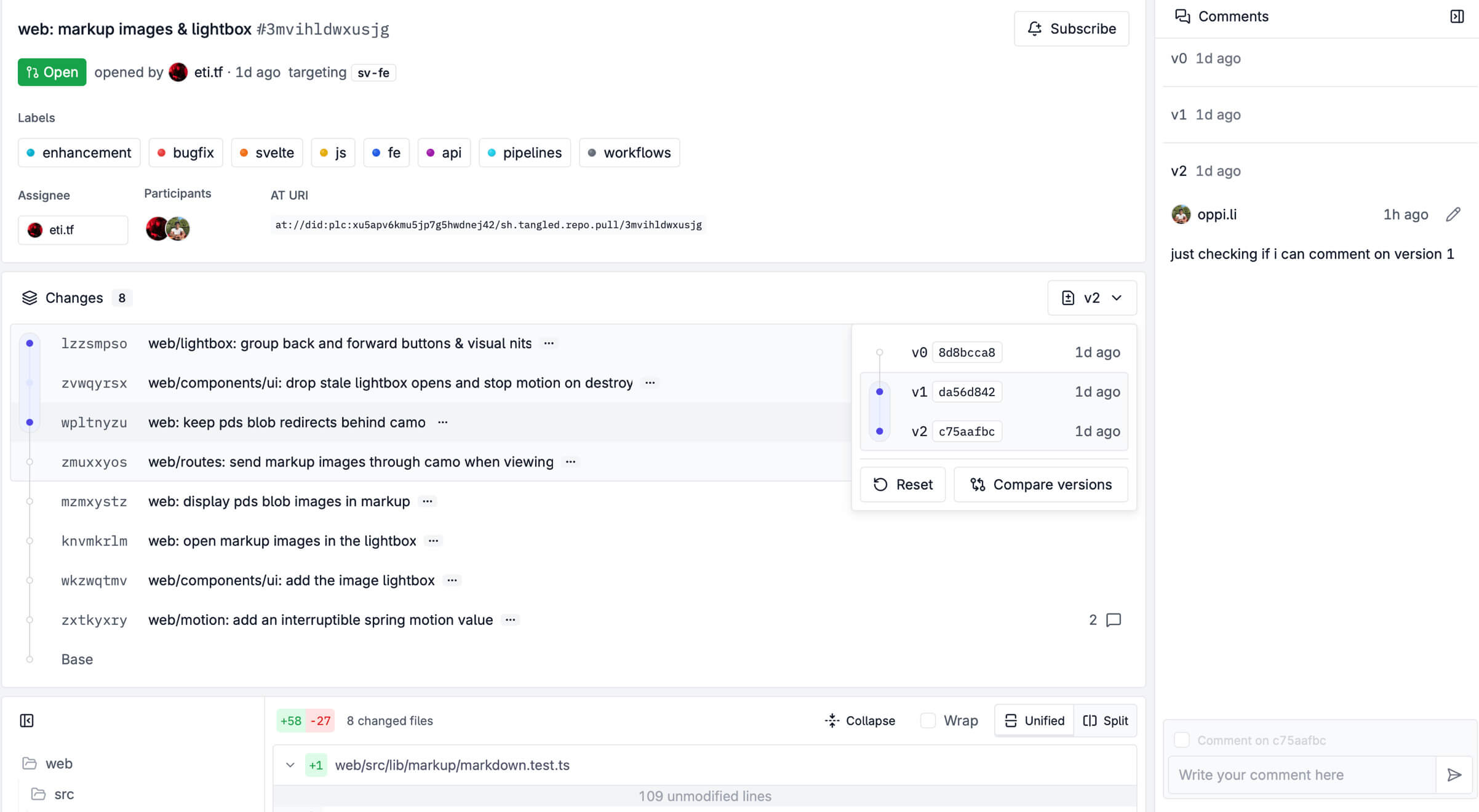
In my opinion, Tangled is the closest thing we have to a “jj-native” forge at the moment. I think you should try it out.
Finally, there’s another class of forge: things that are coming soon, but that aren’t yet available to the public. Right up at the top of that list is East River Source Control, whose project I expect we will all be experimenting with quite soon.
Beyond ERSC, there are a few projects that have published websites and say you can ask to try their product. The ones I’m aware of are revset.dev, juju.bi, and vex.sc. I have not gotten early access to any of those sites, but I mention them in case you’re interested in trying out shiny new (or soon-to-be-new) technology. Which you probably are, since you’re at JJCon.
If you know of any other forges or developments to add better jj support to existing forges, please let me know! I’ll add updates to this blog post later on.
outside jj
Last, I want to give you a tour of the landscape that exists outside of jj itself. That means applications, scripts, and tools that are intended to be used with jj repositories, but without you running the jj CLI.
Up front, let me note that some of these tools even have their own dedicated channel in the official jj discord. I have tried to include tools in my list regardless of whether they have such a channel or not, but just looking around the jj discord can be an easy way to get started with a GUI or TUI for jj, since you can chat with other users and maintainers.
guis
The first category of tools is the somewhat predictable GUI. If you’ve used git for a long time, you might be familiar with the venerable gitk, or the macOS fork gitx, or even one of the newer GUIs like GitTower, Fork, or Retcon. Let’s look at some GUIs built deliberately for jj repos and jj commands.
- gg from https://github.com/gulbanana/gg
gg is (I believe) the oldest jj GUI, written in Rust and using Tauri to build an app for Linux, Windows, and macOS, as well as a web option. gg’s pitch for itself is “what if you were always in the middle of an interactive rebase, but this was actually a good thing?” - jayjay from https://github.com/hewigovens/jayjay
JayJay is a newer GUI that calls itself the “fast, keyboard friendly client for Jujutsu”. On macOS, it’s built against the SwiftUI framework, and on Linux it’s built against Zed’s GPUI framework.
- lightjj from https://github.com/chronologos/lightjj
lightjj bills itself as a “fast powerful UI for jujutsu”. it creates a web server, which allows you to use the GUI from a local or remote repo via SSH port forward. the most interesting features lightjj exposes are 3-pane diffs, conflict resolution, divergence resolution, and markdown rendering for diffs.
I’ll also take a moment here to call out two newer, smaller efforts. Honorable mention goes to:
- jjewel from https://checksimsoftware.com/jjewel/ jjewel is a newer GUI aimed at macOS, offering a native UI plus drag-and-drop manipulation for your change graph.
- weiff from https://github.com/isgj/weiff weiff is a newer effort to create a web GUI, similar to lightjj but under active development.
While jj doesn’t have quite as rich of a GUI environment as git (yet!), there’s a lot of enthusiasm and activity around jj, and I expect there will continue to be more GUIs beyond these as jj gains popularity.
tuis
This is the real growth sector of the jj era, with an abundance of fantastic TUI libraries like Charm for go and Ratatui for Rust, among many others. This has meant TUIs are the area with more variety and more tools than anything else.
- lazyjj from https://github.com/Cretezy/lazyjj
lazyjj is one of the oldest jj TUIs, and offers a full-terminal interactive view of your jj log, including the change graph, browsing files and managing bookmarks. - jj_tui from https://github.com/faldor20/jj_tui
jj_tui lets you move your entire jj usage into a TUI, including commit, rebase, push, pull, squash, split, and filter by revset. - jj-fzf from https://github.com/tim-janik/jj-fzf
jj-fzf is a completely incredible realization of the concept of “what if we used fzf to help with every jj command”. it offers log, split, merge, rebase, and even explicit support for mega-merges, all built on top of the jj CLI and the fzf fuzzy finder script. - jjui from https://github.com/idursun/jjui
jjui is a TUI oriented around the idea of live, interactive, and auto-completed revset expressions. once you’ve written a revset, you can rebase, squash, browse, split, abandon, etc. if you want to preview revsets, or practice writing revsets with instant feedback, jjui is a great tool. - majjit from https://github.com/anthrofract/majjit
majjit is a TUI inspired by the UX of magit, offering fuzzy-matching for changes and bookmarks with keyboard shortcut based jj commands while browsing the jj object graph.
I don’t have time to cover every single tool that I found, so I’m also going to call these out in case you’re looking for inspiration, other tools to try, or something that you might be able to contribute to.
- blazingjj https://github.com/blazingjj/blazingjj
- gojo https://github.com/0xhckr/gojo
- jif https://github.com/jrpat/jif
- jj-tui https://github.com/madicen/jj-tui
- jk https://github.com/joshka/jk
- jufu https://github.com/hkrhd/jufu
editor plugins
vscode
- visual jj from https://www.visualjj.com/
- jjk from https://github.com/keanemind/jjk
jjk (formely Jujutsu Kaizen) is a VSCode plugin for jj, adding file statuses, detailed diff views, line-by-line blame, commit, split, squash, rebase, and even a second pane for the op log. navigate your history of repo actions without leaving VSCode! - jj-view from https://github.com/brychanrobot/jj-view
JJ View is another VSCode integration for jj. In addition to the interactive panel containing the jj change graph that you might expect, JJ View also has explicit integration with Gerrit, GitHub, and GitLab, showing review discussions and inline comments directly inside VSCode.
Rather than show off every single other editor integration one at a time, I’m just going to actively confirm that most editors have explicit jj integrations of some kind. As you can see here, whether you’re using a giant IDE or a tiny cutting edge terminal editor, you have at least a couple of options to try and look for something that fits your workflow.
JetBrains (IntelliJ, PyCharm, etc)
- selvejj from https://selvejj.com/
- jj-idea from https://github.com/kkkev/jj-idea
vim
- fujjitive.vim from https://github.com/zenibako/vim-fujjitive
- jj.nvim from https://github.com/NicolasGB/jj.nvim
emacs
- jj-mode.el from https://github.com/bolivier/jj-mode.el
- Majutsu from https://github.com/0WD0/majutsu
helix
- jj.hx from https://github.com/icorbrey/jj.hx
- juju from https://github.com/waddie/juju
workflow tools
Speaking of workflows, let’s take a look at workflow tools.
- jj-spr from https://github.com/jennings/jj-spr
the spr stands for “super pull requests”. jj-spr is a tool to help you amend and stack your jj changes while creating GitHub pull requests that are easy to review. By using spr, you end up with an automatically maintained append-only branch so your PR can be reviewed, even while you develop your branch using a normal jj flow that can include revising changes. - jj-stack from https://github.com/keanemind/jj-stack jj-stack is a typescript CLI to help you create and manage stacked pull requests on GitHub in particular.
- jj-vine from https://codeberg.org/abrenneke/jj-vine
Inspired by jj-spr and jj-stack, jj-vine bills itself as an “unopinionated and flexible” tool for submitting stacked PRs. It explicitly supports GitHub, GitLab, Forgejo/Codeberg/Gitea, and Azure Devops. It also allows each stacked PR to include more than one change, unlike SPR.
In addition to the “original three” stacked tools, there are several more tools designed to help manage stacked changes for submission, review, and eventual merging on a forge. If the three above aren’t a good fit, check these out, or write your own!
- jj-gh from https://github.com/mrjones2014/jj-gh
- jj-ryu from https://github.com/dmmulroy/jj-ryu
- jx from https://github.com/solodov/jx
- stakk from https://github.com/glennib/stakk
merging
- mergiraf from https://mergiraf.org/
Mergiraf is a merge driver that can solve a wide range of git merge conflicts by understanding the language being merged. - weave from https://github.com/Ataraxy-Labs/weave
weave is a merge driver that uses tree-sitter to handle conflicts by allowing merges at a code entity level. claims a 95% reduction in conflicts from agent-written changes.
diff display
- difftastic from https://github.com/Wilfred/difftastic
difftastic is the original “syntax aware diff” system, showing diffs of the code structure rather than a diff between the lines themselves. - delta from https://github.com/dandavison/delta
delta is a diff printing program that includes both syntax highlighting and extensive theming support. it’s designed to work with git, but jj can output git-style diffs, which delta can then make fancy. I personally use and love delta.
diff editing
- scm-record from https://github.com/arxanas/scm-record
scm-record is the TUI that is built in to jj, invoked every time you runjj split,restore, orresolve. It was created as an interactive alternative togit add -p, and is used in both jj and git-branchless today. I call this out so that you know it’s a separate project from jj, and so that you know you if you contribute to it, your improvements will land not just in jj but also for users of git-branchless or anyone who has configured git or mercurial to use scm-record as well. - jj-hunk https://github.com/laulauland/jj-hunk
Split, commit, or squash selected subsets of a diff without needing an interactive editor. Uses a “hunkset” language, and accepts arguments via CLI flags or JSON. - hunk.nvim from https://github.com/julienvincent/hunk.nvim
hunk.nvim is a diff-editor for neovim, designed for use with jujutsu, as an alternative to the builtin scm-record TUI. - jj-diff from https://github.com/KyleKing/jj-diff
jj-diff is another TUI alternative to scm-record, although it is aimed solely at split, amend, and squash. - jj-diff.el from https://github.com/ccqpein/jj-diff.el
jj-diff.el is a Magit-like diff and hunk editor for Emacs. Its main pitch is that it doesn’t have any dependencies outside of Emacs itself, and allows both interactive and non-interactive splits. - oyui from https://github.com/emilien-jegou/oyui
oyui is my personal favorite diff editor, and what I use for my daily jj split workflow. it is more or less a refresh of scm-record, adding color, syntax highlighting, and group selection. give it a try withcargo install oyui
workspaces
- jujutsu-gi from https://github.com/daeh/jujutsu-gi
- jj-navi from https://github.com/eersnington/jj-navi
- hrd from https://github.com/hugoh/hrd
- renri from https://github.com/yukimemi/renri
- smth from https://github.com/amnn/smth
conclusion
With that, our jj ecosystem tour is complete. I hope you’ve learned about a command, config, or tool that you’d like to investigate and try out. Even better, I’d love to have inspired you to experiment with your own jj config, or create your own jj tool, and share it with the rest of us.
If you do, let me know about it! You can reach me at @indirect on social media, or email me at the address at arko.net. I’d love to hear from you.