The MPS 2026.2 Early Access Program Has Started

MPS 2026.2 EAP1 offers several improvements to test reporting, enhances grouping of found items, and brings a smoother editing experience and a more maintainable foundation for launching MPS and MPS-based products. This release makes multi-node selection more predictable and aligns the MPS startup configuration more closely with the IntelliJ Platform.
Along with numerous bug fixes, this build introduces several key improvements.
Editor tests: Flexible result matching
When an editor test does not need to match the expected result exactly – for example, when the order of child nodes or the value of an attribute is irrelevant – you can now tell MPS which differences to ignore.
There are two ways to customize result matching:
- Node-matching rules: Declare custom matching rules. You can specify which containment roles should be compared, ignored, or excluded, and which properties or references should not be compared.
- Per-node markers: When the exception applies to just one node, add a marker directly to that node in the result fixture using the intentions menu.
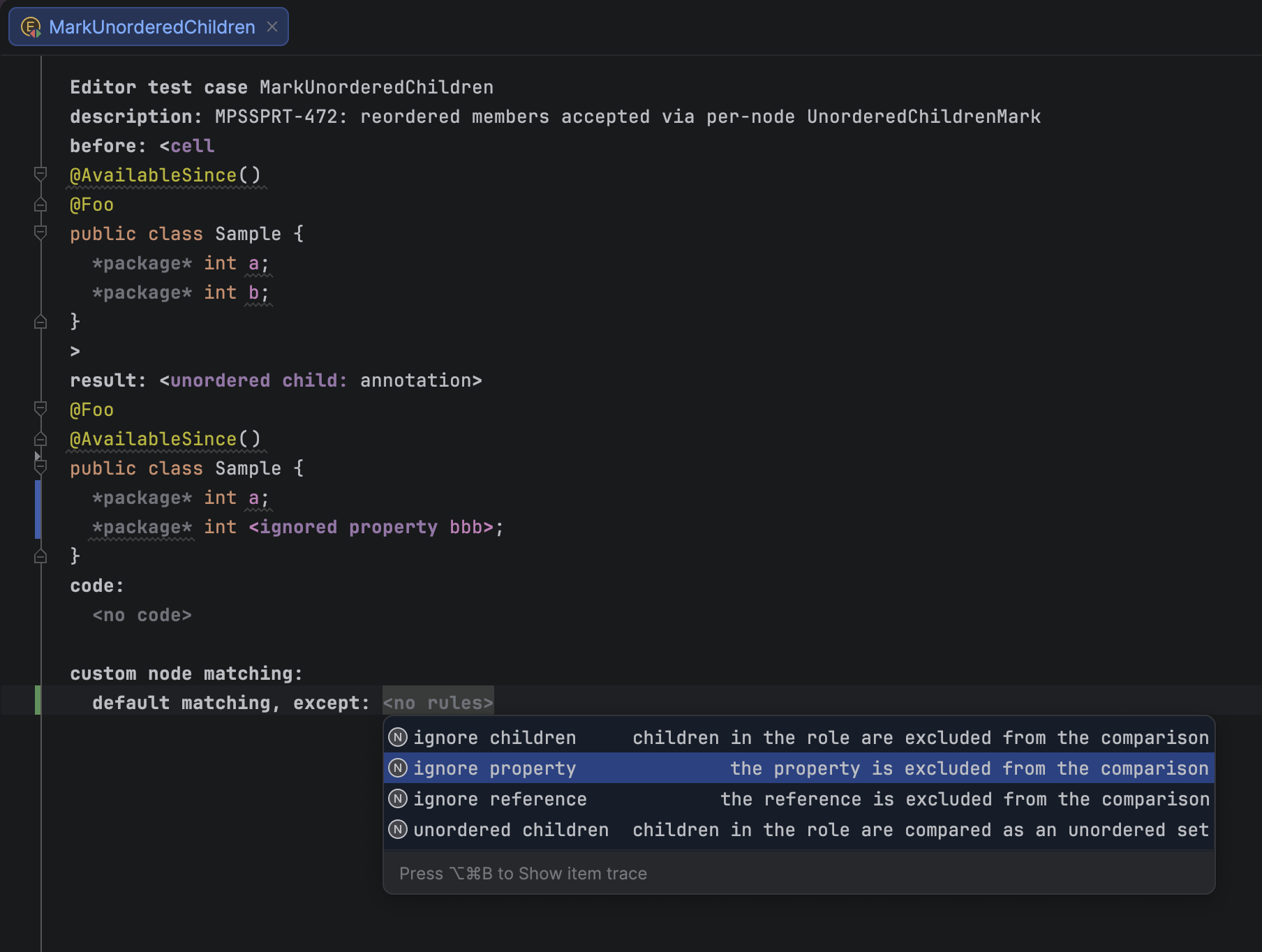
Either way, the parts you don’t care about stop causing false failures – and when a test does fail, the message now points straight at the node and cell responsible, so there’s no more sleuthing through raw assertions.
This improvement is the result of a direct customer request. It ensures fewer brittle editor tests and less fixture babysitting.
More informative test failure messages
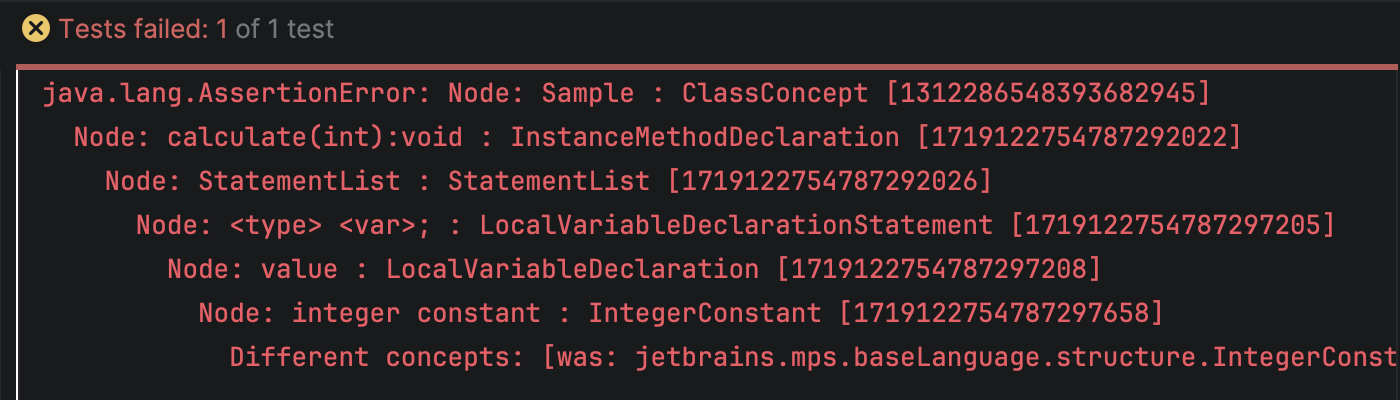
Editor test failures – a wrong selection, a mismatched editor cell “ID”, or a wrong selection range – now describe exactly which node and cell are involved instead of reporting a bare assertion failure. Every node mentioned in a failure message is rendered along with its presentation, concept name, and node ID, making it much easier to locate the problematic node in the result fixture without reproducing the failure in the debugger.
Virtual packages in Find Usages results
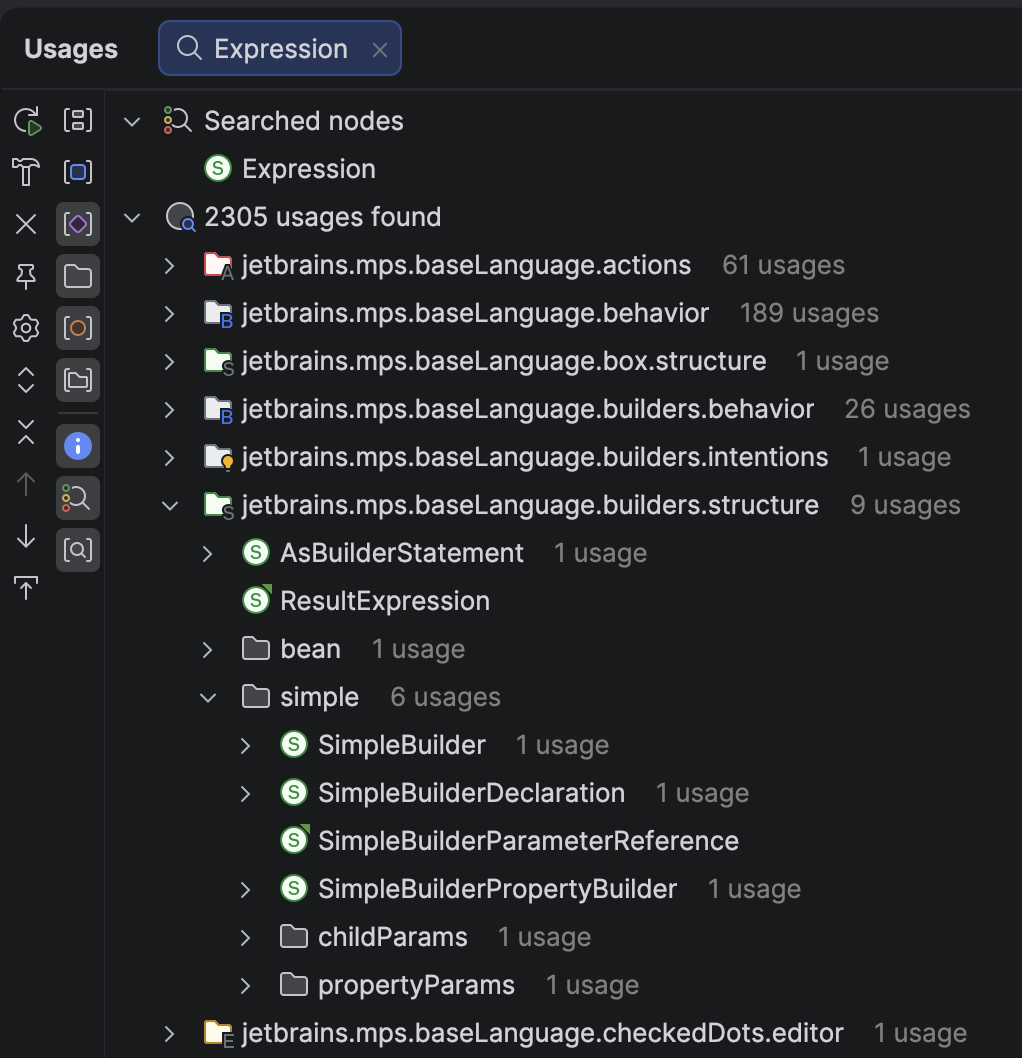
The Find Usages results tree now supports grouping by virtual package. When it’s enabled, usage results are nested under folder nodes corresponding to the virtual package of each root node, mirroring the structure shown in the Project pane. This makes it easier to locate root nodes in large models with many virtual folders.
Dotted virtual package names, for example com.example.ui, expand into one tree level per segment, so the nesting in Find Usages matches the nested virtual folders in the Project view.
The new Group by virtual package toggle appears on the Find Usages toolbar, alongside the existing grouping options, such as module, model, and root node. It is enabled by default for Find Usages. Other tool windows that display usage results – Model Checker, TODO, Dependencies Viewer, and Refactoring View – retain their usual default grouping options.
A more natural way to select lists of nodes
Selecting a larger piece of a model in the MPS editor is now easier with Select Up (Ctrl+Up). When the caret is inside a list of nodes – for example, a sequence of statements in a behavior method or a constraint – Select Up now recognizes the list as a meaningful editing unit.
Instead of jumping directly from one node to its parent, the action first selects all sibling nodes in the list. The parent is selected in the following step. This gives the selection process an intuitive intermediate level and makes common operations, such as copying and pasting a complete group of statements, faster and more reliable.
This also works correctly when the current selection is already a range of nodes, so repeated Select Up actions provide a consistent path from an individual node, through its containing list, to the surrounding structure.
Startup configuration aligned with the IntelliJ Platform
MPS 2026.2 updates the way startup scripts and product metadata are assembled. The MPS build tooling now keeps the platform-provided boot classpath separate from the MPS-specific extension classpath. It also exposes additional JVM arguments as part of the MPS startup script configuration.
This separation allows MPS distributions to consume the boot classpath and JVM options defined by the matching IntelliJ Platform build, while adding only the libraries and settings specific to MPS. Platform updates can therefore be integrated with less manual maintenance and a lower risk of stale launcher configuration.
The generated launchers also apply platform access options more precisely. Shared --add-opens options come from the platform metadata, while operating-system-specific packages are added only to the launcher for the corresponding operating system. This keeps the launch configuration consistent across macOS, Linux, and Windows and helps prevent startup problems caused by outdated or unnecessarily broad JVM arguments.
Together, these changes make the MPS launcher more resilient as the underlying platform evolves and provide a cleaner extension point for teams building custom MPS-based distributions.
You can review the complete list of fixed issues here.
Your JetBrains MPS team

 点赞
点赞 收藏
收藏 点踩
点踩 分享
分享