How to Handle Errors in Go

This article was initially published by a community contributor, Christoph Berger, in the JetBrains’ Go Guide and has since been moved to the JetBrains Go blog. We have also updated it in August 2026 to reflect the most recent changes to the Go language.
Error handling is one of the aspects in which Go differs from other popular languages like Java, C++, JavaScript, and Python. In Go, errors are values. While other languages move error handling out of the code flow, Go considers errors a natural part of the program flow. If a function encounters an error, it returns that error alongside other return values. The caller has the duty to check this error and handle it accordingly.
A typical Go package or app can encounter various types of errors at runtime, including logical errors, I/O errors, network errors, data validation errors, and more. Each of these types may require specific error handling. Go provides a set of tools and techniques to handle different types of errors.
This article explores several aspects of error handling in Go. You will learn error handling techniques and best practices, how to address specific types of errors, and how to avoid common mistakes in error handling.
Before you start
All examples used in this guide are inlined, so that just reading the snippets should be enough to get the picture. If, however, you want to follow along and tinker with the code yourself as you go, we have a repository with code samples from different articles published on the GoLand blog. The code for this guide resides in the error-handling directory.
You can use an IDE of your choice or install the GoLand IDE. There is a free trial available; if you are new to GoLand, this is a great chance to test it out!
Then, fork or clone the repository that contains the code for this guide.
Follow these steps to open the code in GoLand:
- Start GoLand.
- If it’s a fresh installation, you’ll be prompted with a welcome screen. Click the Open button.
- In the file selector dialog that opens, navigate to the repository you cloned earlier, select the folder
error-handling, and click Open.
And you’re set! Keep the IDE within reach while following the guide.
Popular error handling techniques in Go
As mentioned, all error handling in Go is based on the notion of errors as values. An error in Go is a value like any other value. An error value is of the type error, which is a built-in type. But what is this type? Luckily, GoLand makes it easy to inspect the source code of Go itself.
In the Project pane, scroll down to the External Libraries section. Expand Go SDK , then expand builtin.go (because error is a built-in type):
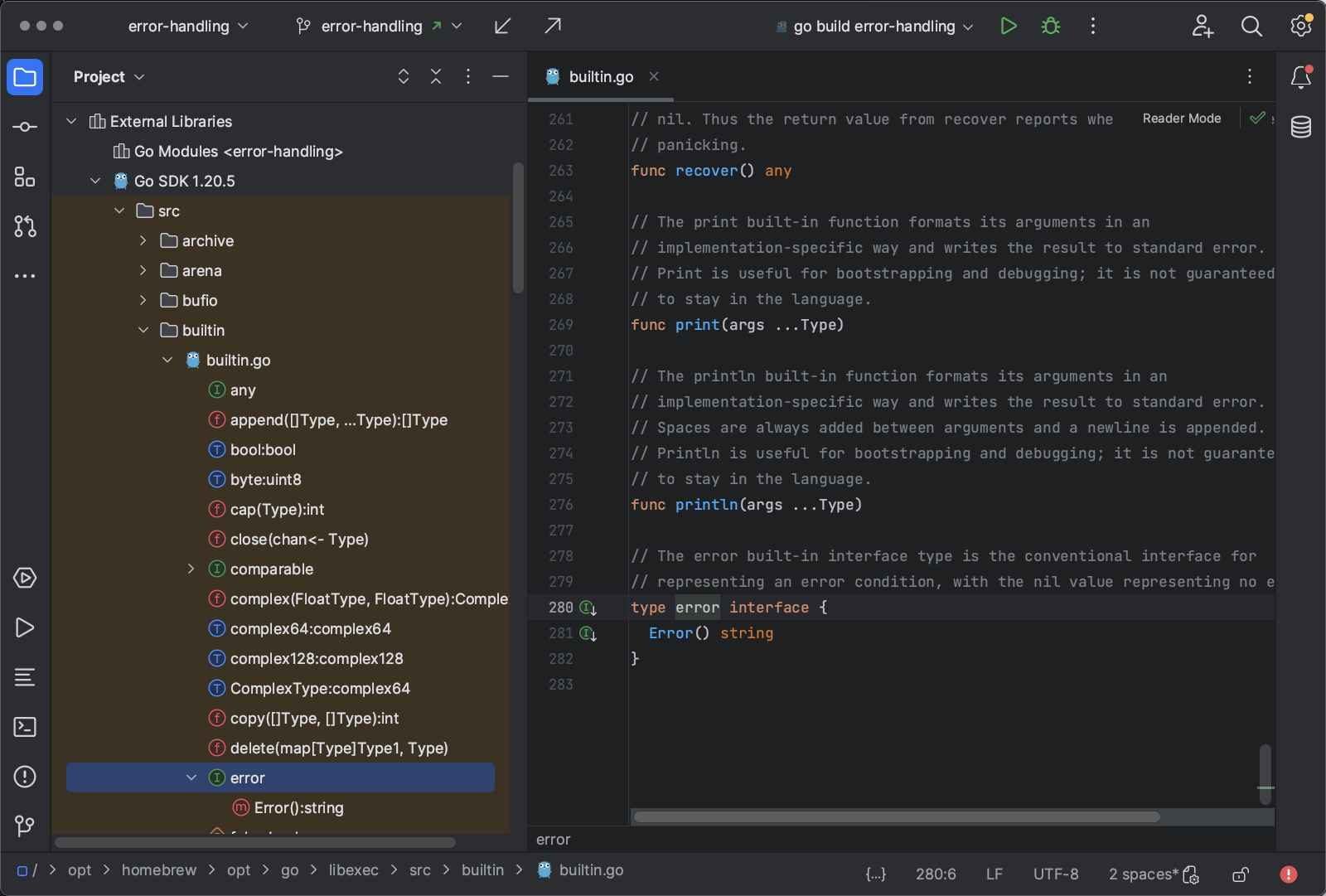
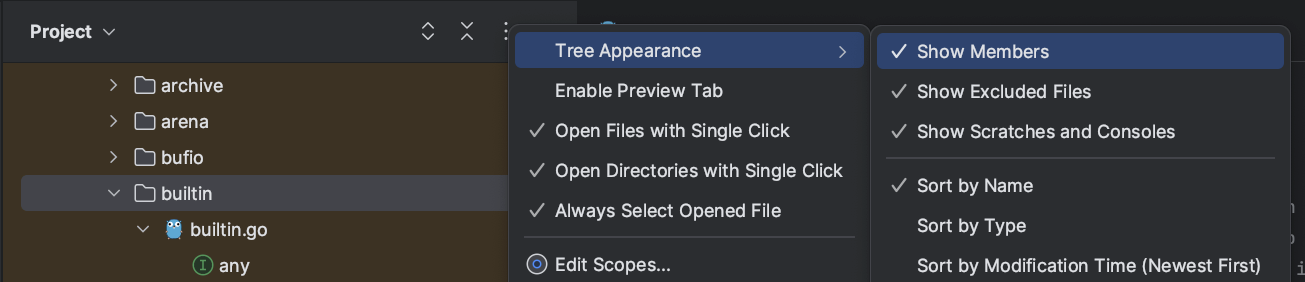
If you cannot expand builtin.go, select the three-dot menu in the Project pane, then Tree Appearance, and ensure that Show Members is checked:
Scroll down until you see the error type below builtin.go, then click it. The file builtin.go opens in the editor area and shows the error type:
type error interface {

  Error() string

}
The error type is an interface with a single function, Error() string. Using an interface type here allows you to easily create custom error types by making the custom type implement the error interface.
So, let’s see how errors can be handled.
Returning errors
In most cases, if a function encounters an error, it does not have the necessary context to properly handle the error by itself, so it has to pass the error back to its caller.
As an example, see func ReadFile() from the sample code (readfile.go):
func ReadFile(path string) ([]byte, error) {

    if path == "" {

       // Create an error with errors.New()

       return nil, errors.New("path is empty")

    }

    f, err := os.Open(path)

    if err != nil {

       // Wrap the error.

       // If the format string uses %w to format the error,

       // fmt.Errorf() returns an error that has the

       // method "func Unwrap() error" implemented.

       return nil, fmt.Errorf("open failed: %w", err)

    }

    defer f.Close()

    buf, err := io.ReadAll(f)

    if err != nil {

       return nil, fmt.Errorf("read failed: %w", err)

    }

    return buf, nil

}
ReadFile() checks the received path, and if the path is empty, it creates a new error and returns it. The data that ReadFile() was supposed to return does not exist; therefore, ReadFile() returns a nil value:
    if path == "" {

       return nil, errors.New("path is empty")

    }
Conventionally, if a function returns an error value, it’s always the last (rightmost) value in the list of return values:
func ReadFile(path string) ([]byte, error) {When ReadFile() is called, it returns the contents of the with an error value that is nil on success and non-nil on failure. Typically, the returned error value is assigned to a variable named err (see main.go in the accompanying repository):
_, err := ReadFile("no/file")

if err != nil {

    fmt.Println("Error:", err)

}
Here, the result of calling ReadFile() is not needed, as this guide looks into error handling specifically. Therefore, the return value is assigned to the blank identifier (_).
Now the caller can test if the error is non-nil and handle the error accordingly.
Panic and recover
Go newcomers might miss the try...catch mechanism that other languages provide. However, Go has something that fulfills a similar purpose: panic and recover. But beware! Unlike try...catch, panic and recover is not, and should not be, the standard way of handling errors. Panicking is only acceptable if an error is indeed unexpected and there is no way of handling it. In such cases, it’s better to have the application crash early and restart it. You’ll learn more about this in the best practices section later.
An example of an error that should not happen is a failed compilation of a regular expression given as a literal string. Because the regular expression is known at compile time, the developer should have made it a valid expression so that the compilation cannot fail at runtime. To enforce this, the regexp package has a function called MustCompile(). The prefix Must indicates that the function panics if it cannot compile the given regular expression.
To demonstrate this, the file verifypath.go contains a function that will verify if a given path is valid. However, the developer entered the regular expression incorrectly – a closing parenthesis is missing:
func isValidPath(p string) bool {

    pathRe := regexp.MustCompile(`(invalid regular expression`)

    return pathRe.MatchString(p)

}
If this function is called without any precaution, the app crashes instantly:
panic: regexp: Compile(`(invalid regular expression`): error parsing regexp: missing closing ): `(invalid regular expression`

goroutine 1 [running]:
regexp.MustCompile({0x1005ca16d, 0x1b})
        /opt/homebrew/opt/go/libexec/src/regexp/regexp.go:319 +0xac
main.isValidPath({0x1005c76af, 0xd})
        /Users/you/dev/JetBrains/jetbrains-go-code-samples/awesomeProject/error-handling/verifypath.go:6 +0x30
main.main()
        /Users/you/dev/JetBrains/jetbrains-go-code-samples/awesomeProject/error-handling/main.go:20 +0xb0

Process finished with the exit code 2
The stack trace reveals that line 6 of verifypath.go is the source of the panic.
In certain cases, crashing the app might not be an option. Consider an HTTP server that must be up and running without disruption. If a panic occurs when handling a request, all other requests should continue being handled, if possible. To do this, the net/http package uses Go’s recovery technique.
There are two scenarios for how it can work described below in case of the panicking isValidPath() function.
It adds a deferred function call to the caller
The caller of isValidPath() sets up a deferred function call near the beginning of the function body:
defer func() {

    // deferred code ...

}() // <- Don't forget the parens, this is an actual function call!
Deferred functions are automatically executed whenever the containing function exits, whether through a normal return call or triggered by a panic.
In the deferred function, it calls recover()
The deferred function can verify if it was invoked because of a normal return or because of a panic. It only needs to call recover() and verify the returned error (see main.go at the end of func main()):
defer func() {

    // Is this func invoked from a panic?

    if r := recover(); r != nil {

       // Yes: recover from the panic

       fmt.Println("Recovering")

       // ...

    }

}()
If the error is nil, the deferred function was invoked because of a normal return, so no recovery is required.
If the deferred function was triggered by a panic, recover() returns the error that caused the panic. Now the deferred function can do whatever is required to recover from the panic.
Logging errors
If a function can handle an error it receives from a called function, it might want to write information about the error to a log file.
Logging an error is straightforward in Go, thanks to the log package in the standard library and the slog package that is available from Go 1.21 onwards.
Here’s an example using the log package in the deferred function from the previous section:
if r := recover(); r != nil {

    log.Printf("Recovering from error `%v`\n", r)

}
log.Printf() is a drop-in replacement for fmt.Printf() that writes to the standard logger’s output. To format an error type, use the %v verb that prints a value in its default format.
A side note: If you write code for a library, consider not logging anything. The library clients will have different opinions about which logger to use and what is printed to stdout or stderr. So, it is almost always better to only return errors and let the library clients do the logging they want.
Using error wrapping
An error often “bubbles up” a call chain of multiple functions. In other words, a function receives an error and passes it back to its caller through a return value. The caller might do the same, and so on, until a function up the call chain handles or logs the error. Each function involved in this “bubbling up” can add valuable contextual information to the error before handing it back to its caller. Passing errors in a way that preserves that chain is called “error wrapping”. You add context while keeping the original error inside the new one, that can be later unwrapped to inspect or match the underlying error.
A function should only pass the error on unchanged if it cannot add any helpful information:
if err != nil {

    // Only do that if no additional context can be added!

    return err

}
In all other cases, it should add appropriate contextual information. However, simply concatenating a new error message with the original one does not work:
// WRONG!

if err != nil {

    return errors.New("open failed:" + err.Error())

}
This would only preserve the original error message, but flatten the error itself into a plain string. With type and structured details gone, callers could no longer unwrap and inspect it.
Instead, you should use error wrapping. An error can be “wrapped” around another error using fmt.Errorf() and the special formatting verb %w. See the ReadFile() function in the file readfile.go:
f, err := os.Open(path)

if err != nil {

    return nil, fmt.Errorf("open failed: %w", err)

}
os.Open() returns an error type that contains additional information, as you will see later. Wrapping the error preserves all this additional information.
Unwrapping wrapped errors
An error returned by a function might contain one or more wrapped errors. Printing or logging the received error will also include all error messages from the wrapped errors. However, sometimes you need to know if a particular type of error is nested somewhere inside the layers of errors.
For example, let’s see how to handle ReadFile()‘s errors in func main():
_, err := ReadFile("no/file")

log.Println("err = ", err)

// Unwrap the error returned by os.Open()

log.Println("errors.Unwrap(err) = ", errors.Unwrap(err))
This code snippet prints the following:
Reading a single file: err =  open failed: open no/file: no such file or directory
Reading a single file: errors.Unwrap(err) =  open no/file: no such file or directory
While the wrapped error message is open failed: open no/file: no such file or directory, the unwrapped error contains only open no/file: no such file or directory, excluding the open failed: message that was added to the wrapped error.
This way, you can unwrap one error after another until you hit the end of the chain.
Testing for specific error types
Occasionally, you need to know if any of the errors inside a chain of wrapped errors are of a particular type.
For example, os.Open returns an error of type fs.PathError that not only records the error but also the operation and the path that caused it. If you can find out that the error chain contains this error, you can make use of the additional information for troubleshooting.
To achieve this, the errors package provides three functions: Is(), As(), and AsType() introduced in Go 1.26.
errors.Is()
Function func Is(err, target error) bool returns true if error err is of the same type as target.
In the case of the ReadFile() function, you can verify that the returned error is, or wraps, an fs.ErrNotExist error:
_, err := ReadFile("no/file")

log.Println("err is fs.ErrNotExist:", errors.Is(err, fs.ErrNotExist))
This prints:
err is fs.ErrNotExist: true
errors.As()
You’ll also want to access the path information. For this, you not only need to ensure the error wraps an fs.PathError but also access this PathError and all its methods.
To do this, use the function func As(err error, target any) bool. Like Is(), function As() returns true if err is or wraps an error of the same type as target, and it also unwraps that error and assigns it to target.
This requires defining a variable of type fs.PathError and passing a pointer to that variable to As():
target := &fs.PathError{}

if errors.As(err, &target) {

    log.Printf("err as PathError: path is '%s'\n", target.Path)

	log.Printf("err as PathError: op is '%s'\n", target.Op)

}
This will log the path and the operation that failed:
err as PathError: path is 'no/file'

err as PathError: op is 'open'
errors.AsType()
Go 1.26 adds AsType(), a generic, type-safe alternative to As(). Its signature is func AsType[E error](err error) (E, bool).
Rather than declaring a target variable up front and passing a pointer to it, AsType() takes the error type you’re looking for as a type parameter and returns two values: the matching error (of type E) and a boolean reporting whether a match was found. This keeps the matched error neatly scoped to the if block:
if target, ok := errors.AsType[*fs.PathError](err); ok {

    log.Printf("err as PathError: path is '%s'\n", target.Path)

    log.Printf("err as PathError: op is '%s'\n", target.Op)

}
Just like the As() example, this logs the path and the operation that failed:
err as PathError: path is 'no/file'

err as PathError: op is 'open'
AsType() has a couple of advantages over As(). Because you specify the error type directly in the call, the compiler checks it for you, so mistakes such as passing a value where a pointer is required are caught at compile time instead of triggering the runtime panic that As() can produce when handed an unsuitable target. AsType() also avoids the reflection that As() relies on internally, which makes it a little faster.
As() is not deprecated, so existing code keeps working. For new code, however, AsType() is the recommended choice, and it’s especially convenient when you need to test for several error types one after another, since each matched error stays scoped to its own branch:
if pathErr, ok := errors.AsType[*fs.PathError](err); ok {

    log.Println("path error at:", pathErr.Path)

} else if linkErr, ok := errors.AsType[*os.LinkError](err); ok {

    log.Println("link error during:", linkErr.Op)

}
Joining errors
Typically, errors get wrapped one by one while being returned to the respective caller. Sometimes, a function needs to collect multiple errors and wrap them into one.
Take the function ReadFiles() (note the plural) from readfiles.go as an example. This function reads multiple files and returns all file contents that were successfully read. If one or more files fail to be read, ReadFiles() will collect the errors and join them into one.
For this, the errors package provides the Join() function (introduced in Go 1.20). Let’s see how ReadFiles() makes use of the Join() function:
func ReadFiles(paths []string) ([][]byte, error) {
    var errs error
    var contents [][]byte

    if len(paths) == 0 {
       // Create a new error with fmt.Errorf() (but without using %w):
       return nil, fmt.Errorf("no paths provided: paths slice is %v", paths)
    }

    for _, path := range paths {
       content, err := ReadFile(path)
       if err != nil {
        errs = errors.Join(errs, fmt.Errorf("reading %s failed: %w", path, err))
          continue
       }
       contents = append(contents, content)
    }

    return contents, errs
}
If an error occurs inside the for loop, it does not break the loop. Instead, it is joined to variable errs, and the loop continues, joining more records as they occur.
Finally, ReadFiles() returns both the contents read successfully and the joined error messages.
Handling joined errors
Now, you might expect that joined errors can be unwrapped like single errors. Unfortunately, this is not the case. A joined error is actually a slice of errors, []error. The Unwrap() function, however, returns a single error. If called on a joined error, Unwrap() returns nil:
_, err = ReadFiles([]string{"no/file/a", "no/file/b", "no/file/c"})
log.Println("joined errors = ", err)

log.Println("errors.Unwrap(err) = ", errors.Unwrap(err))
The second log line prints:
errors.Unwrap(err) =
Fortunately, there is a way to unwrap the slice of joined errors. The joined error type itself helps you do this by providing an Unwrap() []error method that returns the error slice.
To access this Unwrap() method, you only need to type-assert that the error variable implements this method. You can then call it safely:
e, ok := err.(interface{ Unwrap() []error })

if ok {

    log.Println("e.Unwrap() = ", e.Unwrap())

}
This prints the full set of joined errors:
Reading multiple files: e.Unwrap() =  [reading no/file/a failed: open failed: open no/file/a: no such file or directory
reading no/file/b failed: open failed: open no/file/b: no such file or directory reading no/file/c failed: open failed: open no/file/c: no such file or directory]
Context-based error handling
The context package is popular for controlling timeouts of requests or canceling multiple goroutines upon request. If you use a cancelable context, you can inspect and handle the error that caused the cancellation.
Since Go 1.20, you can even send a custom error message when canceling a context by using a WithCancelCause context. The following is a basic example:
    parent := context.Background()

    ctx, cancel := context.WithCancelCause(parent)
    defer cancel(nil)             // Set the cause to Canceled
    cancel(fmt.Errorf("myError")) // Set the cause to myError

    fmt.Println(ctx.Err())          // Output: context.Canceled
    fmt.Println(context.Cause(ctx)) // Output: myError
(Constructing goroutines and cancel situations can get complex quickly. Find a full example in readfiles_concurrent.go.)
The context function WithCancelCause() returns a context and a cancel function that expects an error type. When calling cancel, a custom error message can be passed as input. All interested parties that have access to the context can retrieve the custom error through context.Cause(ctx).
Best practices for error handling in Go
With these error handling techniques in mind, let’s turn to some best practices when working with errors in Go.
Use the defer function
A function can exit at multiple points, through return statements as well as panics. Whenever a function allocates resources, such as files, network connections, or goroutines, use a defer() function to clean up any open resources at function exit.
The ReadFile() function contains a deferred call that closes the opened file:
    f, err := os.Open(path)

    if err != nil {

        return nil, fmt.Errorf("open failed: %w", err)

    }

    defer f.Close()
Note that defer f.Close() comes after the error check. If os.Open() fails, it returns a nil file and a non-nil error, so there’s nothing to close. Deferring the close before the check would risk calling it on a nil file.
Provide explicit error information
Nothing is more frustrating than seeing some cryptic error message like ERROR: EPIC FAIL in the log files without any clue about the context in which the error occurred.
In case you’re wondering: yes, messages like this do occur in the real world. The problem with such a message is that even the developers who ought to know their code might be unable to tell what caused a particular occurrence of this message:
“Look, this particular code is called from so many places, and we really cannot say what exactly caused this particular error at this point. We don’t have enough context in the log file.”
Therefore, if a function encounters an error, it should not pass the error verbatim up the call chain. Rather, if any contextual information is available to help troubleshoot the error, this information should be added to the error by wrapping it in a new error. (See the earlier section on using error wrapping.)
Use panic and recover only when necessary
Go newcomers often frown upon Go’s verbose error handling and want to save typing by letting a function panic instead of handling an error. At the top level, the panic is then recovered and handled. This approach, however, is unidiomatic Go and has many downsides. First and foremost, adding useful contextual information (see the previous section) is not possible with this method. Moreover, because a panic unwinds the call stack outside the regular call/return flow, any function in the call chain between the top-level function and the panicking function contains no error handling code. How can a reader see that any of these functions might observe an error? For comparison, Java has the throws keyword to list all exceptions a function may emit. Go does not have such a feature. It’s not possible to see if any of the callees of a function panics. Standard Go error handling makes the error flow clearly visible.
Go treats errors as a normal part of the program flow because they are exactly that. If an error occurs, it should be handled or passed to the caller until some function up the call chain handles the error or writes it to a log file for troubleshooting.
If you inspect a function, you’ll want to immediately see which errors it may encounter and how it passes them up the call chain.
Calling panic should be reserved for unexpected errors that should never happen. A hard-coded regexp string, as seen in the “Panic and recover” section, is one example. A hard-coded regular expression should be thoroughly crafted and verified, and it must not fail at runtime.
There are also some categories of errors that cannot be handled at all, such as an out-of-memory situation. If the required memory cannot be allocated, the application has no meaningful way to continue and should panic.
On the other hand, user input at runtime is expected to be unreliable. Any error resulting from user input, invalid or missing files, a network timeout, or other predictable sources of failure can and should be handled as an error.
Use libraries and packages that follow error handling best practices
If you have a choice between multiple third-party packages that deliver identical or similar functionality, choose the one that follows best practices for error handling.
You will not do yourself any favors if you decide to use the package with the fanciest API but with brittle error handling. Any package that suppresses errors rather than properly passing them back – or that provides no context for errors – will turn troubleshooting into a hit-or-miss debugging nightmare.
So, take a peek at the code inside a package to see if it contains robust code with proper error handling. This precautionary measure will pay off in the long run.
Create custom error types wherever suitable
Because error is an interface, you can build custom error types with extra functionality as long as they implement Error() string. You saw an example in the “Testing for specific error types” section, where os.Open returned an fs.PathError.
This error is a struct that implements the methods Error(), Unwrap(), and Timeout(), and provides the fields Path, Op, and Error to capture detailed error information:
type PathError struct {
  Op   string
  Path string
  Err  error
}

func (e *PathError) Error() string { return e.Op + " " + e.Path + ": " + e.Err.Error() }

func (e *PathError) Unwrap() error { return e.Err }

// Timeout reports whether this error represents a timeout.func (e *PathError) Timeout() bool {
  t, ok := e.Err.(interface{ Timeout() bool })
  return ok && t.Timeout()
}
In the same manner, you can create your own error types. The only mandatory method to implement is Error(), but if you also implement the method Unwrap(), then the package function errors.Unwrap() will be able to unwrap your error.
Handling specific types of errors
Some types of errors require special treatment due to their specific nature. These types include network errors, I/O errors, and system errors.
Network errors
Failing network connections need special treatment. A network error can be caused by a permanent failure or by a temporary issue. Code that handles a network error needs to distinguish between these two situations.
Consider the task of opening a new TCP connection. This task can fail because the network is temporarily down or because the system at the other end of the connection is restarting or overloaded and cannot accept new connections at the moment.
In such cases, you’ll want to try connecting again at a later time. The net.Dial() function, for example, supports this by returning a specific error type, net.OpError, that provides a method named Temporary() for testing if the error is expected to eventually go away.
With the Temporary() method, you can implement a simple retry algorithm like the one below or a more sophisticated strategy like exponential backoff:
func connectToTCPServer() error {
    var err error
    var conn net.Conn
    for retry := 3; retry > 0; retry-- {
       conn, err = net.Dial("tcp", "127.0.0.1:12345")
       if err != nil {
          // Check if err is a net.OpError
          opErr := &net.OpError{}
          if errors.As(err, &opErr) {
             log.Println("err is net.OpError:", opErr.Error())
             // test if the error is temporary
             if opErr.Temporary() {
                log.Printf("Retrying...\n")
                continue
             }
             retry = 0
          }
       }
    }
    if err != nil {
       return fmt.Errorf("connect failed: %w", err)
    }
    defer conn.Close()
    // send or receive data
    return nil
}
I/O errors
Recovering from an I/O error that occurs after having read or written large amounts of data can be costly. All the data that’s already been processed up to the point where the error occurs might need to be read or written again.
To allow for a more efficient recovery, most I/O-related functions and methods in the standard library return not only an error but also the number of bytes that were successfully processed. A typical example is io.Reader‘s Read() function:
type Reader interface {
	Read(p []byte) (n int, err error)
}
An error recovery procedure could use this information to continue the I/O operation where it was interrupted.
Important note: The io package provides the sentinel error value io.EOF (that is defined as errors.New("EOF")) to signal the successful (!) end of reading an input stream. Every type that implements the io.Reader interface should stick to the documented semantics of returning an error:
…a Reader returning a non-zero number of bytes at the end of the input stream may return eithererr == EOForerr == nil. The next Read should return0, EOF.
Common mistakes to avoid when handling errors in Go
While Go’s error handling may seem unusual at first sight, it’s logical and straightforward to use. However, this doesn’t mean that you can’t make errors with error handling. Here are some mistakes to avoid.
Ignoring errors
The biggest mistake a developer can make in any programming language is to ignore errors. Not catching errors early easily leads to follow-up errors that can be much more difficult to track down compared to the original error if it had been properly handled.
So, the number one rule for avoiding error handling mistakes is to never assign a returned error value to the blank identifier.
Moreover, watch out for functions whose sole return value is an error value. Go does not prevent you from completely ignoring a single return value, but you can use a linter to detect an ignored error return value. (GoLand even highlights unhandled errors right in the editor, to make it easy to avoid this kind of mistake.)
Fun fact: did you know that fmt.Println() returns an error value?
Bottom line is, don’t do this:
WriteString(w, s)
Do this instead:
n, err := WriteString(w, s)
// error handling here, see below
Not wrapping errors in additional context when propagating
Often, if not always, a function that receives an error from calling another function can add valuable contextual information to the error.
So, whenever you find yourself writing this:
n, err := WriteString(w, s)
if err != nil {
    return err
}
take a step back and see if you can include contextual information. In most cases, you can. Even the function name can be valuable information because it allows you to track the chain of function calls that lead to the error:
n, err := WriteString(w, s)
if err != nil {
    return fmt.Errorf("after writing %d characters: %w", n, err)
}
It’s a few more strokes on the keyboard for you now, but it can be an enormous time-saver later on.
Overgeneralizing errors
When composing error messages, be as specific as you can. Include all the contextual information you have.
An error message like “database error” can have a truckload of different possible causes. The message “database error” is genuinely pointless and unhelpful.
Add as much information to the error message as you can. Consider creating custom error types that can carry additional information; see the os.PathError type as an example.
Using incorrect error types
The particular type of error value might seem like a negligible detail. After all, every error implements type error interface{ Error() string }, so in the end, errors are nothing but glorified string types, right?
Wrong. Custom error types can contain extra information and enable advanced error inspection through errors.Is(), errors.As(), and errors.AsType().
So, whenever you send an error back to a caller, make sure to use the error type that is appropriate for the given error context.
Not logging errors
Error messages are indispensable for troubleshooting. Whether an app can handle an error or whether an error forces the app to terminate, the app should log that error for postmortem analysis.
In general, if a function observes an error, it should either handle the error or return it to its caller.
If it can handle the error or if it cannot return the error for some reason (maybe because it is function main()), the function should always log the error and all its contextual information.
Every error that occurs indicates an opportunity for fixing a bug or improving the code. Don’t let this opportunity pass by unnoticed.
Logging errors with log.Fatal()
If your application encounters an unrecoverable error, it might feel natural to log this error by calling log.Fatal(), which conveniently logs a message and exits the process immediately.
However, there is a catch. log.Fatal() calls os.Exit(). Unlike a call to panic(), os.Exit() is not recoverable and skips all deferred functions.
A good practice is to write func main() so that it does not defer any functions and call log.Fatal() or os.Exit() exclusively in main().
Not considering error recovery
“Crash early” is good advice in many circumstances. Crashing an app allows it to restart from a clean state. However, crashing is not always the best option.
- If an error is easy to recover from, crashing the whole application is an overreaction.
- If a process guarantees maximum uptime, it’s better to do your best to recover from the error rather than disrupting the system with a restart.
- If a process spawns goroutines, it’s often sufficient to exit a single goroutine that observes an error condition.
http.ListenAndServe()is an example of this strategy. All incoming requests are handled in separate goroutines, and if one goroutine panics,ListenAndServe()recovers from that panic so that all other concurrent handlers can continue unaffected.
Bottom line: applications may benefit from well-designed error recovery, especially if crashing early entails a considerable cost of respawning the app.
Conclusion
Error handling in Go has very few moving parts and is therefore quick to learn. The true art of error handling involves knowing how to optimally respond to specific error situations and how to manage errors on their way up the call chain.
In this guide, you learned about useful error handling techniques, best practices, specific error types, and common mistakes to avoid. Your acquired knowledge and skills will help you write code that is maintainable and easy to troubleshoot. But do you know how to handle errors in Go securely? Read our next error handling guide to find out!

 点赞
点赞 收藏
收藏 点踩
点踩 分享
分享