Update Chrome before you browse again

Chrome is rolling out an update for its desktop browser. The update includes 327 security fixes, ten of which address critical vulnerabilities.
The stable channel has been updated to 152.0.7977.64/.65 for Windows and Mac, and 152.0.7977.64 for Linux.
How to update Chrome
If you don’t want to wait for the rollout to reach you, manually updating is easy.
The easiest option is to allow Chrome to update automatically. But you can end up lagging behind on updates if you never close your browser or if something goes wrong, such as an extension preventing the update.
To update manually, click the More menu (three dots), then go to Settings > About Chrome. If an update is available, Chrome will start downloading it automatically. Restart Chrome to complete the update, and you’ll be protected against these vulnerabilities.
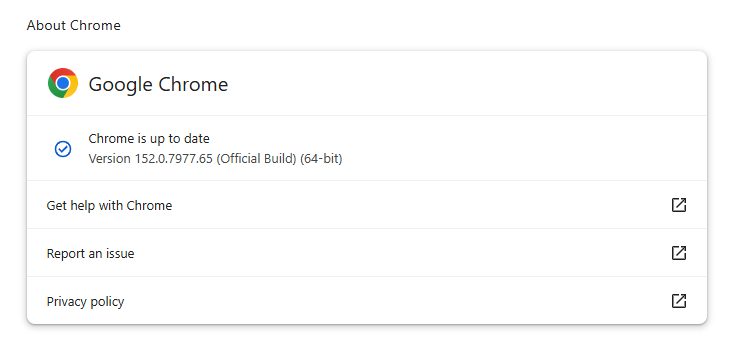
You can find an explanation of the version numbering system and step-by-step instructions in our guide: How to update Chrome on every operating system.
Technical details
We want to highlight two vulnerabilities out of the hundreds because we think they could attract attackers if they go unpatched for too long. Both can be triggered by simply visiting a malicious website.
The first is a critical vulnerability in ANGLE (Almost Native Graphics Layer Engine), tracked as CVE-2026-79282. A remote attacker could exploit it using a crafted HTML page to execute arbitrary code outside the browser sandbox.
Chrome uses ANGLE to translate graphics commands used by web pages and browsers into something your operating system and graphics card can process.
Chrome vulnerabilities that enable remote code execution outside the browser sandbox are particularly valuable to attackers because they can turn a visit to a malicious or compromised website into direct code execution on the underlying operating system, often without requiring additional exploitation steps.
A researcher also discovered a use-after-free vulnerability in Chrome’s V8 engine. Tracked as CVE-2026-78899, it has a CVSS score of 8.8 out of 10. Successful exploitation of this could allow a remote attacker to execute arbitrary code inside the sandbox via a crafted HTML page.
Chrome’s V8 engine is the part of Chrome, and other Chromium-based browsers, that runs JavaScript. Use-after-free is a class of vulnerability caused by incorrect use of dynamic memory during a program’s operation. If, after freeing a memory location, a program does not clear the pointer to that memory, an attacker may be able to use the error to manipulate the program.
The phrase “inside the sandbox” means the malicious code would run in a restricted, sealed-off environment rather than directly on your whole computer. That limits what the attacker can do as it constrains them to the browser, lowering the impact compared with code running outside the sandbox. However, attackers often chain multiple vulnerabilities together to escape the sandbox and achieve a more serious compromise. So, the phrase describes an important security limitation, but it does not mean the vulnerability is harmless.
Stop threats before they can do any harm.
Malwarebytes Browser Guard blocks phishing pages and malicious sites automatically. Free, one click to install. Add it to your browser →

 点赞
点赞 收藏
收藏 点踩
点踩 分享
分享