TerminalWidget for Stargazers

Recently, Dr. Drang submitted a “planets” recipe for TerminalWidget that shows the locations of planets in the night sky. It was a great use of a medium widget format, and did the trick nicely. But some recent updates to TerminalWidget offered some new display possibilities.
The original script was designed to put a grid of information using spaces to create the grid with a monospace font. But TerminalWidget can handle tables, so it was possible to modify the script to output tabular data instead, which means it wasn’t limited to monospace fonts anymore.
With some abbreviation (changing the word “Constellation” to just “Con”), it would fit in a medium widget still, but TerminalWidget now offers an “Extra Large” size widget that makes the display much more readable.
I also (just yesterday) added a new --background-image flag to TerminalWidget that lets you put an image behind any other widget content, after a request from Matt. It responds to the same --filter options as --image, so you can control opacity, blur, etc. So I put a starry background from Unsplash behind the planets widget. (You could also combine the Random Unsplash Image recipe with it and give it a “starry sky” search to keep randomizing the background.)
It came out looking spectacular.
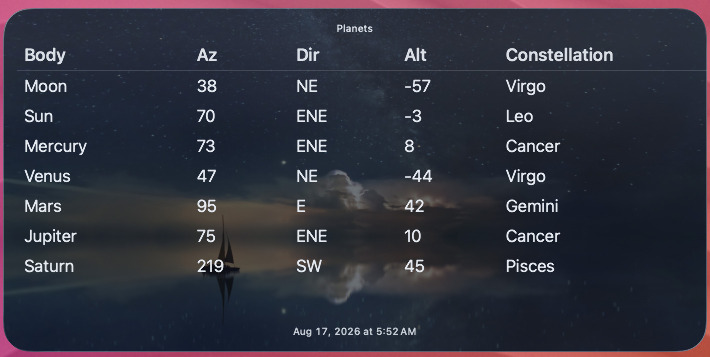
Here’s the recipe for Planets Updated. You just need the Astropy Python package and the coordinates from which you want to locate the planets. Thanks again to Dr. Drang for the inspiration.
Like or share this post Twitter.
BrettTerpstra.com is supported by readers like you. Click here if you'd like to help out.
Find Brett on Mastodon, Bluesky, GitHub, and everywhere else.

 点赞
点赞 收藏
收藏 点踩
点踩 分享
分享