Why Is “Undo” More Important Than “Delete”?

The hidden space between an action and the moment it becomes final.
You hit Send.
For a second, it feels over. Then Gmail does something strange: a small message appears at the bottom of the screen.
Message sent.
Undo.
Two statements that should not sit so comfortably next to each other. If the message has already been sent, what exactly is left to undo?
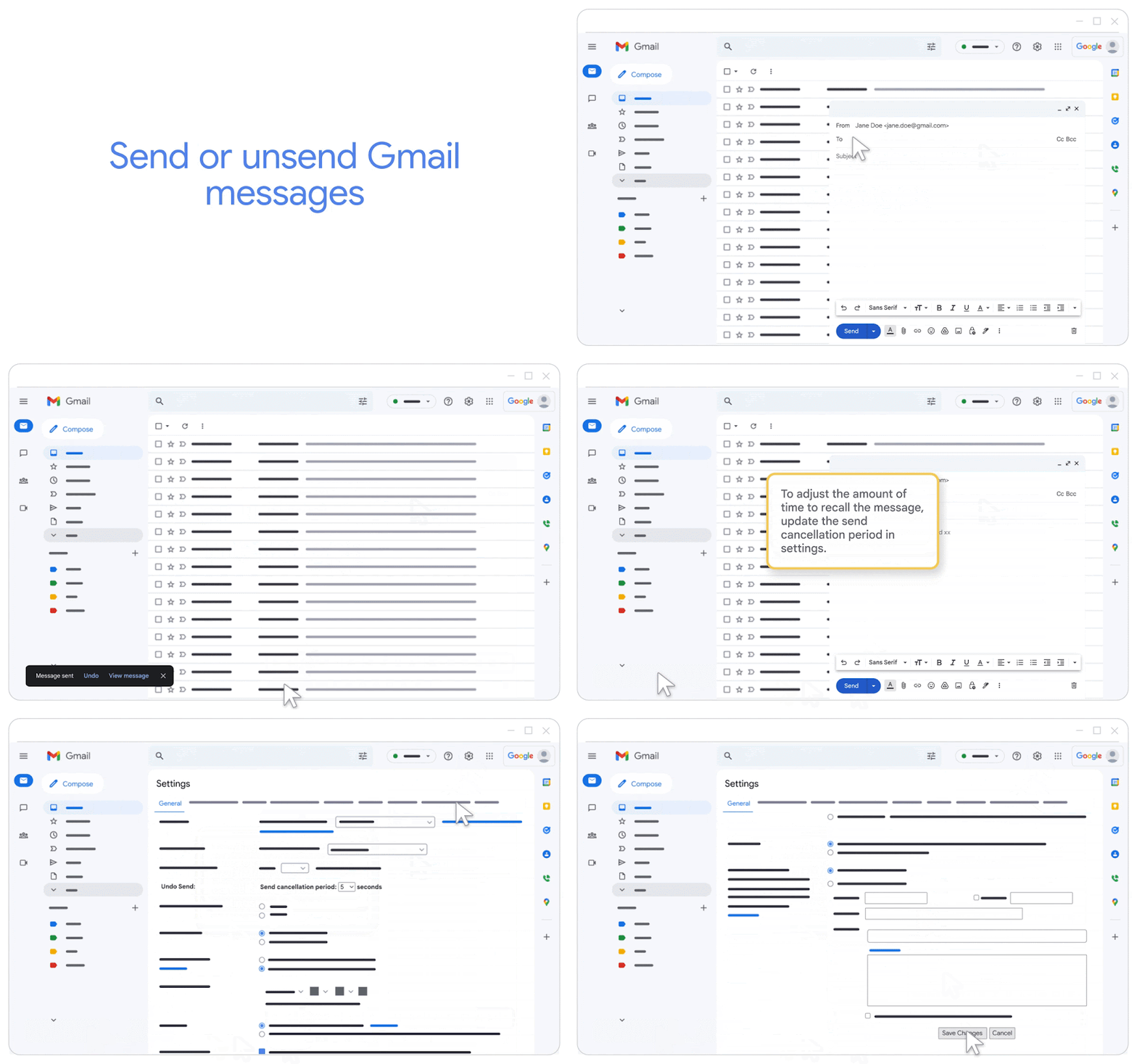
Google’s own wording makes the moment even more interesting. In Gmail’s settings, the feature is called a “Send cancellation period,” and you can set it to 5, 10, 20, or 30 seconds
That small detail changes the question.
Maybe Undo is not a button that rewinds the past. Maybe it is simply a few seconds during which the product keeps your decision negotiable.
Five seconds. Ten. Twenty. Thirty.
Regret, apparently, has a setting!
We do not need to know what happens inside Gmail’s mail servers to understand the experience from the user’s side. You press Send, and for a brief moment there is still an exit. You notice the wrong name, the missing attachment, the sentence you suddenly wish you had phrased differently. You hit Undo, and the decision remains editable for a little longer.
Then the window closes. And that is where the question becomes bigger than Gmail. Because something similar happens when you press a word that sounds far more final:
Delete.
You delete a photo.
It disappears from the place where you are used to seeing it. That is usually enough for us to say the photo is gone. But open a deleted photo in Google Photos and the scene can look much stranger.
In a screen we reviewed on Mobbin, the photo is still there. Under it, the interface says: “60 days left until permanently deleted” Then it offers two choices: Restore. Delete
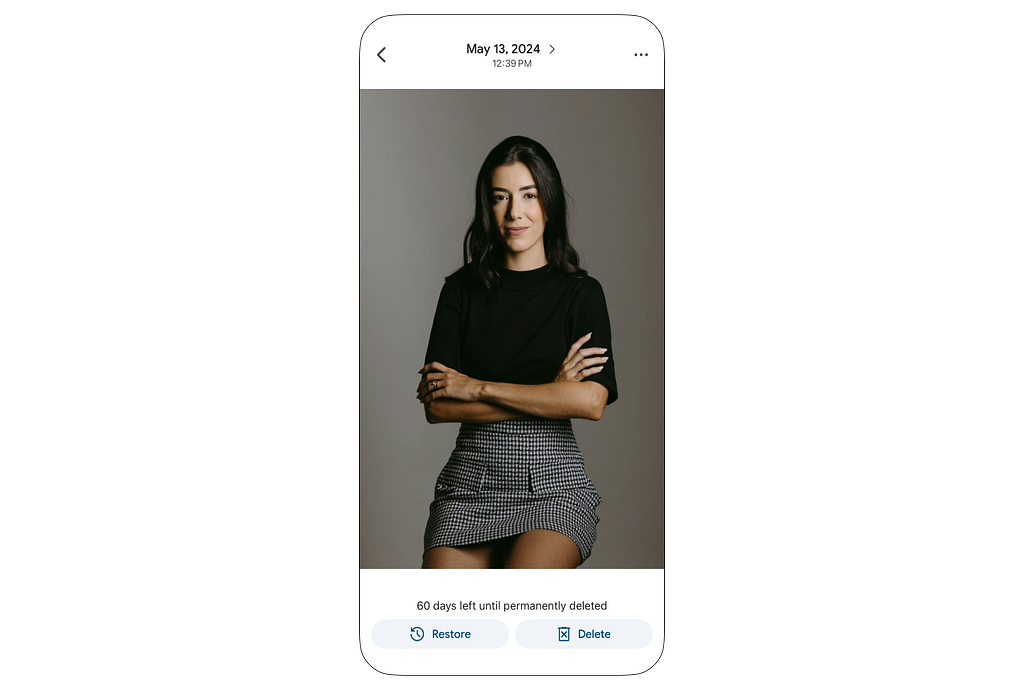
A deleted photo with sixty days left before it is permanently deleted is a peculiar kind of deleted!
The exact number is not the point here, and we should not treat this one screen as a universal Google Photos policy. The interesting part is the contradiction itself: the photo has disappeared from its usual place, but it has not disappeared for good.
It can come back. It can also be deleted again.
So what did the first Delete actually do?
Maybe it was not the end. Maybe it started a countdown.
And suddenly Undo and Delete begin to lose some of their simplicity.
Undo does not always mean, “Put the past back”
Delete does not always mean, “Make this cease to exist”
Sometimes they are just simple labels placed over a much more interesting decision: when should an action become final?
And the surprising part is that this decision is not really a button.
It is time.
We tend to think of interfaces as things we can see: buttons, menus, colors, dialogs.
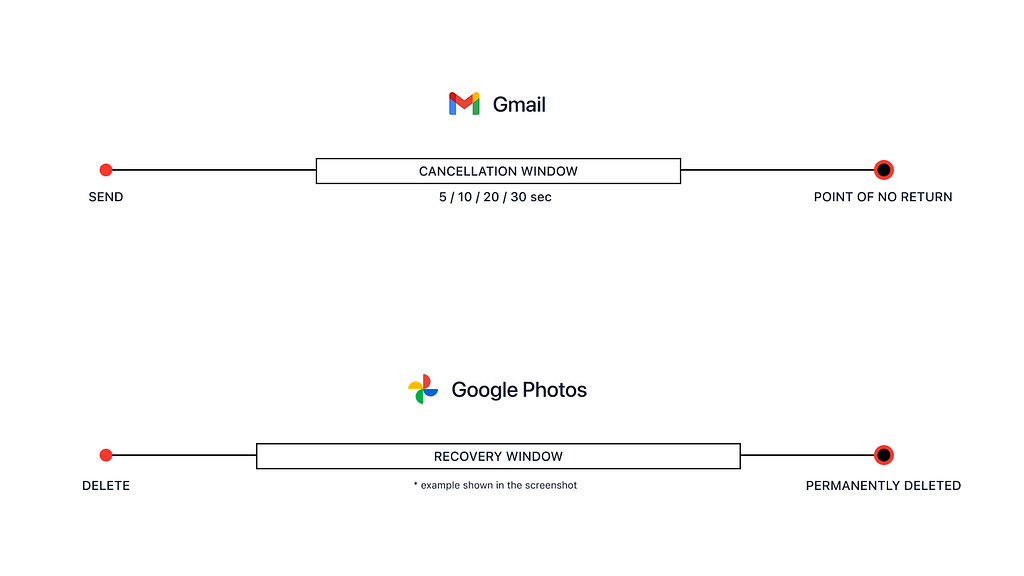
But Gmail puts a few seconds between an action and its finality. Google Photos can put a much longer recovery window between deletion and permanent deletion.
In both cases, there is a stretch of time that does not look like a traditional UI component, yet it changes the entire experience. A gap between:
“I did this” and “I can no longer change it”
The end of that gap is the point of no return.
Not as a design term to memorize, but as something ordinary: the last moment when the door is still open.
In Gmail, you may know you have crossed it because Undo disappears. In Google Photos, the interface may show how much time is left before permanent deletion. In other products, it might appear as a separate step before something is erased for good.
That raises another question.
If people change their minds, why not stop the mistake before it happens?
Why does Gmail not ask after every message: Are you sure you want to send this?
It sounds safer,
For about five minutes.
Now imagine the same question after ten emails. Then twenty. Then every day. Safety quickly starts to feel like friction.
A confirmation asks you to recognize the mistake before you have seen its result. Undo lets you act normally, then gives you a way out when you realize something was not quite what you intended.
Microsoft’s design guidance reflects the same distinction: for repeated actions, Undo can be preferable to forcing a confirmation every time, while a dialog makes more sense before permanently deleting something valuable. [Microsoft — Dialogs and flyouts]
So “Are you sure?” is not automatically the safer design.
Sometimes the more forgiving interface is the one that lets you move first, then makes the mistake survivable for a little while.
But what if you don’t want the door left open at all?
Imagine two files.
The first is an old document you delete because your account has become messy. A Trash folder is reassuring here. If you change your mind two days later, you can bring it back.
The second is a medical document or another sensitive file you delete precisely because you do not want it to remain recoverable.
The action is called Delete in both cases. The intention is not the same.
This is not only a thought experiment. A participatory qualitative study involving 20 active cloud-storage users found that deletion preferences changed with factors such as why a file was being deleted, how sensitive it was, how useful it remained, and its context. Participants preferred recoverability in some situations, while in privacy-related situations some wanted immediate, complete deletion
[Ramokapane et al., 2022 — What Users Want From Cloud Deletion and the Information They Need]
It is a small qualitative study, so it does not give us a universal law. But it ruins the easy answer.
We cannot simply say: make everything reversible and the product will be better.
Sometimes recoverability is protection.
Sometimes real deletion is the control a person is asking for.
And now the original question changes again.
The problem is not that there is a point of no return.
The problem is where it is placed.
Too early, and a small slip can become a real loss.
Too late, and a system that believes it is protecting you can start working against what you actually asked it to do.
And if the product never makes that boundary clear, you may not know when an action has truly become final at all.
Back to Gmail.
Message sent.
Undo.
At the beginning, they looked like a contradiction. Now they look more like two clocks running at once.
The first says: you did something. The second says: it is not completely settled yet.
Maybe that is why Undo matters more than its tiny footprint on the screen suggests. Not because it is a better button than Delete. Because it exposes something interfaces usually hide: there is often a space between a decision and its consequences, and someone had to decide how long that space should last.
The next time Undo appears after Send, it may look less like an eraser for the past and more like a small piece of time left between your decision and the moment it becomes final.
Why Is “Undo” More Important Than “Delete”? was originally published in Bootcamp on Medium, where people are continuing the conversation by highlighting and responding to this story.

 点赞
点赞 收藏
收藏 点踩
点踩 分享
分享