Teardown: Lenovo ThinkPad USB 3.0 Pro Dock (DK1522)


A few years back, I was donated a pair of Lenovo ThinkPad USB 3.0 Pro Docks as they had reached the end of their useful life with an organisation and the person thought I could have some fun with them. While I can’t say both units were perfectly healthy, as one seemed to have a dead port, I did keep them around for a while before deciding it would be interesting to know what was inside. So here’s a quick teardown post …
The Dock
The dock is so recognisably ThinkPad, with the grey colour, plain rectangular shape, the red indicator LED on the “i” and a single power button to turn the dock on and off. This is a software power button – but it’s interesting to me as few other docks I’ve met have one.
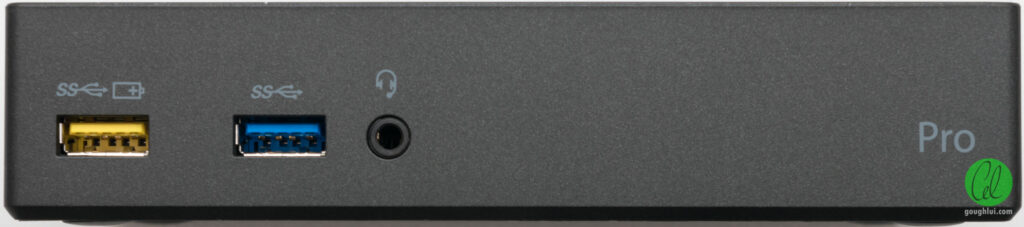
The front side of the dock has the branding “Pro” on it. The two USB 3.0 ports on the front are distinguished – the left-most has a yellow tongue and is a charging downstream port (CDP), likely supporting the BCS 1.5A output, while the one on the right is a regular USB 3.0 SuperSpeed port, so should have about 0.9A available. There is a TRRS combination headset jack on the front too.
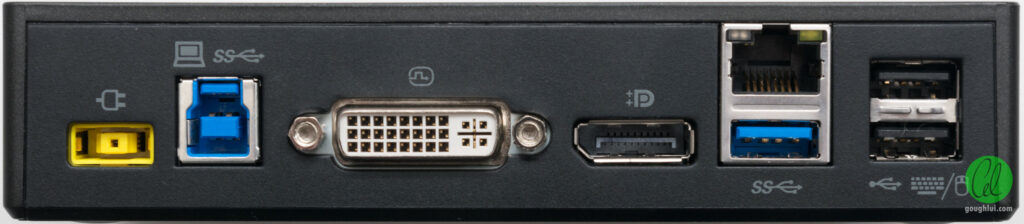
The rear of the unit has a square power jack, for Lenovo’s proprietary 20V laptop power supply. The connection to the host us a USB 3.0 B-connector. Video is output on a DVI connector and a DisplayPort connector. There is a Gigabit Ethernet jack, a single USB 3.0 SuperSpeed port and two USB 2.0 ports, intended for keyboard and mouse usage. Of note is that such a dock does not charge the laptop – it’s merely a device.
Along one edge is a Kensington Lock slot.
The unit is a DisplayLink-based device, as the Plug and Display branding indicates. This unit has a model of DK1522 and requires a 20V/2.25A power supply.
In Use
Using one of these reminds me of just how good we have it with USB-C docks nowadays – one cable that carries power to charge the laptop and a large enough bandwidth to host multiple monitors and different forms of I/O. Prior to all of this, laptops from the early 2000s would…

 点赞
点赞 收藏
收藏 点踩
点踩 分享
分享