New SMPlayer 25.6.0 playing issue comes by calling mpv with 'x11egl' switch (not supported)


Ahoy Haikuports Team,
As I stated in my previous postIssue with Qt apps those requires libqt5script specific version - and an update happened Ports
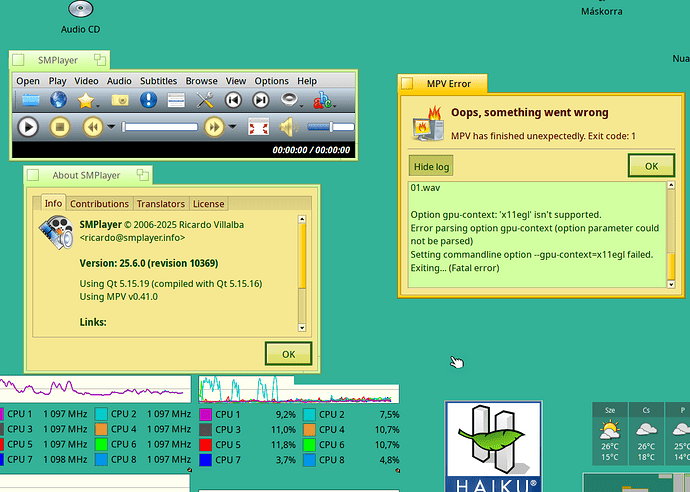
Well, finally I’ve seen SMPlayer sits on the shelf, so I could restore the player “window”. I attempted to play an Audio CD - that’s why important for me - as this player played only the Audio CD without ripping and had a direct read to play the CD I liked for. Now I get error message, something went wrong and an offer I can see the log (here you are), there is, if I open it.
/bin/mpv --no-quiet --terminal --no-msg-color --input-ipc-server=/boot/system/cache/tmp/smplayer-mpv-5a59 --msg-level…
my problem with SMPlayer direct CD playing is finally not in new version of Qt5/Qt6 versions, as I first suspected, but in new version SMPlayer 25.6.0 itself.
When I drag and drop the Audio CD icon to engage playing.. it calls mpv that way to use ‘x11egl’ switch for gpu_context, and seems that does not supported - I assume in Haiku (or mpv itself?). It is for rendering some window, or graphical element (?), I think
Anyway, it does not work now
/bin/mpv --no-quiet --terminal --no-msg-color --input-ipc-server=/boot/system/cache/tmp/smplayer-mpv-bdf --msg-level=ffmpeg/demuxer=error --video-rotate=no --no-config --no-fs --hwdec=no --sub-auto=fuzzy --gpu-context=x11egl --no-input-default-bindings --input-vo-keyboard=no --no-input-cursor --cursor-autohide=no --no-keepaspect --wid=0 --monitorpixelaspect=1 --osd-level=3 --osd-scale=1 --osd-bar-align-y=0.6 --sub-ass --embeddedfonts --sub-line-spacing=0 --sub-scale=1 --sub-font=Arial --sub-color=#ffffffff --sub-shadow-color=#ff000000 --sub-border-color=#ff000000 --sub-border-size=0.75 --sub-shadow-offset=2.5 --sub-font-size=50 --sub-bold=no --sub-italic=no --sub-margin-y=8 --sub-margin-x=20 --sub-codepage=ISO-8859-1 --sid=auto --sub-pos=100 --volume=47 --cache=auto --screenshot-template=cap_%F_%p_%02n --screenshot-format=jpg --screenshot-directory=/boot/home/smplayer_screenshots --audio-pitch-correction=yes --volume-max=110 --audio-client-name=SMPlayer --term-status-msg=. /Audio CD/Track 01.wav
Option gpu-context: 'x11egl' isn't supported. Error parsing option gpu-context (option parameter could not be parsed) Setting commandline option --gpu-context=x11egl failed. Exiting... (Fatal error)
Previous version - SMPlayer 22.7.0 - works as expected.
Could you check this issue?
{And yes, I won’t use Github to report:-)) }
1 post - 1 participantRead full topic

 点赞
点赞 收藏
收藏 点踩
点踩 分享
分享